cancel
Showing results for 
Search instead for 
Did you mean: 

The Power BI Data Visualization World Championships is back! Get ahead of the game and start preparing now! Learn more

Reply

Dynamic RLS

Hi, 


I need help in setting RLS for one of the projects. This particular project pulls data from different tables and we have created some common bridge tables to add slicers etc. Basically, the data model looks like below. 


Jagan_MFilterIT_0-1625071163593.png


we have three different tables and all of these tables have some common fields. but the records are not related to each other and hence we have not created any direct relationships between the data tables. We have created some common sorting tables which connect to all three tables (one to many relationships with single side filter). In this example all the tables have categories of products, we also have user table with the category mapping. we want people to access data from specific category only based on the mapping we give in the user table. 


Now if we have to apply row level security here what should be the approach? 


1 ACCEPTED SOLUTION
Anonymous
Not applicable

Hi @Jagan_MFilterIT 

I build a sample like yours to have a test to show you how to use Dynamic RLS in your data model. I only add an Email column in User Table. Values like User1@xxx.com, User2@xxx.com ...

1.png

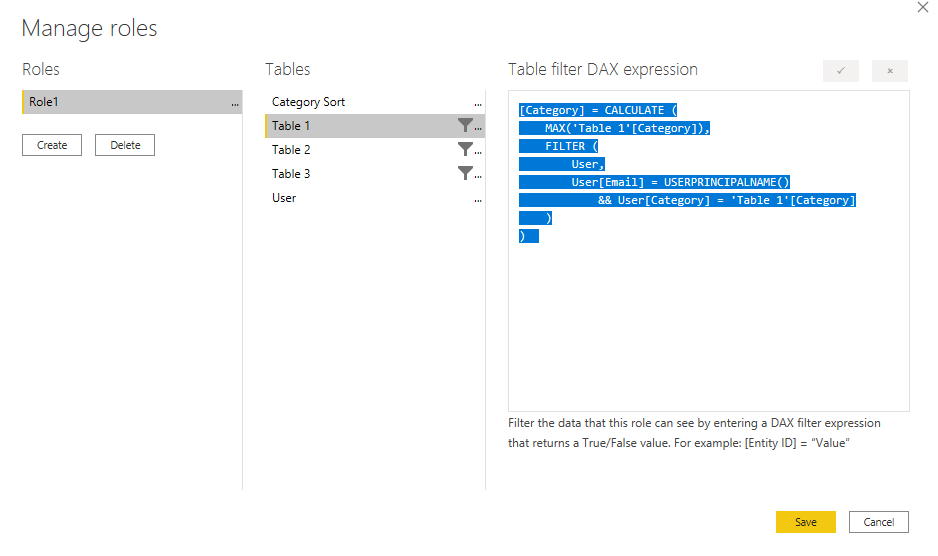
Build a new role in Manage Roles.

2.png

Codes for Table 2 and Table 3 are similar with code in Table 1.

[Category] = CALCULATE (
    MAX('Table 1'[Category]),
    FILTER (
        User,
        User[Email] = USERPRINCIPALNAME()
            && User[Category] = 'Table 1'[Category]
    )
)  
[Category] = CALCULATE (
    MAX('Table 2'[Category]),
    FILTER (
        User,
        User[Email] = USERPRINCIPALNAME()
            && User[Category] = 'Table 2'[Category]
    )
)  
[Category] = CALCULATE (
    MAX('Table 3'[Category]),
    FILTER (
        User,
        User[Email] = USERPRINCIPALNAME()
            && User[Category] = 'Table 3'[Category]
    )
)  

Then let's see the result as Email1 (Email =User1@xxx.com).

2.png

Dynamic RLS works well. Then publish the report to Power BI Service and we need to add role in dataset security.

For reference: Manage security on your model

I will add my pbix file below for reference.


Best Regards,

Rico Zhou


If this post helps, then please consider Accept it as the solution to help the other members find it more quickly. 

View solution in original post

1 REPLY 1
Anonymous
Not applicable

Hi @Jagan_MFilterIT 

I build a sample like yours to have a test to show you how to use Dynamic RLS in your data model. I only add an Email column in User Table. Values like User1@xxx.com, User2@xxx.com ...

1.png

Build a new role in Manage Roles.

2.png

Codes for Table 2 and Table 3 are similar with code in Table 1.

[Category] = CALCULATE (
    MAX('Table 1'[Category]),
    FILTER (
        User,
        User[Email] = USERPRINCIPALNAME()
            && User[Category] = 'Table 1'[Category]
    )
)  
[Category] = CALCULATE (
    MAX('Table 2'[Category]),
    FILTER (
        User,
        User[Email] = USERPRINCIPALNAME()
            && User[Category] = 'Table 2'[Category]
    )
)  
[Category] = CALCULATE (
    MAX('Table 3'[Category]),
    FILTER (
        User,
        User[Email] = USERPRINCIPALNAME()
            && User[Category] = 'Table 3'[Category]
    )
)  

Then let's see the result as Email1 (Email =User1@xxx.com).

2.png

Dynamic RLS works well. Then publish the report to Power BI Service and we need to add role in dataset security.

For reference: Manage security on your model

I will add my pbix file below for reference.


Best Regards,

Rico Zhou


If this post helps, then please consider Accept it as the solution to help the other members find it more quickly. 

Helpful resources

Announcements
Power BI DataViz World Championships

Power BI Dataviz World Championships

The Power BI Data Visualization World Championships is back! Get ahead of the game and start preparing now!

December 2025 Power BI Update Carousel

Power BI Monthly Update - December 2025

Check out the December 2025 Power BI Holiday Recap!

FabCon Atlanta 2026 carousel

FabCon Atlanta 2026

Join us at FabCon Atlanta, March 16-20, for the ultimate Fabric, Power BI, AI and SQL community-led event. Save $200 with code FABCOMM.