
cancel
Showing results for 
Search instead for 
Did you mean: 

The FabCon + SQLCon recap series starts April 14th at 8am Pacific. If you’re tracking where AI is going inside Fabric, this first session is a can't miss. Register now

Reply
Anonymous
Not applicable

Dynamic RLS with combination of multiple dimensions

Hello everyone,


I want to apply dynamic RLS, but on a combination of two dimensions. For example, I have a Sales FactTable that contains sales data. It also has a DimDepartmentId & a DimCountryId. For the dynamic RLS, I want that a certain user only can see the data of the IT department of Belgium, and the data of the R&D department of France (So not both IT & R&D for both France & Belgium).


I currently found a solution, by creating a table OrganizationalStructure. This table contains all combinations of Country & Department. I then added a column in the Sales table 'DimOrgStructureId', referencing to a row in the OrganizationalStructure table. Finally, I created a table that maps the Users with the DimOrgStructureIds of which they should have access to. 

jasperp_1-1620212130711.png


My question is, is there a better way to do is? Especially since I do not want to add the DimOrgStructureId to the Sales table. Ideally, the sales table only contains the sales information and the information about the DimCountryId & DimDepartmentId.


Thanks a lot in advance.


5 REPLIES 5
Anonymous
Not applicable

Hi  @Anonymous  ,

You can use the external tool Dax studio or the Performance analyzer on Power bi Desktop to test your method to check the overall running time, resource consumption time, etc., to make judgments.


This is the installation and use of Dax Studio:

https://daxstudio.org/

https://www.sqlbi.com/articles/capturing-power-bi-queries-using-dax-studio/


This is the relevant content of the Performance analyzer:

https://docs.microsoft.com/en-us/power-bi/create-reports/desktop-performance-analyzer


Best Regards,

Liu Yang

If this post helps, then please consider Accept it as the solution to help the other members find it more quickly.

Anonymous
Not applicable

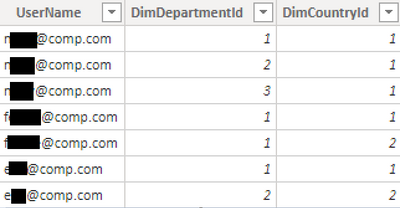
I think I have found a solution myself. I created a new table UserAccessDepCountry. This table contains the Usernames and the combination of the Department & Country they are allowed to see.

jasperp_0-1620292264275.png

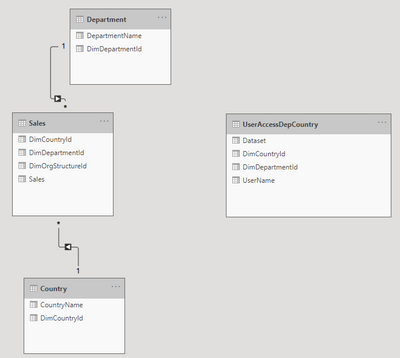
In the data model, I did not create a relationship between this table and the Department & Country table. So the data model currently looks like below:

jasperp_1-1620292335781.png


For the dynamic RLS, I created the following role:

jasperp_2-1620292373510.png

([DimDepartmentId], [DimCountryId]) IN SELECTCOLUMNS(
FILTER('UserAccessDepCountry', ('UserAccessDepCountry'[UserName] = USERPRINCIPALNAME())), "DimDepartmentId", [DimDepartmentId], "DimCountryId", [DimCountryId])


This works as I wanted, as it filters on the combination Department-Country, without the need of a new column in the Sales table. However, my question is if this is a valid solution. Will I face performance issues because I don't use relationships, but DAX to filter the Sales table?

Hi, I am having similar scenario. Was there any performance issue when you use dax filter on Fact table?

Anonymous
Not applicable

Hi @MariaJoe , the performance was good in our case, so we used this solution. However, it will probably vary from case to case.

Thanks!

Helpful resources

Announcements
New to Fabric survey Carousel

New to Fabric Survey

If you have recently started exploring Fabric, we'd love to hear how it's going. Your feedback can help with product improvements.

Power BI DataViz World Championships carousel

Power BI DataViz World Championships - June 2026

A new Power BI DataViz World Championship is coming this June! Don't miss out on submitting your entry.

Join our Fabric User Panel

Join our Fabric User Panel

Share feedback directly with Fabric product managers, participate in targeted research studies and influence the Fabric roadmap.

March Power BI Update Carousel

Power BI Community Update - March 2026

Check out the March 2026 Power BI update to learn about new features.