Get Fabric or SQL Certified for Free.
Get certified for free when you join Fabric Data Days 2026 and dive into Fabric, Power BI, SQL, AI, and other essential data skills.
Join now- Power BI forums
- Get Help with Power BI
- Desktop
- Service
- Report Server
- Power Query
- Mobile Apps
- Developer
- DAX Commands and Tips
- Custom Visuals Development Discussion
- Health and Life Sciences
- Power BI Spanish forums
- Translated Spanish Desktop
- Training and Consulting
- Instructor Led Training
- Dashboard in a Day for Women, by Women
- Galleries
- Data Stories Gallery
- Themes Gallery
- Contests Gallery
- QuickViz Gallery
- Quick Measures Gallery
- Visual Calculations Gallery
- Fabric Apps Gallery
- Notebook Gallery
- Translytical Task Flow Gallery
- TMDL Gallery
- R Script Showcase
- Webinars and Video Gallery
- Ideas
- Custom Visuals Ideas (read-only)
- Issues
- Issues
- Events
- Upcoming Events
July 28 - August 9 | Final Round of the Power BI Dataviz World Championships. This is your chance. Learn more
- Power BI forums
- Forums
- Get Help with Power BI
- Desktop
- Dynamic RLS based on two columns
- Subscribe to RSS Feed
- Mark Topic as New
- Mark Topic as Read
- Float this Topic for Current User
- Bookmark
- Subscribe
- Printer Friendly Page

- Mark as New
- Bookmark
- Subscribe
- Mute
- Subscribe to RSS Feed
- Permalink
- Report Inappropriate Content
Dynamic RLS based on two columns
I'm wondering if it's possible to create a user access table like this. So I have a fact sheet (employee data), I need to give HRBPs access to data based on their roles. Most HRBPs are responsible for single entities, so I list their entity in column "Entity", some HRBPs are responsible for the whole sales sector, that means they should have access to all SALES entities.
When I try to link this table to another table in data modeling, I get an error message as below.
How can I solve the problem?
User access
User Access Table
Solved! Go to Solution.


- Mark as New
- Bookmark
- Subscribe
- Mute
- Subscribe to RSS Feed
- Permalink
- Report Inappropriate Content
@Anonymous You could create two RLS roles
RLS which would be used for all people with single entity access
and 'No RLS' role like this:
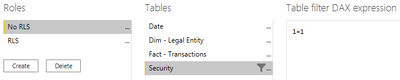
When you publish the report, put all users responsible for the whole sales sector under this 'No RLS' role, and they will be able to see all the data, as effectively for them the RLS is not applied as the restriction of 1=1 is always true, thus will be seeing all the rows.
Hope this helps


- Mark as New
- Bookmark
- Subscribe
- Mute
- Subscribe to RSS Feed
- Permalink
- Report Inappropriate Content
Hi, @Anonymous
If you want super users access data of the entire dataset and not restricted by RLS, you can give them Build permission. And apply RLS to those users who can only access single entity. For more details, you can refer Ways to give Build permission.
Best Regards,
Caiyun Zheng
Is that the answer you're looking for? If this post helps, then please consider Accept it as the solution to help the other members find it more quickly.


- Mark as New
- Bookmark
- Subscribe
- Mute
- Subscribe to RSS Feed
- Permalink
- Report Inappropriate Content
@v-cazheng-msft i think that is incorrect. Build permissions do not override RLS. To override RLS you need to have contributor or better membership in the underlying workspace. And you want to think twice before you do that for regular (management) users.
- Mark as New
- Bookmark
- Subscribe
- Mute
- Subscribe to RSS Feed
- Permalink
- Report Inappropriate Content
Hi, @lbendlin
If a user has contributor or better membership in the worksapce, actually he will has build permission to the datasets of the entire workspace. And then RLS will not restrict his acess to the data in the dataset. RLS will not take effect to him.

Best Regards
Caiyun Zheng
- Mark as New
- Bookmark
- Subscribe
- Mute
- Subscribe to RSS Feed
- Permalink
- Report Inappropriate Content
Thanks, however, i don't want to add the user to the member group of the space because i'm not sure if that will give the user access to the whole sharepoint site behind the group. There are lots of sensitive info in the sharepoint site which the user should not have access to.
- Mark as New
- Bookmark
- Subscribe
- Mute
- Subscribe to RSS Feed
- Permalink
- Report Inappropriate Content
actually no, it won't necessarily slow it down. Being verbose at a lower level is often better than having to apply complex rules.
Test it out and compare the performance for both approaches.
- Mark as New
- Bookmark
- Subscribe
- Mute
- Subscribe to RSS Feed
- Permalink
- Report Inappropriate Content
RLS rules apply to the entire table (the "R" in RLS) as opposed to CLS rules that Power BI doesn't support yet.
You can make the rule as complex as you want, even including related tables. Don't go overboard though - RLS is costly from a performance perspective.
- Mark as New
- Bookmark
- Subscribe
- Mute
- Subscribe to RSS Feed
- Permalink
- Report Inappropriate Content
You are right that RLS seems to slow down the reports significantly. In addition to creating a customized user acess based on a table. How can I give some super users access to the whole dataset? I don't want to include those super users to the access table because that will add many lines to the table and slow down the filtering speed.
- Mark as New
- Bookmark
- Subscribe
- Mute
- Subscribe to RSS Feed
- Permalink
- Report Inappropriate Content
@Anonymous You could create two RLS roles
RLS which would be used for all people with single entity access
and 'No RLS' role like this:
When you publish the report, put all users responsible for the whole sales sector under this 'No RLS' role, and they will be able to see all the data, as effectively for them the RLS is not applied as the restriction of 1=1 is always true, thus will be seeing all the rows.
Hope this helps
Helpful resources

FabCon & SQLCon – Barcelona 2026
Join us in Barcelona for FabCon and SQLCon, the Fabric, Power BI, SQL, and AI community event. Save €200 with code FABCMTY200.

Fabric Community Sticker Challenge - Barcelona 2026
If you love stickers, then you will definitely want to check out our community sticker challenge, Barcelona edition!

Power BI Monthly Update - July 2026
Check out the July 2026 Power BI update to learn about new features.

Power BI DataViz World Championships - June 2026
A new Power BI DataViz World Championship is coming this June! Don't miss out on submitting your entry.

| User | Count |
|---|---|
| 26 | |
| 24 | |
| 23 | |
| 19 | |
| 17 |


| User | Count |
|---|---|
| 30 | |
| 28 | |
| 20 | |
| 20 | |
| 19 |


