cancel
Showing results for 
Search instead for 
Did you mean: 

The Power BI Data Visualization World Championships is back! Get ahead of the game and start preparing now! Learn more

Reply
snaruma
Regular Visitor

Dynamic Quartile slicer

Hi,


I am trying to dynamically calculate quartiles for a certain column based on the selection of a calculated column.


So, I have a list of 100 account Ids with 2 columns (1) Normalized Electric Usage (Norm_Usage) and (2) Heating & Cooling Load/Square Footage (H&C Load/SFT). I have divided these 100 accounts into 4 quartiles (based on column 1 Normalized Electric Usage) by creating a calculated column using a DAX function.


Step1: Create 4 quartiles based on column Normalized Electric Usage. Each quartile (1, 2,3 and 4) have 25 accounts each. 

Quartile(Norm_Usage) =
var Q1=percentile.exc(Test[Norm_Usage],0.25)
var Q2=percentile.exc(Test[Norm_Usage],0.5)
var Q3=percentile.exc(Test[Norm_Usage],0.75)
return
if(Test[Norm_Usage]<Q1, 4, if(Test[Norm_Usage]>=Q1 && Test[Norm_Usage]<Q2,3,if(Test[Norm_Usage]>=Q2 && Test[Norm_Usage]<Q3, 2, 1)))
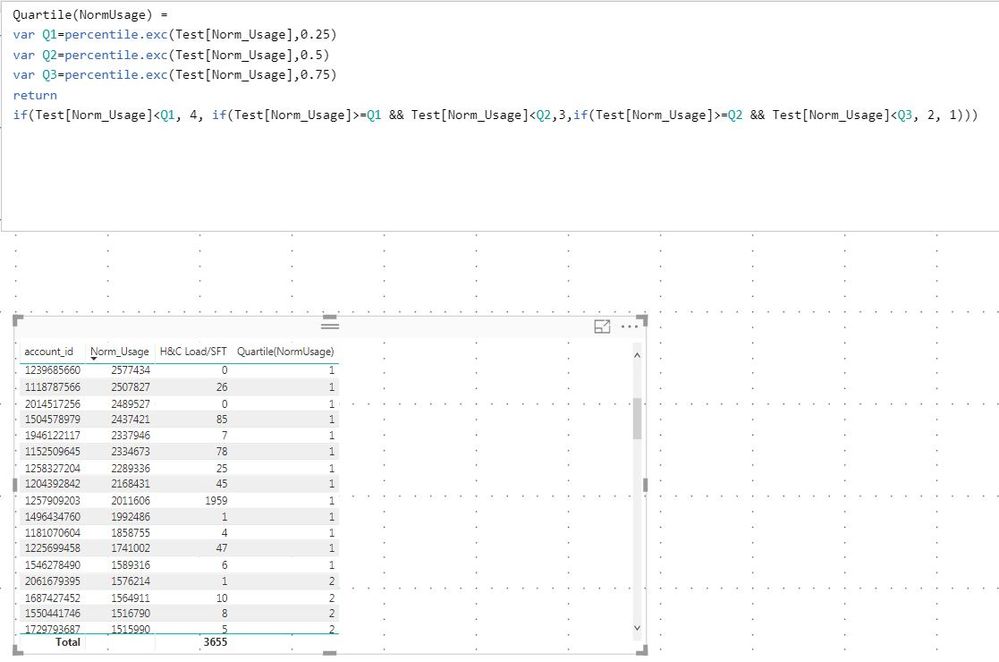
 

Once I have done that, I would like to be able to select and filter by the column "Quartile(Norm_Usage)" and have a query dynamically calculate 4 quartiles (based on column 2  Heating & Cooling Load/Square Footage (H&C Load/SFT) values) for the accounts that show up within each quartile.


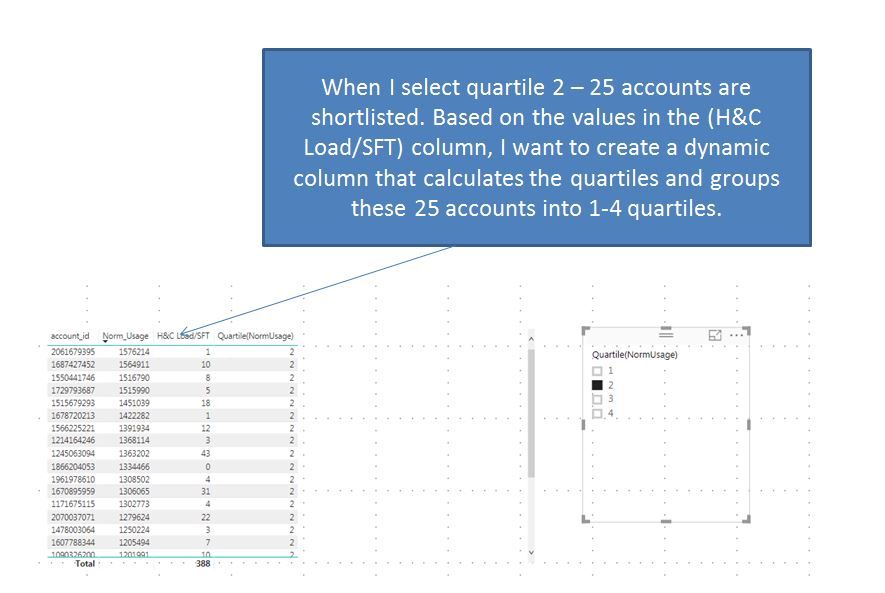
Step 2: When I select Quartile 1 in the column Quartile(Norm_Usage), it has 25 accounts. Based on the Heating & Cooling Load/Square Footage (H&C Load/SFT) values of these 25 accounts, I want to dynamically calculate and group these 25 accounts into 4 quartiles using the similar DAX function used above.Thus the 25 accounts should be broken down into 1-4 quartile values based on the distribution. This is the part where I am stuck. How should I use a DAX function such that the quartiles are calculated dynamically based on the quartile value selection of the Quartile(Norm_Usage) column (values are 1, 2, 3 and 4).
 

Appreciate any help with this.


4 REPLIES 4
Anonymous
Not applicable

I also have this issue. I need a dynamic quartile slicer than can be used as dimesnion in a chart. The dimension should dynamically segment the data into 4 quarters based on values and the applied filters.


Has anyone found a solution? @Greg_Deckler 


Anonymous
Not applicable

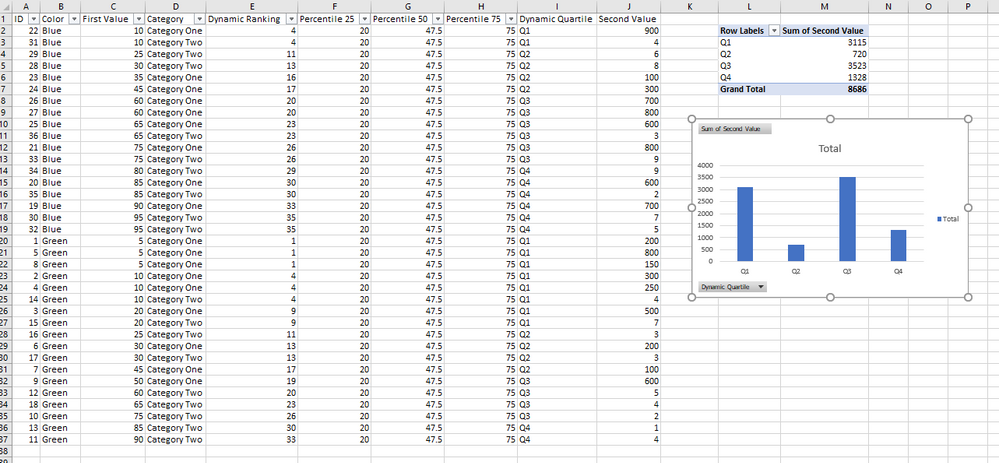
Dynamic Quartile Example.png

snaruma
Regular Visitor

Hi,


I am trying to dynamically calculate quartiles for a certain column based on the selection of a calculated column.


So, I have a list of 100 account Ids with 2 columns (1) Normalized Electric Usage (Norm_Usage) and (2) Heating & Cooling Load/Square Footage (H&C Load/SFT). I have divided these 100 accounts into 4 quartiles (based on column 1 Normalized Electric Usage) by creating a calculated column using a DAX function. (I have attached a sample dataset)


Step1: Create 4 quartiles based on column Normalized Electric Usage. Each quartile (1, 2,3 and 4) have 25 accounts each. 

Quartile(Norm_Usage) =
var Q1=percentile.exc(Test[Norm_Usage],0.25)
var Q2=percentile.exc(Test[Norm_Usage],0.5)
var Q3=percentile.exc(Test[Norm_Usage],0.75)
return
if(Test[Norm_Usage]<Q1, 4, if(Test[Norm_Usage]>=Q1 && Test[Norm_Usage]<Q2,3,if(Test[Norm_Usage]>=Q2 && Test[Norm_Usage]<Q3, 2, 1)))


Step1.JPG


Once I have done that, I would like to be able to select and filter by the column "Quartile(Norm_Usage)" and have a query dynamically calculate 4 quartiles (based on column 2  Heating & Cooling Load/Square Footage (H&C Load/SFT) values) for the accounts that show up within each quartile.


Step 2: When I select Quartile 1 in the column Quartile(Norm_Usage), it has 25 accounts. Based on the Heating & Cooling Load/Square Footage (H&C Load/SFT) values of these 25 accounts, I want to dynamically calculate and group these 25 accounts into 4 quartiles using the similar DAX function used above.Thus the 25 accounts should be broken down into 1-4 quartile values based on the distribution. This is the part where I am stuck. How should I use a DAX function such that the quartiles are calculated dynamically based on the quartile value selection of the Quartile(Norm_Usage) column (values are 1, 2, 3 and 4).


Step2.JPG 

Finally - this is how I would like my dataset to look like (it is a sample dataset filtered on quartile 2 of Quartile(Norm_Usage column):
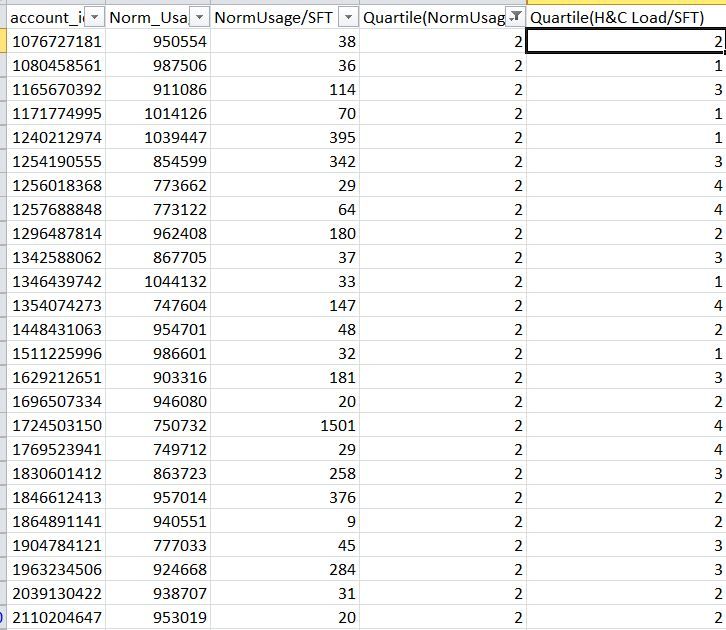
Capture.JPG


Appreciate any help with this.


Greg_Deckler
Community Champion
Community Champion

Please see this post regarding How to Get Your Question Answered Quickly: https://community.powerbi.com/t5/Community-Blog/How-to-Get-Your-Question-Answered-Quickly/ba-p/38490.


Sample data.


Follow on LinkedIn
@ me in replies or I'll lose your thread!!!
Instead of a Kudo, please vote for this idea
Become an expert!: Enterprise DNA
External Tools: MSHGQM
YouTube Channel!: Microsoft Hates Greg
Latest book!:
DAX For Humans

DAX is easy, CALCULATE makes DAX hard...

Helpful resources

Announcements
Power BI DataViz World Championships

Power BI Dataviz World Championships

The Power BI Data Visualization World Championships is back! Get ahead of the game and start preparing now!

December 2025 Power BI Update Carousel

Power BI Monthly Update - December 2025

Check out the December 2025 Power BI Holiday Recap!

FabCon Atlanta 2026 carousel

FabCon Atlanta 2026

Join us at FabCon Atlanta, March 16-20, for the ultimate Fabric, Power BI, AI and SQL community-led event. Save $200 with code FABCOMM.