
This is best Fabric, Power BI, SQL and AI community event. How do we know? The last event sold out! Save €200 with code FABCMTY200.
Register nowA new Data Days event is coming soon! This time we’re going bigger than ever. Fabric, Power BI, SQL, AI and more. Don't miss out.
new to power bi so hoping some of you experts can help me.
the table below is highlighting kids shots on a goal, both using their right and left feet, and the number of times they failed to hit the target (broken down per foot). interested in building a percentage failure rate based on my selection, so for example, if i selected only person a i would want the failure rate (lets say on a card) to read 23% (i.e. (2+1)/(10+3) = 23%), however if i selected both person a and person b the failure rate should read 21% (i.e. (2+1+4+0)/(10+3+10+10)=21%). Any and all help would be much appreciated, thanks
Solved! Go to Solution.
@Anonymous
Hi Dave,
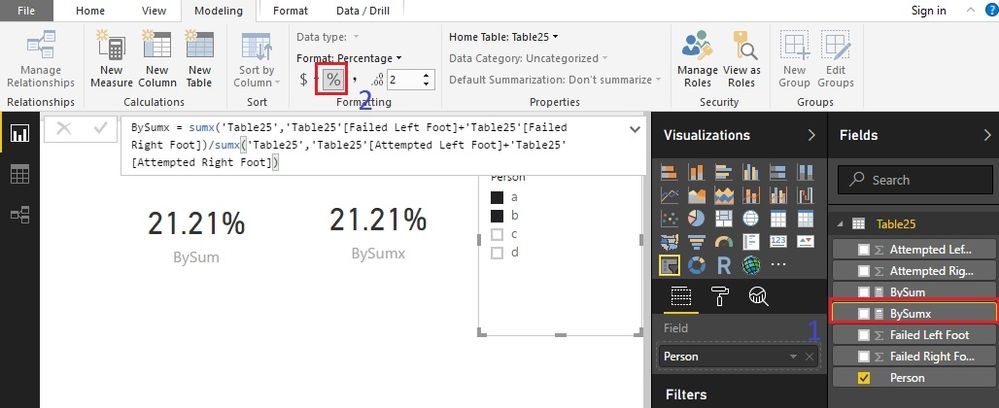
Click the measure first, then change the format.
Best Regards!
Dale
Hi @Anonymous,
There are two options.
Option 1:
BySumx =
SUMX ( 'Table25', 'Table25'[Failed Left Foot] + 'Table25'[Failed Right Foot] )
/ SUMX (
'Table25',
'Table25'[Attempted Left Foot] + 'Table25'[Attempted Right Foot]
)Option 2:
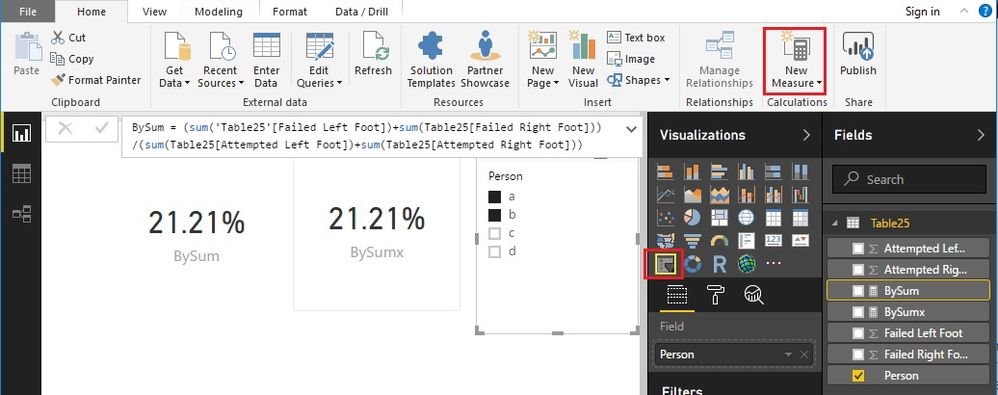
BySum =
( SUM ( 'Table25'[Failed Left Foot] ) + SUM ( Table25[Failed Right Foot] ) )
/ ( SUM ( Table25[Attempted Left Foot] ) + SUM ( Table25[Attempted Right Foot] ) )Finally, we can add them to a Card visual. A slicer will help to choose person.
These two formulas work under the context of 'Table25'[Person], so the result is dynamic.
Best Regards!
Dale
Hi Dale,
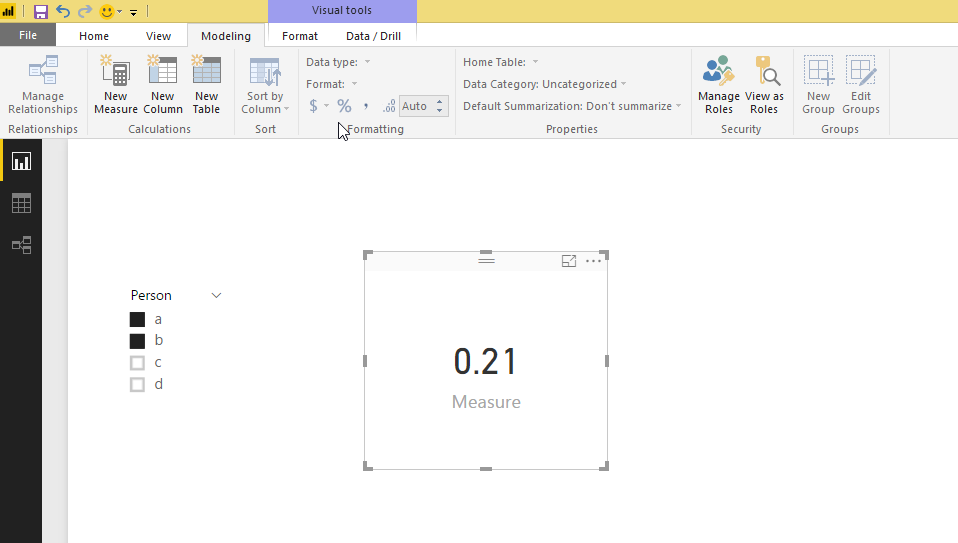
thank you for the response, thats works but can you confirm how you got the value in the card to be a percentage, as mine is showing as a decimal, i.e. 0.21. the option to change to percentage
under modelling - formatting - the percentage icon and Format options are greyed out (sorry cannot upload image as no option to do so?)
thanks,
dave
@Anonymous
Hi Dave,
Click the measure first, then change the format.
Best Regards!
Dale
Check out the May 2026 Power BI update to learn about new features.
Sign up to receive a private message when registration opens and key events begin.
If you have recently started exploring Fabric, we'd love to hear how it's going. Your feedback can help with product improvements.
| User | Count |
|---|---|
| 32 | |
| 26 | |
| 22 | |
| 20 | |
| 15 |
| User | Count |
|---|---|
| 63 | |
| 45 | |
| 28 | |
| 24 | |
| 22 |