This is best Fabric, Power BI, SQL and AI community event. How do we know? The last event sold out! Save €200 with code FABCMTY200.
Register nowA new Data Days event is coming soon! This time we’re going bigger than ever. Fabric, Power BI, SQL, AI and more. Don't miss out.
Hi,
I need a help on displaying the measure columns based on the slicer selections.
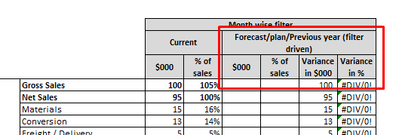
I have 12 measure columns which needs to be displayed in the matrix visual on 4 columns only based on the slicer selection.
For example:
1. Forecast Variance
2. Current Variance
3. Prior Variance
On the matrix visual, I should display only one measure column if the user select the values in the slicer.
If the user selects Forecast then I need to the Forecast variance in the matrix, and so.
There are 4 columns like this in matrix that need to dynamically pick the measure valuse.
these are calucualted measure so cannot use unpivot for this.
I have separate measure for each of these
For Variance, I have 4 measure -
1. Actual Variance
2. Current Forecast variance
3. Budget Variance
4, Prior PLan Variance.
Thanks,
Farooqh
Solved! Go to Solution.
I got the solution for this.
This thread:
https://www.fourmoo.com/2017/11/21/power-bi-using-a-slicer-to-show-different-measures/
I got the solution for this.
This thread:
https://www.fourmoo.com/2017/11/21/power-bi-using-a-slicer-to-show-different-measures/
Hi @Farooqh ,
Thanks a lot for sharing your solution. If your problem has been resolved, please mark it as Answered. It will help the others in the community find the solution easily if they face the same problem with you. Thank you.
Best Regards
Rena
Check out the May 2026 Power BI update to learn about new features.
Sign up to receive a private message when registration opens and key events begin.
If you have recently started exploring Fabric, we'd love to hear how it's going. Your feedback can help with product improvements.
| User | Count |
|---|---|
| 26 | |
| 25 | |
| 22 | |
| 19 | |
| 17 |
| User | Count |
|---|---|
| 42 | |
| 41 | |
| 40 | |
| 21 | |
| 20 |