FabCon is coming to Atlanta
Join us at FabCon Atlanta from March 16 - 20, 2026, for the ultimate Fabric, Power BI, AI and SQL community-led event. Save $200 with code FABCOMM.
Register now!- Power BI forums
- Get Help with Power BI
- Desktop
- Service
- Report Server
- Power Query
- Mobile Apps
- Developer
- DAX Commands and Tips
- Custom Visuals Development Discussion
- Health and Life Sciences
- Power BI Spanish forums
- Translated Spanish Desktop
- Training and Consulting
- Instructor Led Training
- Dashboard in a Day for Women, by Women
- Galleries
- Data Stories Gallery
- Themes Gallery
- Contests Gallery
- QuickViz Gallery
- Quick Measures Gallery
- Visual Calculations Gallery
- Notebook Gallery
- Translytical Task Flow Gallery
- TMDL Gallery
- R Script Showcase
- Webinars and Video Gallery
- Ideas
- Custom Visuals Ideas (read-only)
- Issues
- Issues
- Events
- Upcoming Events
The Power BI Data Visualization World Championships is back! Get ahead of the game and start preparing now! Learn more
- Power BI forums
- Forums
- Get Help with Power BI
- Desktop
- Re: Dynamic Measure depends on slicer value
- Subscribe to RSS Feed
- Mark Topic as New
- Mark Topic as Read
- Float this Topic for Current User
- Bookmark
- Subscribe
- Printer Friendly Page

- Mark as New
- Bookmark
- Subscribe
- Mute
- Subscribe to RSS Feed
- Permalink
- Report Inappropriate Content
Dynamic Measure depends on slicer value
Hi,
Need help in building a pie chart where the data is as follows,
col1 col2
A 150
B 500
C 200
when we click "A" on the slicer,the pie chart should display A (% out of 100) and remaining percentage should be B+C(%) should be displayed.can anyone help me in this scenario
Solved! Go to Solution.


- Mark as New
- Bookmark
- Subscribe
- Mute
- Subscribe to RSS Feed
- Permalink
- Report Inappropriate Content
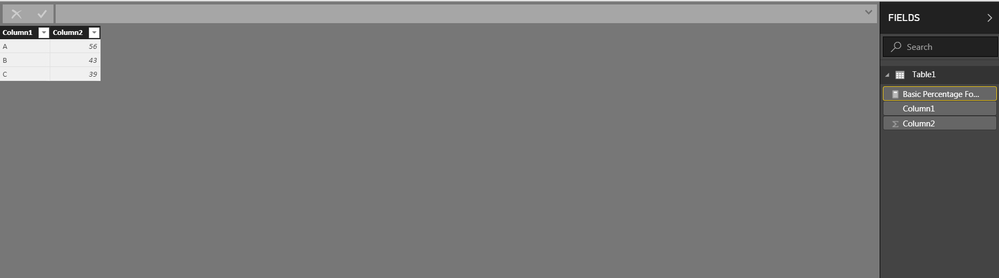
Basic Percentage Formula =
var Numerator = LOOKUPVALUE(Table1[Column2], Table1[Column1], SELECTEDVALUE(Table1[Column1]))
var Denominator = CALCULATE(SUM(Table1[Column2]), ALLEXCEPT(Table1, Table1[Column2]))
return
DIVIDE(Numerator, Denominator)
Did I answer your question?
Please help by clicking the thumbs up button and mark my post as a solution!
- Mark as New
- Bookmark
- Subscribe
- Mute
- Subscribe to RSS Feed
- Permalink
- Report Inappropriate Content
Sorry for the late response,
If you click your visual and click Format > Edit Interactions. Some new options should appear on your visual. What you want to do is change it to HIGHLIGHTING mode.
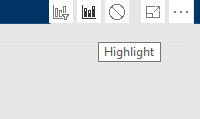
Hope that helps
Did I answer your question?
Please help by clicking the thumbs up button and mark my post as a solution!
- Mark as New
- Bookmark
- Subscribe
- Mute
- Subscribe to RSS Feed
- Permalink
- Report Inappropriate Content
i am a newbie with this
- Mark as New
- Bookmark
- Subscribe
- Mute
- Subscribe to RSS Feed
- Permalink
- Report Inappropriate Content
Basic Percentage Formula =
var Numerator = LOOKUPVALUE(Table1[Column2], Table1[Column1], SELECTEDVALUE(Table1[Column1]))
var Denominator = CALCULATE(SUM(Table1[Column2]), ALLEXCEPT(Table1, Table1[Column2]))
return
DIVIDE(Numerator, Denominator)
Did I answer your question?
Please help by clicking the thumbs up button and mark my post as a solution!
- Mark as New
- Bookmark
- Subscribe
- Mute
- Subscribe to RSS Feed
- Permalink
- Report Inappropriate Content
- Mark as New
- Bookmark
- Subscribe
- Mute
- Subscribe to RSS Feed
- Permalink
- Report Inappropriate Content
Sorry for the late response,
If you click your visual and click Format > Edit Interactions. Some new options should appear on your visual. What you want to do is change it to HIGHLIGHTING mode.
Hope that helps
Did I answer your question?
Please help by clicking the thumbs up button and mark my post as a solution!
- Mark as New
- Bookmark
- Subscribe
- Mute
- Subscribe to RSS Feed
- Permalink
- Report Inappropriate Content
- Mark as New
- Bookmark
- Subscribe
- Mute
- Subscribe to RSS Feed
- Permalink
- Report Inappropriate Content
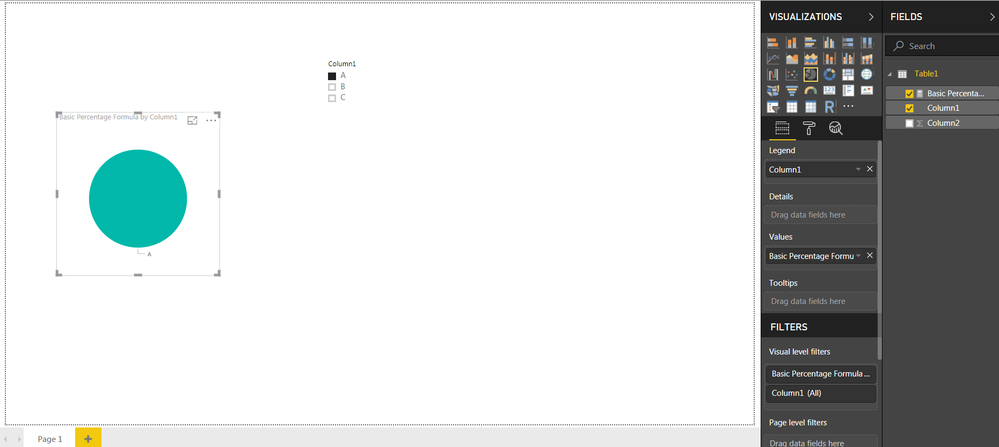
Hi i have tried the above formula but its not working though... 😞

Helpful resources

Power BI Dataviz World Championships
The Power BI Data Visualization World Championships is back! Get ahead of the game and start preparing now!

Power BI Monthly Update - December 2025
Check out the December 2025 Power BI Holiday Recap!

FabCon Atlanta 2026
Join us at FabCon Atlanta, March 16-20, for the ultimate Fabric, Power BI, AI and SQL community-led event. Save $200 with code FABCOMM.

| User | Count |
|---|---|
| 37 | |
| 37 | |
| 33 | |
| 32 | |
| 29 |


| User | Count |
|---|---|
| 130 | |
| 88 | |
| 82 | |
| 68 | |
| 64 |


