Join us at FabCon Atlanta from March 16 - 20, 2026, for the ultimate Fabric, Power BI, AI and SQL community-led event. Save $200 with code FABCOMM.
Register now!Learn from the best! Meet the four finalists headed to the FINALS of the Power BI Dataviz World Championships! Register now
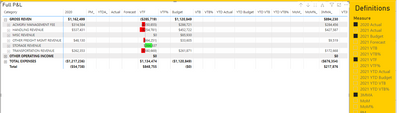
Hi, quick question, I have a solution that allows my report users to add/remove the display of measure data in a Matrix visual. However, as you can see, the solution is not ideal.
Is there a way to add/remove the measure itself and not just the data?
Thanx in advance.
Solved! Go to Solution.
Hi, @pawlowski6132
After the test, I can just use measures to achieve the dynamic display of measures' data based on the Slicer selection, the title can’t disappear because the measures are placed into the value of the Matrix and they won’t disappear until you delete them from the Matrix manually, here are my steps:
I created the measures for the measures I want to slicer by the selection of Slicer:
Measure11 =
var _selectedmeasure=
SELECTCOLUMNS(ALLSELECTED(Slicer),"1",[name])
return
IF("Measure1" in _selectedmeasure,[Measure1],BLANK())Measure22 =
var _selectedmeasure=
SELECTCOLUMNS(ALLSELECTED(Slicer),"1",[name])
return
IF("Measure2" in _selectedmeasure,[Measure2],BLANK())Measure33 =
var _selectedmeasure=
SELECTCOLUMNS(ALLSELECTED(Slicer),"1",[name])
return
IF("Measure3" in _selectedmeasure,[Measure3],BLANK())
And I created a Matrix and a Slicer table and place like this:
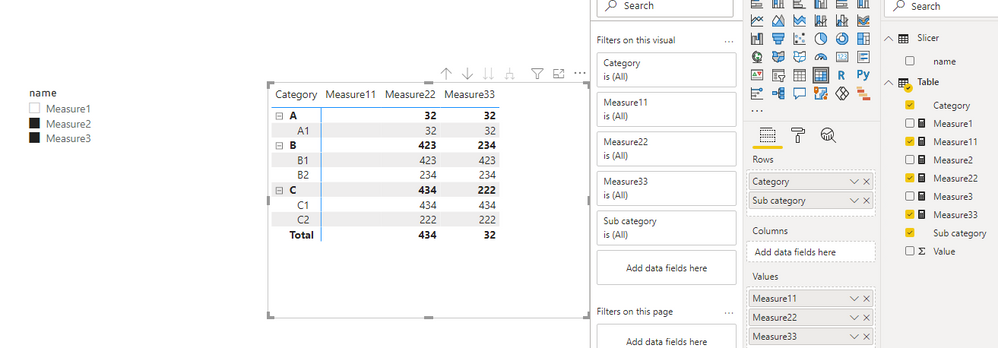
You can download my test pbix file here
Here are some possible ways to achieve adding/Removing matrix columns based on Slicer, you can check if they can meet your requirement in your situation:
Thank you very much!
Best Regards,
Community Support Team _Robert Qin
If this post helps, then please consider Accept it as the solution to help the other members find it more quickly.
Hi, @pawlowski6132
After the test, I can just use measures to achieve the dynamic display of measures' data based on the Slicer selection, the title can’t disappear because the measures are placed into the value of the Matrix and they won’t disappear until you delete them from the Matrix manually, here are my steps:
I created the measures for the measures I want to slicer by the selection of Slicer:
Measure11 =
var _selectedmeasure=
SELECTCOLUMNS(ALLSELECTED(Slicer),"1",[name])
return
IF("Measure1" in _selectedmeasure,[Measure1],BLANK())Measure22 =
var _selectedmeasure=
SELECTCOLUMNS(ALLSELECTED(Slicer),"1",[name])
return
IF("Measure2" in _selectedmeasure,[Measure2],BLANK())Measure33 =
var _selectedmeasure=
SELECTCOLUMNS(ALLSELECTED(Slicer),"1",[name])
return
IF("Measure3" in _selectedmeasure,[Measure3],BLANK())
And I created a Matrix and a Slicer table and place like this:
You can download my test pbix file here
Here are some possible ways to achieve adding/Removing matrix columns based on Slicer, you can check if they can meet your requirement in your situation:
Thank you very much!
Best Regards,
Community Support Team _Robert Qin
If this post helps, then please consider Accept it as the solution to help the other members find it more quickly.
Please look into the functionality of Calculation Groups and SELECTEDMEASURE()
thanx, will do
Share feedback directly with Fabric product managers, participate in targeted research studies and influence the Fabric roadmap.
Check out the February 2026 Power BI update to learn about new features.
| User | Count |
|---|---|
| 50 | |
| 47 | |
| 29 | |
| 15 | |
| 14 |
| User | Count |
|---|---|
| 89 | |
| 74 | |
| 39 | |
| 26 | |
| 24 |