cancel
Showing results for 
Search instead for 
Did you mean: 

The Power BI Data Visualization World Championships is back! Get ahead of the game and start preparing now! Learn more

Reply
Coriel-11
Resolver II
Resolver II

Dynamic M query parameters checkbox not showing in Options

Hi,
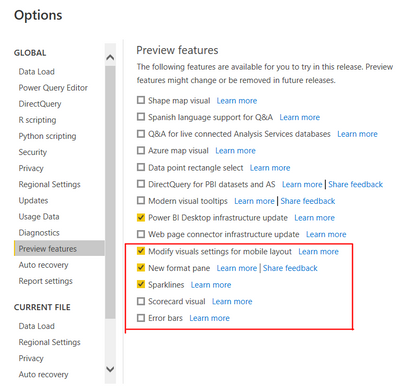
I'm trying to use Dynamic M query parameters but am falling at the first hurdle*. When I go to  File>Options and Settings>Options in Desktop, I'm not seeing the check box for "Dynamic M query parameters" under preview features.


I'm running the latest update of Power BI and am using a Pro license.


Is this something my IT team has inflicted on me, or is there anything I can do to fix this?


Matt


*I've followed this through in case it was now automatically incoporated, but the functionality itself is not working. In Data modelling view>Properties>Advanced, I'm not seeing a "bind to parameter" option

Coriel11_0-1650458278100.png


1 ACCEPTED SOLUTION
Coriel-11
Resolver II
Resolver II

I eventually got to the bottom of this. There were 2 issues here:


1- This functionality only works with DirectQuery sources. If you're just wanting to pick a complicated Excel file from a SharePoint folder of identically laid out Excel/CSV files you can't do it.


2- If you are using a DirectQuery then this feature became "generally available" in the April 2022. Once this happens it no longer appears under File>Options and Settings>Options>Preview Features. This is the reason I couldn't even see the check box, which threw me off the scent (hence why I thought it might be down to our set-up).

View solution in original post

5 REPLIES 5
BAllYouCanB
Regular Visitor

(I deleted by earlier post about the Dynamic M query parameters checkbox not showing in Options not being visible in the Preview Features section - given that it's now August of '23 I believe, from the original post, that it's now in General Availability)


That being said - I'm not able to set a parameter for either a Direct Query or an Import source. Is there something else I need to be doing to allow a stored procedure to use a list (or the result of a query) as an input parameter?

Coriel-11
Resolver II
Resolver II

I eventually got to the bottom of this. There were 2 issues here:


1- This functionality only works with DirectQuery sources. If you're just wanting to pick a complicated Excel file from a SharePoint folder of identically laid out Excel/CSV files you can't do it.


2- If you are using a DirectQuery then this feature became "generally available" in the April 2022. Once this happens it no longer appears under File>Options and Settings>Options>Preview Features. This is the reason I couldn't even see the check box, which threw me off the scent (hence why I thought it might be down to our set-up).

v-xiaotang
Community Support
Community Support

Hi @Coriel-11 

Thanks for reaching out to us.

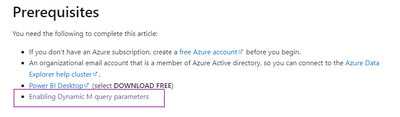
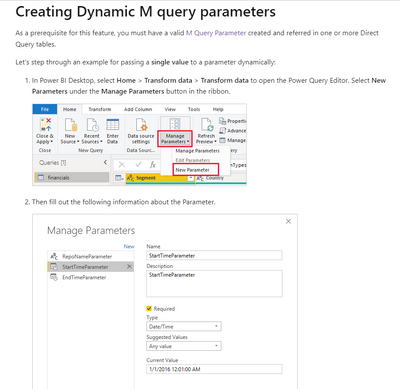
This article writes how to enable dynamic parameters, 

vxiaotang_0-1651197829247.png

Dynamic M query parameters in Power BI Desktop - Power BI | Microsoft Docs

vxiaotang_1-1651197886862.png


Best Regards,

Community Support Team _Tang

If this post helps, please consider Accept it as the solution to help the other members find it more quickly.

Thank you @v-xiaotang.

That page (& its video) was actually one of the places I first started out and I suppose in a way it does contain the answer to my problem, but it also led me on a bit of a wild goose chase.


I came to it because I was trying to find a more user-friendly way of being able to change parameters in desktop when differing excel &/or csv files are bring pulled into Power Query. I use parameters all the time, but changing them is not straight fprward for non-techie people who don't otherwise use Power BI.


This seemed like the perfect solution, but, I eventually realised, it only works for DirectQuery sources. Moreover since this feature became generally available in the April 2022 (and once a feature "becomes generally available" it no longer appears under File>Options and Settings>Options>Preview Features) I couldn't even see the check box under File>Options and Settings>Options>Preview Features, so that threw me off for a bit.


Do you if there's a good reason why this functionality doesn't work for simpler sources? It would really be useful and it seems a bit odd you can't use for most of the common types of source regardless of whether they are dynamic.

Thanks,

Coriel.

Coriel-11
Resolver II
Resolver II

Just bumping this to see if anyone has any ideas. Have had it confirmed that our IT team hasn't deliberately deactivated this globally.
Matt

Helpful resources

Announcements
Power BI DataViz World Championships

Power BI Dataviz World Championships

The Power BI Data Visualization World Championships is back! Get ahead of the game and start preparing now!

December 2025 Power BI Update Carousel

Power BI Monthly Update - December 2025

Check out the December 2025 Power BI Holiday Recap!

FabCon Atlanta 2026 carousel

FabCon Atlanta 2026

Join us at FabCon Atlanta, March 16-20, for the ultimate Fabric, Power BI, AI and SQL community-led event. Save $200 with code FABCOMM.