Join us at FabCon Atlanta from March 16 - 20, 2026, for the ultimate Fabric, Power BI, AI and SQL community-led event. Save $200 with code FABCOMM.
Register now!The Power BI Data Visualization World Championships is back! Get ahead of the game and start preparing now! Learn more
I have a dashboard with 1 KPI and 3 filters (Year, Month and Week). is it possible to have a custom target depending on the filters selected by users.
Dynamic Target = IF week selected THEN 100 ELSE if month selected THEN 1000 ELSE if year selected THEN 1000 ELSE if nothing selected THEN 1000
If multiple filters are used then the lowest target should be displayed. If all the 3 selections are used (Example 2016 > Jan > 4) then the lowest target should be used.
How can I achieve the dynamic target field (using DAX) based on the filters selected?
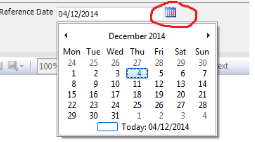
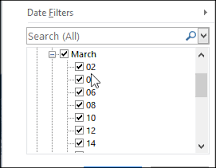
Is there a custom visual out there which will let me create a date filter / slicer using a calendar selection like it is possible in SSRS Parameters? or a collapsable tree style .
something like following?
Solved! Go to Solution.
To check if a slicer has been selected we use HASONEVALUE function in DAX.
Using this you can create a measure named ShowValues as
IF( ( HASONEVALUE(Calendar[WeekNum]) &&
HASONEVALUE(Calendar[MonthName]) &&
HASONEVALUE(Calendar[Year]) ), 100,
IF ( HASONEVALUE(Calendar[WeekNum]) &&
HASONEVALUE(Calendar[MonthName]) , 100,
IF ( HASONEVALUE(Calendar[WeekNum]) ,100,
If ( HASONEVALUE(Calendar[MonthName]) &&
HASONEVALUE(Calendar[Year]) , 5000,
If ( HASONEVALUE(Calendar[MonthName]) ,5000,
If (HASONEVALUE(Calendar[Year]) , 9999, 0) ) )) ))
This is a nested if expression.
As per you sample visual , the above expression will give the same result irrespective of the year, month and weeknumber selected, when you have multiple years.
When you have targets for different year by year, by year and month and by year month and weeknum the data model will have to be totally different and the expression to be used will be different. Hope you understand that.
Try it out and if it works accept this as a solution and also give KUDOS.
Cheers
CheenuSing
To check if a slicer has been selected we use HASONEVALUE function in DAX.
Using this you can create a measure named ShowValues as
IF( ( HASONEVALUE(Calendar[WeekNum]) &&
HASONEVALUE(Calendar[MonthName]) &&
HASONEVALUE(Calendar[Year]) ), 100,
IF ( HASONEVALUE(Calendar[WeekNum]) &&
HASONEVALUE(Calendar[MonthName]) , 100,
IF ( HASONEVALUE(Calendar[WeekNum]) ,100,
If ( HASONEVALUE(Calendar[MonthName]) &&
HASONEVALUE(Calendar[Year]) , 5000,
If ( HASONEVALUE(Calendar[MonthName]) ,5000,
If (HASONEVALUE(Calendar[Year]) , 9999, 0) ) )) ))
This is a nested if expression.
As per you sample visual , the above expression will give the same result irrespective of the year, month and weeknumber selected, when you have multiple years.
When you have targets for different year by year, by year and month and by year month and weeknum the data model will have to be totally different and the expression to be used will be different. Hope you understand that.
Try it out and if it works accept this as a solution and also give KUDOS.
Cheers
CheenuSing
@Anonymous
worked like a charm! thanks for the solution.
The Power BI Data Visualization World Championships is back! Get ahead of the game and start preparing now!
| User | Count |
|---|---|
| 39 | |
| 37 | |
| 33 | |
| 32 | |
| 29 |
| User | Count |
|---|---|
| 132 | |
| 88 | |
| 82 | |
| 68 | |
| 64 |