

cancel
Showing results for 
Search instead for 
Did you mean: 

The Power BI Data Visualization World Championships is back! Get ahead of the game and start preparing now! Learn more

Reply
AlanP514
Post Patron
Post Patron

Dynamic Information

Hi All, 
I have a requirement, Please help with this 
The requirement is I want to create a title name it should be dynamic .


If the user selects any date from the date slicer, if that particular date data is available the title should show blank  and vice versa
1St scenario: If data is available the title should be blank which means no need to show anything 
2Nd Scenario: If data is not available it should Dynamically show "No Data available"

AlanP514_0-1658299328917.png

Please help me to achieve this Dax


1 ACCEPTED SOLUTION
v-luwang-msft
Community Support
Community Support

Hi @AlanP514 ,

Based on your description, it seems to me that you should have two columns of data, one as the date used by the slicer, and the other as the date available. When the date selected by the slicer is in the available dates, then blank is returned, and when the slicer's date is not in the available dates, then No Data available is returned.
Refer to the following.

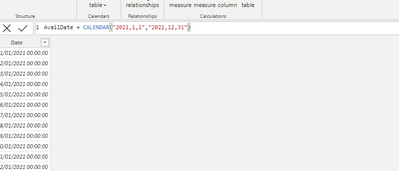
Availtable:

vluwangmsft_0-1658916537744.png

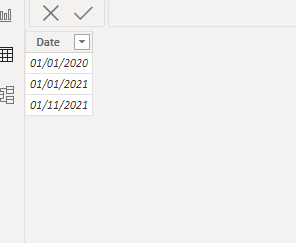
Slicer table:

vluwangmsft_1-1658916550364.png


create the below measure:

test =
VAR test1 =
    CONCATENATEX ( ALLSELECTED ( 'Slicer Date' ), 'Slicer Date'[Date] )
VAR test2 =
    CONCATENATEX ( AvailDate, AvailDate[Date] )
RETURN
    IF ( ISERROR ( FIND ( test1, test2 ) ), "No Data available", BLANK () )

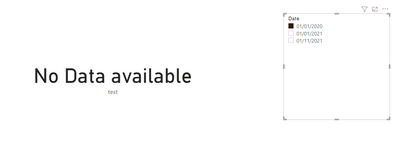
Output result:

vluwangmsft_2-1658916637317.pngvluwangmsft_3-1658916655023.png


Did I answer your question? Mark my post as a solution!


Best Regards

Lucien

View solution in original post

3 REPLIES 3
v-luwang-msft
Community Support
Community Support

Hi @AlanP514 ,

Based on your description, it seems to me that you should have two columns of data, one as the date used by the slicer, and the other as the date available. When the date selected by the slicer is in the available dates, then blank is returned, and when the slicer's date is not in the available dates, then No Data available is returned.
Refer to the following.

Availtable:

vluwangmsft_0-1658916537744.png

Slicer table:

vluwangmsft_1-1658916550364.png


create the below measure:

test =
VAR test1 =
    CONCATENATEX ( ALLSELECTED ( 'Slicer Date' ), 'Slicer Date'[Date] )
VAR test2 =
    CONCATENATEX ( AvailDate, AvailDate[Date] )
RETURN
    IF ( ISERROR ( FIND ( test1, test2 ) ), "No Data available", BLANK () )

Output result:

vluwangmsft_2-1658916637317.pngvluwangmsft_3-1658916655023.png


Did I answer your question? Mark my post as a solution!


Best Regards

Lucien

ryan_mayu
Super User
Super User

@AlanP514 

maybe you can try this

if(isblank(measure),"","No Data available")


Did I answer your question? Mark my post as a solution!

Proud to be a Super User!


Avantika-Thakur
Solution Supplier
Solution Supplier

Hi @AlanP514 ,

You can try creating a DAX like below :

Dynamic text = IF( selectedvalue(Date) <> BLANK()," ", "No-data Available")


Hope this helps.

Please accept the solution if it answers your query.

Thanks!
Avantika


Helpful resources

Announcements
Power BI DataViz World Championships

Power BI Dataviz World Championships

The Power BI Data Visualization World Championships is back! Get ahead of the game and start preparing now!

December 2025 Power BI Update Carousel

Power BI Monthly Update - December 2025

Check out the December 2025 Power BI Holiday Recap!

FabCon Atlanta 2026 carousel

FabCon Atlanta 2026

Join us at FabCon Atlanta, March 16-20, for the ultimate Fabric, Power BI, AI and SQL community-led event. Save $200 with code FABCOMM.