

Join us at FabCon Atlanta from March 16 - 20, 2026, for the ultimate Fabric, Power BI, AI and SQL community-led event. Save $200 with code FABCOMM.
Register now!The Power BI Data Visualization World Championships is back! Get ahead of the game and start preparing now! Learn more
Hello Community!,
I want to create a dynamic Index as a measure or a calculated column, so that I can see the number of rows according to the filtered data based on 'Region' or 'State'.
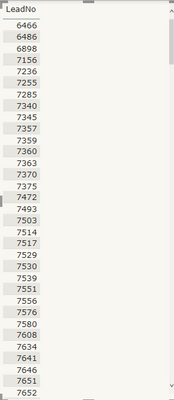
I have the date like:
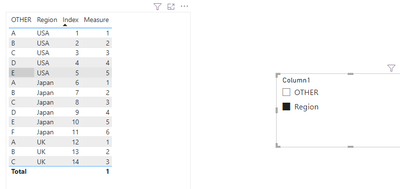
I have tried creating an index column from the Power Query but when I filter out the data according to the region, it doesn't shows the new Index from 1 to the number of rows, it shows the index value of that particular Customer name,
For eg:
What I want is to show the Index value from 1 according to the filtered.
I would really appreciate your help a lot.
Thanks & Regards,
Abhinav
Hi @abhinav_003 ,
Please have a try.
Create a measure.
Measure = VAR _REGION=RANKX(FILTER(ALL('Table'),'Table'[Region]=SELECTEDVALUE('Table'[Region])),CALCULATE(MAX('Table'[Index])),,ASC,Skip)
VAR _OTHER=RANKX(FILTER(ALL('Table'),'Table'[OTHER]=SELECTEDVALUE('Table'[OTHER])),CALCULATE(MAX('Table'[Index])),,ASC,Skip)
VAR _ER=IF(SELECTEDVALUE('Table (2)'[Column1])="OTHER",_OTHER,IF(SELECTEDVALUE('Table (2)'[Column1])="Region",_REGION,IF(SELECTEDVALUE('Table (2)'[Column1])=BLANK(),_REGION)))
RETURN _ER
How to Get Your Question Answered Quickly
If it does not help, please provide more details with your desired output and pbix file without privacy information (or some sample data) .
Best Regards
Community Support Team _ Polly
If this post helps, then please consider Accept it as the solution to help the other members find it more quickly.
@abhinav_003 , You can create a rank column
For Rank Refer to these links
https://radacad.com/how-to-use-rankx-in-dax-part-1-of-3-calculated-columns
Column Rank: https://www.youtube.com/watch?v=wDS_Vi4r9I4&list=PLPaNVDMhUXGaaqV92SBD5X2hk3TMNlHhb&index=39
Hey @amitchandak thanks for your reply,
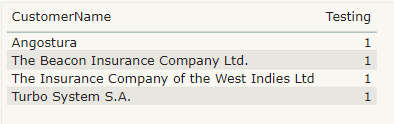
I tried 'Rankx' function but it is ranking all of them the same (1), I have attached the output as well as the formula of the same, please tell me where did I make the mistake.
Thanks & Regards,
Abhinav.
The Power BI Data Visualization World Championships is back! Get ahead of the game and start preparing now!
| User | Count |
|---|---|
| 63 | |
| 55 | |
| 42 | |
| 41 | |
| 23 |
| User | Count |
|---|---|
| 171 | |
| 136 | |
| 119 | |
| 79 | |
| 54 |