cancel
Showing results for 
Search instead for 
Did you mean: 

The Power BI Data Visualization World Championships is back! Get ahead of the game and start preparing now! Learn more

Reply
Anonymous
Not applicable

Dynamic Histogram showing total earnings for each simulation

Hi all, 
I`m trying to create a dynamic/filterable histogram that shows:
x-axis: sum of earnings per simulation number
y-axis: Number of simulations in each bucket (Distinct Count of Simulation Number)
Filters: a. Asset Scenario & b. FY

Using the following data:

FYAsset ScenariosEarnings valuesSimulation Number
22230.8308821
22230.7803572
22230.6922153
22230.3981684
22230.998235
23220.9309381
23220.324922
23220.618623
23220.7907254
23220.2236865
23230.2403261
23230.2554422
23230.9028363
23230.0537574
23230.7987335
22220.8209991
22220.9734592
22220.9640443
22220.2251934
22220.35735
1 REPLY 1
lbendlin
Super User
Super User

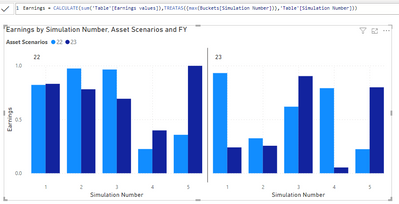
This is not a histogram but it is dynamic. For a histogram you'll have to change the sort order as needed

lbendlin_0-1686530916938.png


see attached.

Helpful resources

Announcements
November Power BI Update Carousel

Power BI Monthly Update - November 2025

Check out the November 2025 Power BI update to learn about new features.

Fabric Data Days Carousel

Fabric Data Days

Advance your Data & AI career with 50 days of live learning, contests, hands-on challenges, study groups & certifications and more!

FabCon Atlanta 2026 carousel

FabCon Atlanta 2026

Join us at FabCon Atlanta, March 16-20, for the ultimate Fabric, Power BI, AI and SQL community-led event. Save $200 with code FABCOMM.

Top Solution Authors
Top Kudoed Authors