Don't miss your chance to take the Fabric Data Engineer (DP-600) exam for FREE! Find out how by attending the DP-600 session on April 23rd (pacific time), live or on-demand.
Learn moreNext up in the FabCon + SQLCon recap series: The roadmap for Microsoft SQL and Maximizing Developer experiences in Fabric. All sessions are available on-demand after the live show. Register now
Couldn't load the data for this visual
CalculationProperty(measure xxx) (1,1) Calculation error in measure xxx/
Invalid FormatStringDefinition expression of measure xxx. FormatStringDefinition must have a DAX expression which is of type String.
-----------------
Measure xxx uses a dynamic format string expression by referencing [MeasureABC] which returns type string. A simplified expression is shown below.
--------------------
[MeasureABC] = "#,0"
--------------------
Note - issue only occurs after a new unrelated and unused calculation group was added to the model. Workaround fix - can be resolved by a) simply deleting the calculation group or b) by simply copying the "#,0" directly into the measure xxx formatstringexpression and for all other measures instead of referencing [MeasureABC]. Why is the existence of a calc group cause this error to happen when it works fine before? This issue can be re-produced.
Did you ever find a solution to this? I'm encountering the same issue and no support online for it.
Good news! I just found a workaround for this problem. As you probably know, Power BI recently introducted user-defined functions as a preview feature. If you use a function instead of a measure for your format definition, it won't cause this problem. I haven't tried putting a measure inside the function, but at the very least, if the function is self-contained, it will work. You can always pass any measure results into the function as either a predetermined value or an expression to be evaluated at runtime.
https://learn.microsoft.com/en-us/dax/best-practices/dax-user-defined-functions
Hi @Tomi ,
Based on the knowledge, dynamic format strings can be used with calculation groups.
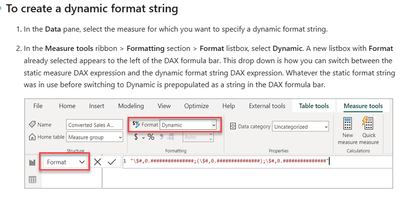
You can view the following document to learn more about how to create a dynamic format string.
Create dynamic format strings for measures in Power BI Desktop - Power BI | Microsoft Learn
Best Regards,
Wisdom Wu
If this post helps, then please consider Accept it as the solution to help the other members find it more quickly.
If you have recently started exploring Fabric, we'd love to hear how it's going. Your feedback can help with product improvements.
A new Power BI DataViz World Championship is coming this June! Don't miss out on submitting your entry.
Share feedback directly with Fabric product managers, participate in targeted research studies and influence the Fabric roadmap.
| User | Count |
|---|---|
| 48 | |
| 45 | |
| 41 | |
| 20 | |
| 17 |
| User | Count |
|---|---|
| 69 | |
| 64 | |
| 32 | |
| 31 | |
| 27 |