This time we’re going bigger than ever. Fabric, Power BI, SQL, AI and more. We're covering it all. You won't want to miss it.
Learn moreJoin the FabCon + SQLCon recap series. Up next: Power BI, Real-Time Intelligence, IQ and AI, and Data Factory take center stage. All sessions are available on-demand after the live show. Register now
I have a table with data below. I have a date slicer which is filtering the date in this table. Based on the date range selected I need to filter my table in such a way that for each company
and type M it brings the smallest and largest date and corresponding amount and excludes other type M records. Rest all the type records(X,Y) should appear as it is.
Basically 2 records of type M for each company and the first record should have the amount negative.I want to create a calculated table based on this.Is it achievable in DAX?
Input table
group | company_name | Type | Date | Amount |
AA | A | X | 28-02-2019 | 100 |
AA | A | Y | 27-03-2019 | 200 |
AA | A | M | 27-04-2019 | 300 |
AA | B | X | 10-05-2019 | 400 |
AA | A | M | 29-04-2019 | 500 |
AA | A | M | 15-05-2019 | 500 |
AA | B | M | 10-06-2019 | 600 |
AA | B | M | 11-06-2019 | 700 |
AA | B | M | 20-06-2019 | 800 |
Output Table:
group | company_name | Type | Date | Amount |
AA | A | X | 28-02-2019 | 100 |
AA | A | Y | 27-03-2019 | 200 |
AA | A | M | 27-04-2019 | -300 |
AA | B | X | 10-05-2019 | 400 |
AA | A | M | 15-05-2019 | 500 |
AA | B | M | 10-06-2019 | -600 |
AA | B | M | 20-06-2019 | 800 |
Thank you!
Solved! Go to Solution.
Hello @valentina14
you could use this formula to create a new table
New Table =
FILTER('Table','Table'[Type]<>"M"||
('Table'[Type]="M"&&
('Table'[Date]=CALCULATE(MIN('Table'[Date]),FILTER('Table','Table'[group]=EARLIER('Table'[group])&&'Table'[company_name]=EARLIER('Table'[company_name])&&'Table'[Type]="M"))||
'Table'[Date]=CALCULATE(MAX('Table'[Date]),FILTER('Table','Table'[group]=EARLIER('Table'[group])&&'Table'[company_name]=EARLIER('Table'[company_name])&&'Table'[Type]="M")))))
Result:
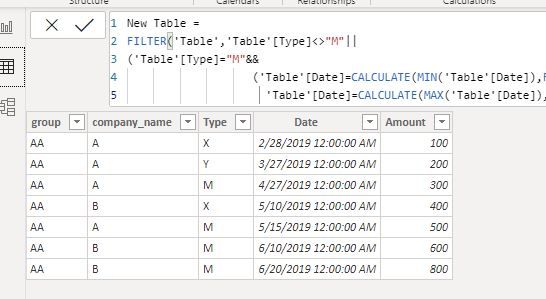
and here's the sample pbix file, please try it out.
Best regards
Lin
Hello @valentina14
you could use this formula to create a new table
New Table =
FILTER('Table','Table'[Type]<>"M"||
('Table'[Type]="M"&&
('Table'[Date]=CALCULATE(MIN('Table'[Date]),FILTER('Table','Table'[group]=EARLIER('Table'[group])&&'Table'[company_name]=EARLIER('Table'[company_name])&&'Table'[Type]="M"))||
'Table'[Date]=CALCULATE(MAX('Table'[Date]),FILTER('Table','Table'[group]=EARLIER('Table'[group])&&'Table'[company_name]=EARLIER('Table'[company_name])&&'Table'[Type]="M")))))
Result:
and here's the sample pbix file, please try it out.
Best regards
Lin
@Anonymous , Add these two measure in place of date and amount in visual
firstnonblank(Table[Date], blank())
firstnonblankvalue(Table[Date], max(Table[Amount]))
And check
Check out the April 2026 Power BI update to learn about new features.
If you have recently started exploring Fabric, we'd love to hear how it's going. Your feedback can help with product improvements.
A new Power BI DataViz World Championship is coming this June! Don't miss out on submitting your entry.
| User | Count |
|---|---|
| 38 | |
| 38 | |
| 31 | |
| 22 | |
| 15 |
| User | Count |
|---|---|
| 74 | |
| 61 | |
| 31 | |
| 31 | |
| 23 |