cancel
Showing results for 
Search instead for 
Did you mean: 

The Power BI Data Visualization World Championships is back! Get ahead of the game and start preparing now! Learn more

Reply
auxilio99357
Frequent Visitor

Dynamic Filtering from Table - Period of time

Hi!! hope you can help me! 🙂 


I want to create a slicer which filters with the "User Selection" column from the following table called 'Slicer Period Table'


auxilio99357_1-1619478425138.png


When the user selects Last Month, Last Qtr or Last Yr, the value that i want to get are the ones in the column "Month index", so i created this measure:


Period Selection = IF (HASONEVALUE ('Slicer Periodo Table'[User Selection]),VALUES('Slicer Period Table'[Month Index]),COUNTROWS(DimDates))
 

Then I want to calculate some measures that are filter by this slicer, like this:


Total Revenue = CALCULATE([Revenue], ALL(DimDates), AND(DimDates[month index]<=0, DimDates[month index]>= [Period Selection]))
 
The problem is that the measure gives the followig error: "A function 'CALCULATE' has been used in a True/False expression that is used as a table filter expression. This is not allowed." 
i´m very new to DAX so i don´t know how to solve it.
 
Unfortunately i cannot take pictures of my Data tables but i have a common sales table with every transaction that has this 4 columns:
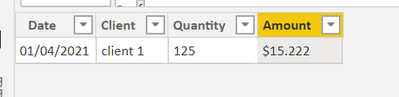
auxilio99357_3-1619479616273.png

I will always have the amount of sales up to two months before the current day. (For example if we are on April 2021, the last sales I have are from February 2020). Thats why the month index in the 'Slicer Period Table' don´t make sense.


And a DimDates table like this
auxilio99357_2-1619479278512.png
 
Thank you!!!! 😊


1 ACCEPTED SOLUTION
samdthompson
Memorable Member
Memorable Member

Hello, yes you can do this. Heres a link to a very detailed description which I have used lots of time. Its even got a downloadable example.


https://blog.crossjoin.co.uk/2016/05/30/creating-current-day-week-month-and-year-reports-in-power-bi...


// if this is a solution please mark as such. Kudos always appreciated.

View solution in original post

1 REPLY 1
samdthompson
Memorable Member
Memorable Member

Hello, yes you can do this. Heres a link to a very detailed description which I have used lots of time. Its even got a downloadable example.


https://blog.crossjoin.co.uk/2016/05/30/creating-current-day-week-month-and-year-reports-in-power-bi...


// if this is a solution please mark as such. Kudos always appreciated.

Helpful resources

Announcements
Power BI DataViz World Championships

Power BI Dataviz World Championships

The Power BI Data Visualization World Championships is back! Get ahead of the game and start preparing now!

December 2025 Power BI Update Carousel

Power BI Monthly Update - December 2025

Check out the December 2025 Power BI Holiday Recap!

FabCon Atlanta 2026 carousel

FabCon Atlanta 2026

Join us at FabCon Atlanta, March 16-20, for the ultimate Fabric, Power BI, AI and SQL community-led event. Save $200 with code FABCOMM.