Learn from the best! Meet the four finalists headed to the FINALS of the Power BI Dataviz World Championships! Register now
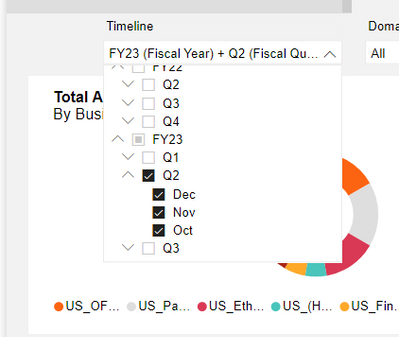
I have a drop-down menu with several Year, Quarter and Month options, what I need to do is that, when opening the report, the options of Months of the current Year-Quarter are automatically marked and it shows the information of those Months.
Could someone please give me a guide?
Here an example of what I want one the report is loaded:
Solved! Go to Solution.
Hi @Syndicate_Admin ,
Please try this custom visual:
Best Regards,
Gao
Community Support Team
If there is any post helps, then please consider Accept it as the solution to help the other members find it more quickly. If I misunderstand your needs or you still have problems on it, please feel free to let us know. Thanks a lot!
How to get your questions answered quickly -- How to provide sample data
Hi @Syndicate_Admin ,
Please try this custom visual:
Best Regards,
Gao
Community Support Team
If there is any post helps, then please consider Accept it as the solution to help the other members find it more quickly. If I misunderstand your needs or you still have problems on it, please feel free to let us know. Thanks a lot!
How to get your questions answered quickly -- How to provide sample data
Hello, thank you very much for the solution, I will apply it!
A new Power BI DataViz World Championship is coming this June! Don't miss out on submitting your entry.
Share feedback directly with Fabric product managers, participate in targeted research studies and influence the Fabric roadmap.
| User | Count |
|---|---|
| 47 | |
| 36 | |
| 27 | |
| 15 | |
| 15 |
| User | Count |
|---|---|
| 58 | |
| 56 | |
| 38 | |
| 21 | |
| 21 |