This is best Fabric, Power BI, SQL and AI community event. How do we know? The last event sold out! Save €200 with code FABCMTY200.
Register nowA new Data Days event is coming soon! This time we’re going bigger than ever. Fabric, Power BI, SQL, AI and more. Don't miss out.
Hello,
I'm not sure if there is a way to do this in Power BI, but I'm creating a table that does the following.
For team EC Saas 2 (column C), how many scrum masters are there (column E), how many product owners (column F) are there, etc
For team Dev (column (C), how many scrum masters are there (column E), how many product owners (column F) are there, etc
For team Oc Dev (column C), how many scrum masters are there (column E), how many product owners (column F) are there, etc
etc......
*The number of scrum masters, products owners, etc are driven by FTEs (column D)
Solved! Go to Solution.
Hi @Nosh10 ,
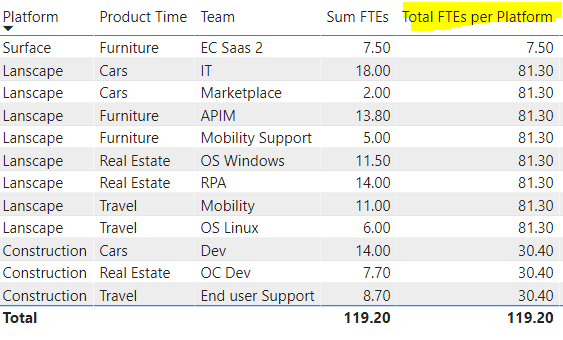
I create a column to sum FTEs based on each Platform.
Total FTEs per Platform =
CALCULATE (
SUM ( 'Table'[Sum FTEs] ),
ALLEXCEPT ( 'Table', 'Table'[Platform] )
)
For your latest post, I don't think it is the same requirement with the original one. Please try the formula to check if it is what you want. If it isn't, please share the expected results. We will understand clearly.
Sorry for the mix up.
I'm looking to create an ETF column that does the following:
How many ETFs are in surface
How many ETFs are in construction
How many EFTs are in landscaping
Hi @Nosh10 ,
I create a column to sum FTEs based on each Platform.
Total FTEs per Platform =
CALCULATE (
SUM ( 'Table'[Sum FTEs] ),
ALLEXCEPT ( 'Table', 'Table'[Platform] )
)
For your latest post, I don't think it is the same requirement with the original one. Please try the formula to check if it is what you want. If it isn't, please share the expected results. We will understand clearly.
Hi @Nosh10 ,
Could you tell me if your problem has been solved? If it is, kindly mark the helpful answer as solution if you feel that makes sense. Welcome to share your own solution. More people will benefit from the thread.
Hi @Nosh10 ,
Could you please clarify the specific logic and the different logic between these teams?
Because for now, I don't know what's the differences among them and no calculation logic here.
Thanks
Aiolos Zhao
Check out the May 2026 Power BI update to learn about new features.
Sign up to receive a private message when registration opens and key events begin.
If you have recently started exploring Fabric, we'd love to hear how it's going. Your feedback can help with product improvements.
| User | Count |
|---|---|
| 32 | |
| 26 | |
| 25 | |
| 24 | |
| 15 |
| User | Count |
|---|---|
| 62 | |
| 48 | |
| 27 | |
| 21 | |
| 20 |