This time we’re going bigger than ever. Fabric, Power BI, SQL, AI and more. We're covering it all. You won't want to miss it.
Learn moreJoin the FabCon + SQLCon recap series. Up next: Power BI, Real-Time Intelligence, IQ and AI, and Data Factory take center stage. All sessions are available on-demand after the live show. Register now
Hi everyone,
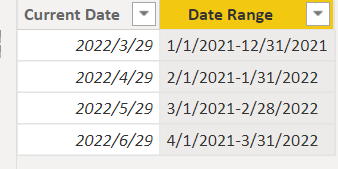
I'm still learning Power Bi so this may be a simple solution, but I have a report where I'm using DateTime.LocalNow() so the report shows the last refresh date on the date the report is refreshed. I also have a date range to show what data is included in the report. The date range is 3 months behind the current date (so refreshing today would show 3/29/2022 and a date range of 01/01/2021-12/31/2021). Currently the date range has to be updated manually every month. I'm wanting to make this dynamic so when the report is refreshed in April I won't have to manually go in and update the date range. I'm having trouble figuring out a dynamic way to show the rolling 12 months 3 months behind, while keeping the range between the first and late day of the month. Below may help in what I'm looking to do:
Thank you for any help you can give!
Solved! Go to Solution.
is this what you want?
Date Range =
EOMONTH('Table'[Current Date],-15)+1 &"-"& EOMONTH('Table'[Current Date],-3)
Proud to be a Super User!
is this what you want?
Date Range =
EOMONTH('Table'[Current Date],-15)+1 &"-"& EOMONTH('Table'[Current Date],-3)
Proud to be a Super User!
Check out the April 2026 Power BI update to learn about new features.
If you have recently started exploring Fabric, we'd love to hear how it's going. Your feedback can help with product improvements.
A new Power BI DataViz World Championship is coming this June! Don't miss out on submitting your entry.
| User | Count |
|---|---|
| 39 | |
| 37 | |
| 31 | |
| 23 | |
| 15 |
| User | Count |
|---|---|
| 76 | |
| 59 | |
| 32 | |
| 31 | |
| 26 |