cancel
Showing results for 
Search instead for 
Did you mean: 

Next up in the FabCon + SQLCon recap series: The roadmap for Microsoft SQL and Maximizing Developer experiences in Fabric. All sessions are available on-demand after the live show. Register now

Reply
Daysy
Frequent Visitor

Dynamic Date Filter Help Please

Hi All,


Have been using PBI for a year or so and this site has been a great resource, but in this instance my Google-Fu is failing me.


I have an extensive table that shows each payment a customer makes with a movement number and date.  The movement shows the number of updates on the account (first time it hits the table it's movement 1, next update is movement 2 etc) and the date that movement occured.  What I would like to be able to do is add a filter to my report for the last day of each month and for my table to filter down to the last movement for each customer that was before that month end date. 


For example, I would like to filter on 31/05/2020 and my table to filter to Customer A, Movement 2 and Customer B, Movement 1. Or Filter to 30/04/2021 and my table would filter to Customer A, Movement 3,Customer B, Movement 3.


CustomerLast Movement DatePaidOutstandingMovement
Customer A02/01/2019100030001
Customer A01/05/2020100020002
Customer A28/08/2020100010003
Customer B01/05/2020500060001
Customer B01/01/2021300030002
Customer B08/04/2021150015003


I've got as far as grouping the customer name and can pull the latest movement from that, but I can't work out a way to combine it with a filter to pick up only the last movement number before the month end date.


Any help gratefully received!


Thanks


Daysy

1 ACCEPTED SOLUTION
Anonymous
Not applicable

Hi  @Daysy ,

Here are the steps you can follow:

1. Create calendar.

Date_Table =
CALENDARAUTO()

2. Create calculated column

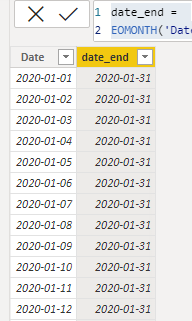
date_end =
EOMONTH('Date_Table'[Date],0)

vyangliumsft_0-1640592759396.png

3. Create measure.

Flag =
var _select=SELECTEDVALUE('Date_Table'[date_end])
return
IF(
    MONTH(_select)=MONTH(MAX('Table'[Last Movement Date])),1,0)
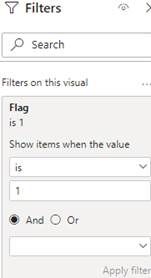
Place [Flag] in Filters, set is=1, apply filter.

vyangliumsft_1-1640592759397.jpeg

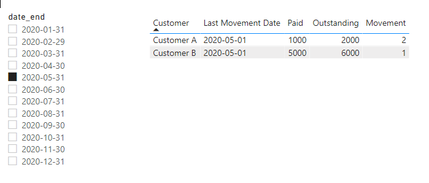
4. Result:

vyangliumsft_2-1640592759401.png


Best Regards,

Liu Yang

If this post helps, then please consider Accept it as the solution to help the other members find it more quickly

View solution in original post

5 REPLIES 5
Anonymous
Not applicable

Hi  @Daysy ,

Here are the steps you can follow:

1. Create calendar.

Date_Table =
CALENDARAUTO()

2. Create calculated column

date_end =
EOMONTH('Date_Table'[Date],0)

vyangliumsft_0-1640592759396.png

3. Create measure.

Flag =
var _select=SELECTEDVALUE('Date_Table'[date_end])
return
IF(
    MONTH(_select)=MONTH(MAX('Table'[Last Movement Date])),1,0)
Place [Flag] in Filters, set is=1, apply filter.

vyangliumsft_1-1640592759397.jpeg

4. Result:

vyangliumsft_2-1640592759401.png


Best Regards,

Liu Yang

If this post helps, then please consider Accept it as the solution to help the other members find it more quickly

smpa01
Community Champion
Community Champion

@Daysy  can you use a Calendar Table to do all the slicing, it would be way easier.

Did I answer your question? Mark my post as a solution!
Proud to be a Super User!
My custom visualization projects
Plotting Live Sound: Viz1
Beautiful News:Viz1, Viz2, Viz3
Visual Capitalist: Working Hrs
Daysy
Frequent Visitor

Yes, I'm reasonably comfortable using calendar tables and could add one in to this.  It's the only way I could think to pick up the last days of the month and filter that way, but I'm not sure how to implement that.  


@Anonymous solution has got me part way there, thank you, using the latest movement date and latest movement number in the table and using the movement date in the slicer, but I would like to take it a step further and just have month end dates to slice by.


Thanks


Daysy

Anonymous
Not applicable

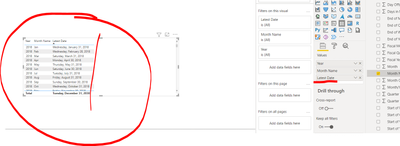
Will the last movement date be in the visual? Then when adding the date to the visual, choose latest date. Then when you use a date filter, it will show you the max date of the date filtered.


PoweredOut20_0-1640183100214.png


Thanks.  It's a table visual I'm using as I want the end user to be able to extract the filtered table to Excel.  I guess another way to look at it is that I want to be able to add a date filter and only pick up the last movement before that date, not all of the movements before that date.

Helpful resources

Announcements
New to Fabric survey Carousel

New to Fabric Survey

If you have recently started exploring Fabric, we'd love to hear how it's going. Your feedback can help with product improvements.

Power BI DataViz World Championships carousel

Power BI DataViz World Championships - June 2026

A new Power BI DataViz World Championship is coming this June! Don't miss out on submitting your entry.

Join our Fabric User Panel

Join our Fabric User Panel

Share feedback directly with Fabric product managers, participate in targeted research studies and influence the Fabric roadmap.

March Power BI Update Carousel

Power BI Community Update - March 2026

Check out the March 2026 Power BI update to learn about new features.