Hi all,
I am trying to utilise the new dynamic formatting for measures feature that was released in the April 2023 update but am having trouble getting it to work as i need.
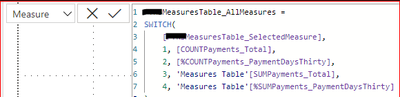
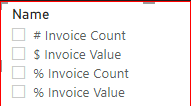
I have a slicer I am using to to be able to switch the chosen measure in a series of clustered column charts between the actual count and actual value of invoices of my data set and the count % and value %, following the process in the RADACAD link below. This is working perfectly however I now require the data labels to be in the correct formatting for each chosen measure.
Change the Column or Measure Value in a Power BI Visual by Selection of the Slicer: Parameter Table ...
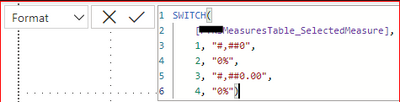
Until the April 2023 update i realised i would need to use calculation groups, but with the update i would like to use the new dynamic format feature for measures. I've tried to create a switch measure in the Format field and whilst the % and actual count measures are appearing as required, the actual value of invoices are not. I need this measure to be in Millions (M), but when i put the number formatting string in the switch measure it does not work. Could you please review the above and the below screenshots of each and advise where i am going wrong with the formatting for the value of invoices?
My Measure
My Measure Format
My Slicer fields
Really appreciate any help you could give 🙂


