This is best Fabric, Power BI, SQL and AI community event. How do we know? The last event sold out! Save €200 with code FABCMTY200.
Register nowA new Data Days event is coming soon! This time we’re going bigger than ever. Fabric, Power BI, SQL, AI and more. Don't miss out.
Hello,
I am creating a dashboard that has to do with deadlines. There are multiple tasks with separate due dates and whenever I click on a single task, I would love a countdown timer to show up catered to that specific due date. Is there any way I can create this? I am willing to try anything.
Thank you
This is extremely interesting! I have never encountered this before but there may be a workaround.
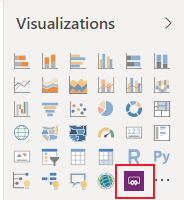
I have not yet tried this but I would go about this by trying to create the countdown timer within PowerApps, and then using the PowerApps for Power BI visual.
Here is a short video on how to create the actual app:
There is a countdown timer custom visual, have you looked at that?
Hi Greg,
I have looked at that but I have to manually input the date I want to countdown to and it does not change from task to task. I am hoping for one that changes depending on the task deadline that I click on my dashboard.
Thanks!
Hi @samanthamirae,
By my tests, I 'm afraid that there is no better way than count down timer custom visual for your requirment in Power BI currently.
You also could post your new idea in Power BI idea forum and add your comments there to improve Power BI and make this feature coming sooner.
Best Regards,
Cherry
Check out the May 2026 Power BI update to learn about new features.
Sign up to receive a private message when registration opens and key events begin.
If you have recently started exploring Fabric, we'd love to hear how it's going. Your feedback can help with product improvements.
| User | Count |
|---|---|
| 31 | |
| 26 | |
| 23 | |
| 22 | |
| 15 |
| User | Count |
|---|---|
| 62 | |
| 47 | |
| 28 | |
| 24 | |
| 20 |