cancel
Showing results for 
Search instead for 
Did you mean: 

The Power BI Data Visualization World Championships is back! Get ahead of the game and start preparing now! Learn more

Reply
Anonymous
Not applicable

Dynamic Conditional Formatting Based On Previous Year

Hello there,

Could I get assistance with conditional formatting. I need to be able to change colors based on previous year.  So, if the amount last year is greater than this year then I would like to change the color of this year Red to show that is “bad”, and if last years totals were less than this year then I would like to change the color of this year total to be Green to show that this year we did “good.” I don’t think this is possible with conditional formatting because the values for each order type are constantly changing from year to year. Please let me know if you have any ideas. Thank you in advance!


Some example numbers below.

Order Type

Sales

Sales Last Year

Ship Amount

Ship Last Year

1

$18,000

$16,000

$6,000

$9,000

2

$12,000

$12,500

$7,000

$6,500

3

$20,000

$17,000

$10,000

$12,000


What I would like it to show. 

Order Type

Sales

Sales Last Year

Ship Amount

Ship Last Year

1

$18,000

$16,000

$6,000

$9,000

2

$12,000

$12,500

$7,000

$6,500

3

$20,000

$17,000

$10,000

$12,000

1 ACCEPTED SOLUTION
jdbuchanan71
Super User
Super User

Hello @Anonymous 

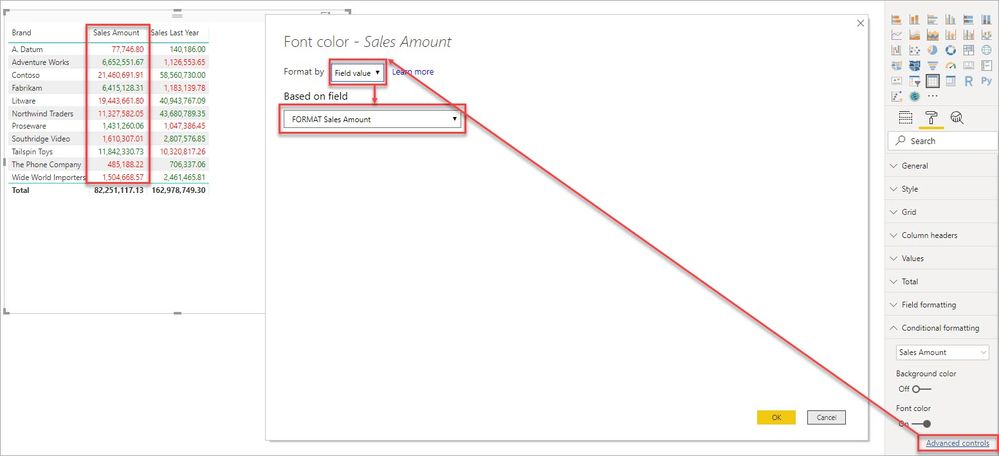
You can write a measure to apply the formatting.

FORMAT Sales Amount = IF ( [Sales Amount] > [Sales Last Year], "GREEN", "RED")

The use it in conditional fomatting to color the text.

conditionalformatYoY.jpg

You would just need a formatting measure for each column but it should work in all contexts.

FORMAT Sales Last Year = IF ( [Sales Amount] < [Sales Last Year], "GREEN", "RED")

View solution in original post

2 REPLIES 2
jdbuchanan71
Super User
Super User

Hello @Anonymous 

You can write a measure to apply the formatting.

FORMAT Sales Amount = IF ( [Sales Amount] > [Sales Last Year], "GREEN", "RED")

The use it in conditional fomatting to color the text.

conditionalformatYoY.jpg

You would just need a formatting measure for each column but it should work in all contexts.

FORMAT Sales Last Year = IF ( [Sales Amount] < [Sales Last Year], "GREEN", "RED")
Anonymous
Not applicable

That works perfectly! Thank you so much!

Helpful resources

Announcements
Power BI DataViz World Championships

Power BI Dataviz World Championships

The Power BI Data Visualization World Championships is back! Get ahead of the game and start preparing now!

December 2025 Power BI Update Carousel

Power BI Monthly Update - December 2025

Check out the December 2025 Power BI Holiday Recap!

FabCon Atlanta 2026 carousel

FabCon Atlanta 2026

Join us at FabCon Atlanta, March 16-20, for the ultimate Fabric, Power BI, AI and SQL community-led event. Save $200 with code FABCOMM.

Top Solution Authors