This is best Fabric, Power BI, SQL and AI community event. How do we know? The last event sold out! Save €200 with code FABCMTY200.
Register nowA new Data Days event is coming soon! This time we’re going bigger than ever. Fabric, Power BI, SQL, AI and more. Don't miss out.
How do I show Comments in a measure?
My goal is to dynamically show the value of a column in a text box (or whaterever visual)
I have 4 fields with comments
[comment1] [comment2] [comment3] [comment4]
and 4 variables
[Level1] [Level2] [Level3] [Level4]
I use the levels as slicers,
let's say I click on [Level1] I want to assign to the measure so it can only show [comment1], not the rest.
is this possible?
I tried if isfiltered then show values comment1 (or comment2, 3 etc), but didnt work
any ideas?
I tried if is filtered then values comment1 but didn't work.
Solved! Go to Solution.
No, it's because VALUES returns multiple values. Which is why it's not called VALUE. A measure has to return a single value for each filtering context. If you're trying to display multiple values from the Commentary1 column for each row, you'll need to use the CONCATENATEX function. If there's only one Commentary1 value for each row you can probably use FIRSTNONBLANK.
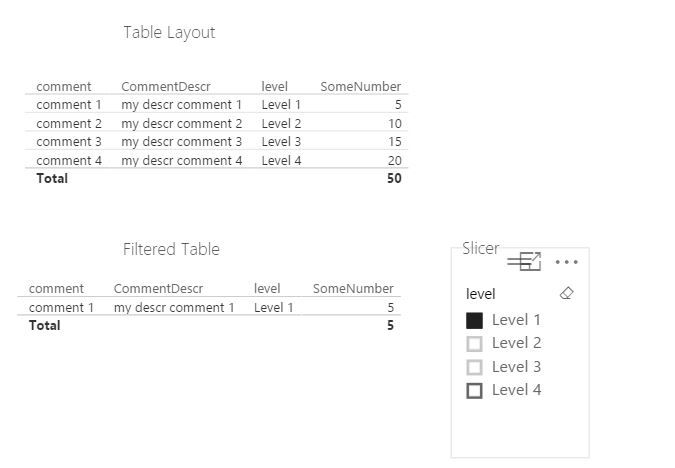
@Gabrielmm This sounds more like a layout issue. If your column and level are column names you need to unpivot so the data is in rows. Then everything will work as you expect. Here is a screenshot of sample data.
The overall table layout is shown, then i use a slicer and a table to show the filter. The overall table is excluded from the slicer filtering interaction which is why it is not filtered.
I'm close to have it working ,It's like this:
It's maybe because I have blanks?
No, it's because VALUES returns multiple values. Which is why it's not called VALUE. A measure has to return a single value for each filtering context. If you're trying to display multiple values from the Commentary1 column for each row, you'll need to use the CONCATENATEX function. If there's only one Commentary1 value for each row you can probably use FIRSTNONBLANK.
There is 1 only comment for each row, FIRSTNONBLANK worked perfectly,Thanks!
Check out the May 2026 Power BI update to learn about new features.
Sign up to receive a private message when registration opens and key events begin.
If you have recently started exploring Fabric, we'd love to hear how it's going. Your feedback can help with product improvements.
| User | Count |
|---|---|
| 28 | |
| 25 | |
| 23 | |
| 19 | |
| 17 |
| User | Count |
|---|---|
| 49 | |
| 47 | |
| 40 | |
| 21 | |
| 19 |