Get Fabric or SQL Certified for Free.
Get certified for free when you join Fabric Data Days 2026 and dive into Fabric, Power BI, SQL, AI, and other essential data skills.
Join now- Power BI forums
- Get Help with Power BI
- Desktop
- Service
- Report Server
- Power Query
- Mobile Apps
- Developer
- DAX Commands and Tips
- Custom Visuals Development Discussion
- Health and Life Sciences
- Power BI Spanish forums
- Translated Spanish Desktop
- Training and Consulting
- Instructor Led Training
- Dashboard in a Day for Women, by Women
- Galleries
- Data Stories Gallery
- Themes Gallery
- Contests Gallery
- QuickViz Gallery
- Quick Measures Gallery
- Visual Calculations Gallery
- Notebook Gallery
- Translytical Task Flow Gallery
- TMDL Gallery
- R Script Showcase
- Webinars and Video Gallery
- Ideas
- Custom Visuals Ideas (read-only)
- Issues
- Issues
- Events
- Upcoming Events
Try your skills in the Power BI Dataviz World Championship! Round one ends June 26. Join now
- Power BI forums
- Forums
- Get Help with Power BI
- Desktop
- Re: Dynamic Calculation (Need Help!!)
- Subscribe to RSS Feed
- Mark Topic as New
- Mark Topic as Read
- Float this Topic for Current User
- Bookmark
- Subscribe
- Printer Friendly Page

- Mark as New
- Bookmark
- Subscribe
- Mute
- Subscribe to RSS Feed
- Permalink
- Report Inappropriate Content
Dynamic Calculation (Need Help!!)
Is this possible to be done in powerbi?
Example in forecasting:
In 2020 I have 50, dashboard filter 5% to the number for the following forecast years.
Start of forcasting and the expected result:
in
2020: 50
2021 : 50-(50*0.05) = 48
2022: 48 - (48*0.05) = 46
2023: 46 - (46*0.05) = 44
.
.
2025
Solved! Go to Solution.


- Mark as New
- Bookmark
- Subscribe
- Mute
- Subscribe to RSS Feed
- Permalink
- Report Inappropriate Content
Hi @Anonymous ,
According to your description, you could create what-if parameter, then create measure (based on the what-if parameter); the following formula to create a measure :
Step 1: Add what-if parameter(Percentage)
Step2: Add measure(Value)

Value =
VAR _a =
    MAX ( 'Table'[Year] ) - 2020
RETURN
    CALCULATE (
        MAX ( 'Table'[Sales] ) * ( 1 - [Percentage Value] ) ^ _a,
        ALL ( 'Table' )
    )
The final output is shown below:
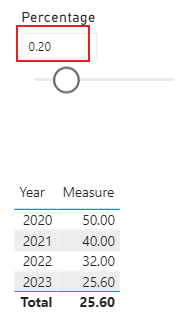

Best Regards,
Yalan Wu
If this post helps, then please consider Accept it as the solution to help the other members find it more quickly.
- Mark as New
- Bookmark
- Subscribe
- Mute
- Subscribe to RSS Feed
- Permalink
- Report Inappropriate Content
You could modify the measure by the following:
value =
VAR _a =
    MAX ( 'Table'[Year] ) - 2020
RETURN
    CALCULATE (
        MAX ( 'Table'[Sales] ) * ( 1 - [Percentage Value] + [scenario Value] ) ^ _a,
        ALL ( 'Table' )
    )
The final output is shown below:

Best Regards,
Yalan Wu
If this post helps, then please consider Accept it as the solution to help the other members find it more quickly.
- Mark as New
- Bookmark
- Subscribe
- Mute
- Subscribe to RSS Feed
- Permalink
- Report Inappropriate Content
Hi @Anonymous ,
According to your description, you could create what-if parameter, then create measure (based on the what-if parameter); the following formula to create a measure :
Step 1: Add what-if parameter(Percentage)
Step2: Add measure(Value)
Value =
VAR _a =
    MAX ( 'Table'[Year] ) - 2020
RETURN
    CALCULATE (
        MAX ( 'Table'[Sales] ) * ( 1 - [Percentage Value] ) ^ _a,
        ALL ( 'Table' )
    )
The final output is shown below:
Best Regards,
Yalan Wu
If this post helps, then please consider Accept it as the solution to help the other members find it more quickly.
- Mark as New
- Bookmark
- Subscribe
- Mute
- Subscribe to RSS Feed
- Permalink
- Report Inappropriate Content
Hi @v-yalanwu-msft, thanks for your solution!!
what if the scenario is like - i have 2 what-if parameters, attrition 5% and recruitment 3%
2020:52
2021: 52- (52*5%)+(52*3%) = 51
2022: 51-(51*5%)+(51*3%) = N
20233:N-(N*5%)+(51*3%)=N
.
.
- Mark as New
- Bookmark
- Subscribe
- Mute
- Subscribe to RSS Feed
- Permalink
- Report Inappropriate Content
You could modify the measure by the following:
value =
VAR _a =
    MAX ( 'Table'[Year] ) - 2020
RETURN
    CALCULATE (
        MAX ( 'Table'[Sales] ) * ( 1 - [Percentage Value] + [scenario Value] ) ^ _a,
        ALL ( 'Table' )
    )
The final output is shown below:
Best Regards,
Yalan Wu
If this post helps, then please consider Accept it as the solution to help the other members find it more quickly.
- Mark as New
- Bookmark
- Subscribe
- Mute
- Subscribe to RSS Feed
- Permalink
- Report Inappropriate Content
Hi @CNENFRNL, thanks for your input.
My Question - if the 5% is based on the what-if parameter, can it still be populate using the script you share?


- Mark as New
- Bookmark
- Subscribe
- Mute
- Subscribe to RSS Feed
- Permalink
- Report Inappropriate Content
@Anonymous , simply an algbra question,
f(n)=f(n-1)*(1-0.05)=f(n-2)*(1-0.05)^2= ... =f(0)*0.95^nlet
Source = Table.FromList({2020..2025}, Splitter.SplitByNothing(), {"Yr"}),
Yr2020 = 50,
#"Added Custom" = Table.AddColumn(Source, "Forecast_PQ", each Number.RoundUp(Yr2020 * Number.Power(.95, [Yr]-2020)))
in
#"Added Custom"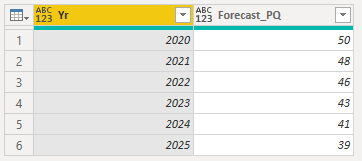
| Thanks to the great efforts by MS engineers to simplify syntax of DAX! Most beginners are SUCCESSFULLY MISLED to think that they could easily master DAX; but it turns out that the intricacy of the most frequently used RANKX() is still way beyond their comprehension! |
DAX is simple, but NOT EASY! |
Helpful resources

Fabric Data Days 2026
Don't miss out on Data Days, June 15 through August 7. Learn Fabric, Power BI, SQL, AI and more.

Power BI Monthly Update - May 2026
Check out the May 2026 Power BI update to learn about new features.

Power BI DataViz World Championships - June 2026
A new Power BI DataViz World Championship is coming this June! Don't miss out on submitting your entry.

| User | Count |
|---|---|
| 23 | |
| 21 | |
| 20 | |
| 19 | |
| 13 |


| User | Count |
|---|---|
| 58 | |
| 52 | |
| 37 | |
| 31 | |
| 27 |


