FabCon is coming to Atlanta
Join us at FabCon Atlanta from March 16 - 20, 2026, for the ultimate Fabric, Power BI, AI and SQL community-led event. Save $200 with code FABCOMM.
Register now!- Power BI forums
- Get Help with Power BI
- Desktop
- Service
- Report Server
- Power Query
- Mobile Apps
- Developer
- DAX Commands and Tips
- Custom Visuals Development Discussion
- Health and Life Sciences
- Power BI Spanish forums
- Translated Spanish Desktop
- Training and Consulting
- Instructor Led Training
- Dashboard in a Day for Women, by Women
- Galleries
- Data Stories Gallery
- Themes Gallery
- Contests Gallery
- QuickViz Gallery
- Quick Measures Gallery
- Visual Calculations Gallery
- Notebook Gallery
- Translytical Task Flow Gallery
- TMDL Gallery
- R Script Showcase
- Webinars and Video Gallery
- Ideas
- Custom Visuals Ideas (read-only)
- Issues
- Issues
- Events
- Upcoming Events
Learn from the best! Meet the four finalists headed to the FINALS of the Power BI Dataviz World Championships! Register now
- Power BI forums
- Forums
- Get Help with Power BI
- Desktop
- Re: Dynamic Budgeting Tool
- Subscribe to RSS Feed
- Mark Topic as New
- Mark Topic as Read
- Float this Topic for Current User
- Bookmark
- Subscribe
- Printer Friendly Page


- Mark as New
- Bookmark
- Subscribe
- Mute
- Subscribe to RSS Feed
- Permalink
- Report Inappropriate Content
Dynamic Budgeting Tool
I am currently trying to build a dynamic budgeting tool for an energy company. With oil prices being so low currently this company would like to have the ability to "turn off" a well to help determine what is economic and what is not. So if a well is selected in a slicer I would like to set its value to zero while keeping the others the same. Is it possible to do that through a measure?
Thank you in advanvce!
Solved! Go to Solution.


- Mark as New
- Bookmark
- Subscribe
- Mute
- Subscribe to RSS Feed
- Permalink
- Report Inappropriate Content
Hi @TheCAKurtle ,
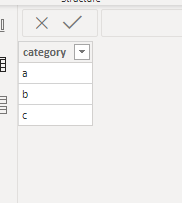
1. Create a slicer table,put the categories in the column:
2.Delete the relationship between table and the slicer table:

3.Create a measure as below:
Measure = IF(SELECTEDVALUE('slicer table'[category])=SELECTEDVALUE('Table'[Category]),0,'Table'[Ratio])
Finally you will see:
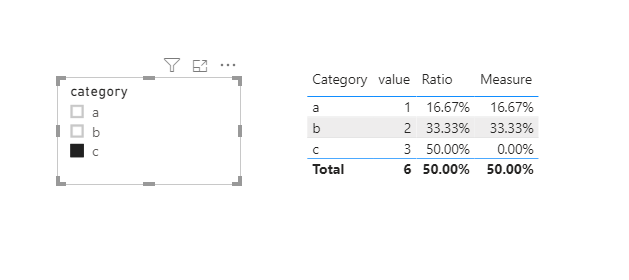
Is the above what you need?
Here is my sample .pbix file you can refer to.
Kelly
- Mark as New
- Bookmark
- Subscribe
- Mute
- Subscribe to RSS Feed
- Permalink
- Report Inappropriate Content
Hi @TheCAKurtle ,
1. Create a slicer table,put the categories in the column:
2.Delete the relationship between table and the slicer table:
3.Create a measure as below:
Measure = IF(SELECTEDVALUE('slicer table'[category])=SELECTEDVALUE('Table'[Category]),0,'Table'[Ratio])
Finally you will see:
Is the above what you need?
Here is my sample .pbix file you can refer to.
Kelly
- Mark as New
- Bookmark
- Subscribe
- Mute
- Subscribe to RSS Feed
- Permalink
- Report Inappropriate Content


- Mark as New
- Bookmark
- Subscribe
- Mute
- Subscribe to RSS Feed
- Permalink
- Report Inappropriate Content
Not sure I got, But What if, Measure slicer or Bookmark can help
https://docs.microsoft.com/en-us/power-bi/desktop-what-if
https://radacad.com/bookmarks-and-buttons-making-power-bi-charts-even-more-interactive


- Mark as New
- Bookmark
- Subscribe
- Mute
- Subscribe to RSS Feed
- Permalink
- Report Inappropriate Content
Yes.
Please see this post regarding How to Get Your Question Answered Quickly: https://community.powerbi.com/t5/Community-Blog/How-to-Get-Your-Question-Answered-Quickly/ba-p/38490
It is really tough to say without seeing the data but maybe something along the lines of:
Measure =
  VAR __Selected = 'Table'
  VAR __UnSelected = EXCEPT(ALL('Table'),__Selected)
RETURN
  SUMX(__UnSelected,[Column])
So basically, you grab everybody in context within the slicer (__Selected). You then get everyone (ALL) and then filter out __Selected using EXCEPT. Then you just SUMX across __UnSelected for some Column. And you have effectively wiped out any impact from the "selected" wells, in effect, setting their values to zero.
Follow on LinkedIn
@ me in replies or I'll lose your thread!!!
Instead of a Kudo, please vote for this idea
Become an expert!: Enterprise DNA
External Tools: MSHGQM
YouTube Channel!: Microsoft Hates Greg
Latest book!: DAX For Humans
DAX is easy, CALCULATE makes DAX hard...
- Mark as New
- Bookmark
- Subscribe
- Mute
- Subscribe to RSS Feed
- Permalink
- Report Inappropriate Content
Thanks for the quick reply. I am using this calculation to feed into several others so from this I get a ratio for how much production a particular well contributes which is then used to allocate costs. When a wells production goes to 0 I would like those ratios to be recalculated so that costs can be reallocated. I don't think this solution will work for that... Or am I mistaken?
- Mark as New
- Bookmark
- Subscribe
- Mute
- Subscribe to RSS Feed
- Permalink
- Report Inappropriate Content
I have no idea if it will work or not because I have zero sense of the data. Please see this post regarding How to Get Your Question Answered Quickly: https://community.powerbi.com/t5/Community-Blog/How-to-Get-Your-Question-Answered-Quickly/ba-p/38490
Follow on LinkedIn
@ me in replies or I'll lose your thread!!!
Instead of a Kudo, please vote for this idea
Become an expert!: Enterprise DNA
External Tools: MSHGQM
YouTube Channel!: Microsoft Hates Greg
Latest book!: DAX For Humans
DAX is easy, CALCULATE makes DAX hard...

Helpful resources

Join our Fabric User Panel
Share feedback directly with Fabric product managers, participate in targeted research studies and influence the Fabric roadmap.

Power BI Monthly Update - February 2026
Check out the February 2026 Power BI update to learn about new features.

FabCon Atlanta 2026
Join us at FabCon Atlanta, March 16-20, for the ultimate Fabric, Power BI, AI and SQL community-led event. Save $200 with code FABCOMM.

| User | Count |
|---|---|
| 53 | |
| 51 | |
| 36 | |
| 15 | |
| 14 |


| User | Count |
|---|---|
| 92 | |
| 75 | |
| 41 | |
| 26 | |
| 25 |


