FabCon is coming to Atlanta
Join us at FabCon Atlanta from March 16 - 20, 2026, for the ultimate Fabric, Power BI, AI and SQL community-led event. Save $200 with code FABCOMM.
Register now!- Power BI forums
- Get Help with Power BI
- Desktop
- Service
- Report Server
- Power Query
- Mobile Apps
- Developer
- DAX Commands and Tips
- Custom Visuals Development Discussion
- Health and Life Sciences
- Power BI Spanish forums
- Translated Spanish Desktop
- Training and Consulting
- Instructor Led Training
- Dashboard in a Day for Women, by Women
- Galleries
- Data Stories Gallery
- Themes Gallery
- Contests Gallery
- QuickViz Gallery
- Quick Measures Gallery
- Visual Calculations Gallery
- Notebook Gallery
- Translytical Task Flow Gallery
- TMDL Gallery
- R Script Showcase
- Webinars and Video Gallery
- Ideas
- Custom Visuals Ideas (read-only)
- Issues
- Issues
- Events
- Upcoming Events
The Power BI Data Visualization World Championships is back! Get ahead of the game and start preparing now! Learn more
- Power BI forums
- Forums
- Get Help with Power BI
- Desktop
- Re: Dynamic 100% stacked column chart
- Subscribe to RSS Feed
- Mark Topic as New
- Mark Topic as Read
- Float this Topic for Current User
- Bookmark
- Subscribe
- Printer Friendly Page

- Mark as New
- Bookmark
- Subscribe
- Mute
- Subscribe to RSS Feed
- Permalink
- Report Inappropriate Content
Dynamic 100% stacked column chart
I hope I'm wording this correctly. I have a data request to show the percentage of students that earned a D or F on their latest report card.
I want the end user to be able to use a parameter or something like that so they can select a minimum threshold that calculates the percentage of students that meet or exceed that threshold. Using the sample data below, if the end user selected 2, then the 100% stacked column chart would show 75% of the students have 2 or more Ds or Fs and 25% do not. If 3 were selected, then it would recalculate to show 50% have 3 or more Ds/Fs and 50% do not.
Below is a copy of the sample data and here a link to the sample pbix file:
https://drive.google.com/file/d/1fPdCS7gRuaHimtxKiP7K9PktJmpKUVsT/view?usp=sharing
| StudentID | School Year | Term | Mark | D/F |
| 1 | 2020 | S1 | A | 0 |
| 1 | 2020 | S1 | B | 0 |
| 1 | 2020 | S1 | A | 0 |
| 1 | 2020 | S1 | D | 1 |
| 1 | 2020 | S1 | F | 1 |
| 1 | 2020 | S1 | D | 1 |
| 2 | 2020 | S1 | A | 0 |
| 2 | 2020 | S1 | B | 0 |
| 2 | 2020 | S1 | D | 1 |
| 2 | 2020 | S1 | D | 1 |
| 2 | 2020 | S1 | F | 1 |
| 2 | 2020 | S1 | D | 1 |
| 3 | 2020 | S1 | A | 0 |
| 3 | 2020 | S1 | A | 0 |
| 3 | 2020 | S1 | A | 0 |
| 3 | 2020 | S1 | A | 0 |
| 3 | 2020 | S1 | A | 0 |
| 3 | 2020 | S1 | A | 0 |
| 4 | 2020 | S1 | C | 0 |
| 4 | 2020 | S1 | C | 0 |
| 4 | 2020 | S1 | C | 0 |
| 4 | 2020 | S1 | C | 0 |
| 4 | 2020 | S1 | D | 1 |
| 4 | 2020 | S1 | D | 1 |
Solved! Go to Solution.


- Mark as New
- Bookmark
- Subscribe
- Mute
- Subscribe to RSS Feed
- Permalink
- Report Inappropriate Content
Hello @adamwakatsuki. Try this...
Percent Students With Failing Grades =
    VAR TotalStudents =
        CALCULATE(
            DISTINCTCOUNT(Marks[StudentID]),
            FILTER(
                ALLSELECTED(Marks),
                Marks[School Year] = SELECTEDVALUE(Marks[School Year]) &&
                Marks[Term] = SELECTEDVALUE(Marks[Term])
            )
        )
    VAR StudentTermSummary =
        SUMMARIZE(
            FILTER(
                ALLSELECTED(Marks),
                Marks[School Year] = SELECTEDVALUE(Marks[School Year]) &&
                Marks[Term] = SELECTEDVALUE(Marks[Term])
            ),
            Marks[StudentID],
            Marks[School Year],
            Marks[Term],
            "FailingGrades",
            CALCULATE(
                COUNTROWS(Marks),
                Marks[Mark] IN {"D", "F"}
            ) + 0
        )
    VAR StudentsWithFailingGrades =
        CALCULATE(
            DISTINCTCOUNT(Marks[StudentID]),
            FILTER(
                StudentTermSummary,
                [FailingGrades] >= SELECTEDVALUE('Number of Failing Grades'[Number of Failing Grades])
            )
        )
    RETURN

DIVIDE(
        StudentsWithFailingGrades,
        TotalStudents,
        BLANK()
    )
I hope this helps! 🙂


- Mark as New
- Bookmark
- Subscribe
- Mute
- Subscribe to RSS Feed
- Permalink
- Report Inappropriate Content
Hi, @Anonymous
According to your description, I can understand what you want to get. You want to get a dynamic 100% stacked column chart based on the selected value of the Slicer. You can try my steps:
- Create two measures:
Students earned more than selected number =

var _summarize=

SUMMARIZE('Marks',[StudentID],"D/F",SUM(Marks[D/F]))

var _selectedvalue=SELECTEDVALUE('Number of Failing Grades'[Number of Failing Grades])

var _total=DISTINCTCOUNT('Marks'[StudentID])

var _count=

COUNTX(FILTER(_summarize,[D/F]>=_selectedvalue),[StudentID])

return

DIVIDE(_count,_total)
Students earned less than selected number =
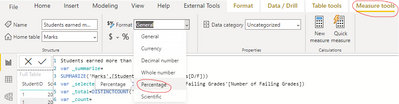
1-[Students earned more than selected number]- Set their measure format to “Percentage”, like this:
- Create a 100% stacked column chart and place the two measures, like this:

And you can get what you want.
You can download my test pbix file here
Best Regards,
Community Support Team _Robert Qin
If this post helps, then please consider Accept it as the solution to help the other members find it more quickly.
- Mark as New
- Bookmark
- Subscribe
- Mute
- Subscribe to RSS Feed
- Permalink
- Report Inappropriate Content
@v-robertq-msft @ I already delivered a solution on this. @Anonymous @Said I was awesome and I asked him to convince my wife of that! 🙂. He just needs to mark my suggestion as the solution 😉
- Mark as New
- Bookmark
- Subscribe
- Mute
- Subscribe to RSS Feed
- Permalink
- Report Inappropriate Content
- Mark as New
- Bookmark
- Subscribe
- Mute
- Subscribe to RSS Feed
- Permalink
- Report Inappropriate Content
@Anonymous I'm going to need you to convince my wife of that! 😉
Glad I could help!
- Mark as New
- Bookmark
- Subscribe
- Mute
- Subscribe to RSS Feed
- Permalink
- Report Inappropriate Content
Hello @adamwakatsuki. Try this...
Percent Students With Failing Grades =
    VAR TotalStudents =
        CALCULATE(
            DISTINCTCOUNT(Marks[StudentID]),
            FILTER(
                ALLSELECTED(Marks),
                Marks[School Year] = SELECTEDVALUE(Marks[School Year]) &&
                Marks[Term] = SELECTEDVALUE(Marks[Term])
            )
        )
    VAR StudentTermSummary =
        SUMMARIZE(
            FILTER(
                ALLSELECTED(Marks),
                Marks[School Year] = SELECTEDVALUE(Marks[School Year]) &&
                Marks[Term] = SELECTEDVALUE(Marks[Term])
            ),
            Marks[StudentID],
            Marks[School Year],
            Marks[Term],
            "FailingGrades",
            CALCULATE(
                COUNTROWS(Marks),
                Marks[Mark] IN {"D", "F"}
            ) + 0
        )
    VAR StudentsWithFailingGrades =
        CALCULATE(
            DISTINCTCOUNT(Marks[StudentID]),
            FILTER(
                StudentTermSummary,
                [FailingGrades] >= SELECTEDVALUE('Number of Failing Grades'[Number of Failing Grades])
            )
        )
    RETURN

DIVIDE(
        StudentsWithFailingGrades,
        TotalStudents,
        BLANK()
    )
I hope this helps! 🙂
- Mark as New
- Bookmark
- Subscribe
- Mute
- Subscribe to RSS Feed
- Permalink
- Report Inappropriate Content
I left out one thing...for your stacked column chart, you're going to need a second measure.
Other Measure = 1 - [Percent Students With Failing Grades]

Helpful resources

Power BI Dataviz World Championships
The Power BI Data Visualization World Championships is back! Get ahead of the game and start preparing now!

Power BI Monthly Update - December 2025
Check out the December 2025 Power BI Holiday Recap!

FabCon Atlanta 2026
Join us at FabCon Atlanta, March 16-20, for the ultimate Fabric, Power BI, AI and SQL community-led event. Save $200 with code FABCOMM.

| User | Count |
|---|---|
| 39 | |
| 37 | |
| 33 | |
| 32 | |
| 29 |


| User | Count |
|---|---|
| 133 | |
| 88 | |
| 85 | |
| 68 | |
| 64 |


