cancel
Showing results for 
Search instead for 
Did you mean: 

The Power BI Data Visualization World Championships is back! It's time to submit your entry. Live now!

Reply
tmaki828
Regular Visitor

Duration

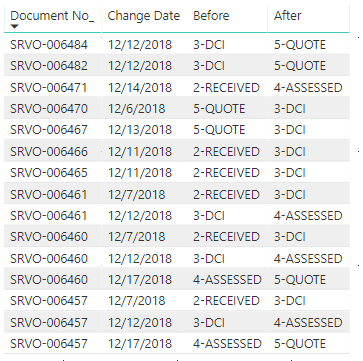
I'm looking for a way to calculate the number of days between when a Service Order status is "2-RECEIVED" to "5-QUOTED".  We are looking to report the average it takes orders to go from Received to Quote.  Please note that there could be multiple Service Orders records for one Service Order.


Example:  How long did it take SRVO-006460 to go from Received to Quote.  Our SLA = 7 days.

 Sample Data.PNG


1 ACCEPTED SOLUTION
Anonymous
Not applicable

HI @tmaki828,


You can use following measure to calculate datediff based on current 'document no' and 'before' 'after' fields tag:

Measure =
VAR currNo =
    SELECTEDVALUE ( Table[Document No_] )
VAR list =
    CALCULATETABLE (
        VALUES ( Table[Change Date] ),
        FILTER (
            ALLSELECTED ( Table ),
            [Document No_] = currNo
                && [Before] = "2-RECEIVED"
                && [After] = "5-QUOTED"
        )
    )
RETURN
    DATEDIFF ( MINX ( list, [Change Date] ), MAXX ( list, [Change Date] ), DAY )


Regards,

Xiaoxin Sheng

View solution in original post

2 REPLIES 2
Anonymous
Not applicable

HI @tmaki828,


You can use following measure to calculate datediff based on current 'document no' and 'before' 'after' fields tag:

Measure =
VAR currNo =
    SELECTEDVALUE ( Table[Document No_] )
VAR list =
    CALCULATETABLE (
        VALUES ( Table[Change Date] ),
        FILTER (
            ALLSELECTED ( Table ),
            [Document No_] = currNo
                && [Before] = "2-RECEIVED"
                && [After] = "5-QUOTED"
        )
    )
RETURN
    DATEDIFF ( MINX ( list, [Change Date] ), MAXX ( list, [Change Date] ), DAY )


Regards,

Xiaoxin Sheng

AlB
Community Champion
Community Champion

Hi @tmaki828

Is it not 10 days in the example shown?

Please paste some text format data tha can be readily copied on top of the screen capture. 

Is what you show the full table you're working with (I mean all fields)?

Helpful resources

Announcements
Power BI DataViz World Championships

Power BI Dataviz World Championships

The Power BI Data Visualization World Championships is back! It's time to submit your entry.

January Power BI Update Carousel

Power BI Monthly Update - January 2026

Check out the January 2026 Power BI update to learn about new features.

FabCon Atlanta 2026 carousel

FabCon Atlanta 2026

Join us at FabCon Atlanta, March 16-20, for the ultimate Fabric, Power BI, AI and SQL community-led event. Save $200 with code FABCOMM.