Join us at FabCon Atlanta from March 16 - 20, 2026, for the ultimate Fabric, Power BI, AI and SQL community-led event. Save $200 with code FABCOMM.
Register now!The Power BI Data Visualization World Championships is back! Get ahead of the game and start preparing now! Learn more
Is there any known way to filter using time stamps?
I'm trying to determine if a scheduled appointment is in the "AM slot," the "PM slot," or "All Day."
I have start and end dates and I calculated a duration (horus) column. I tried to write
slot = IF('SR Calendar'[RequestedStartDateConv] = 09:00:00AM & 'SR Calendar'[RequestedEndDateConv] = 01:00:00PM, "AM", IF('SR Calendar'[RequestedStartDateConv] = 02:00:00PM & 'SR Calendar'[RequestedEndDateConv] = 06:00:00PM, "PM", IF('SR Calendar'[AdjDuration] = 8, "All Day", "Other")))
Help? Is this even possible?
Solved! Go to Solution.
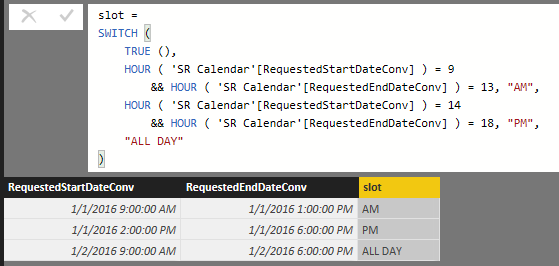
Check whether below formula can achieve your goal or not.
slot =
SWITCH (
TRUE (),
HOUR ( 'SR Calendar'[RequestedStartDateConv] ) = 9
&& HOUR ( 'SR Calendar'[RequestedEndDateConv] ) = 13, "AM",
HOUR ( 'SR Calendar'[RequestedStartDateConv] ) = 14
&& HOUR ( 'SR Calendar'[RequestedEndDateConv] ) = 18, "PM",
"ALL DAY"
)
Check whether below formula can achieve your goal or not.
slot =
SWITCH (
TRUE (),
HOUR ( 'SR Calendar'[RequestedStartDateConv] ) = 9
&& HOUR ( 'SR Calendar'[RequestedEndDateConv] ) = 13, "AM",
HOUR ( 'SR Calendar'[RequestedStartDateConv] ) = 14
&& HOUR ( 'SR Calendar'[RequestedEndDateConv] ) = 18, "PM",
"ALL DAY"
)
Hi @bhmiller89
You could use a SWITCH function with TRUE in DAX for that column with >= 9:00 <13:00 etc values.
Here is a tutorial
http://www.powerpivotpro.com/2015/03/the-diabolical-genius-of-switch-true/
Dave
The Power BI Data Visualization World Championships is back! Get ahead of the game and start preparing now!
Check out the November 2025 Power BI update to learn about new features.
| User | Count |
|---|---|
| 59 | |
| 43 | |
| 42 | |
| 23 | |
| 17 |
| User | Count |
|---|---|
| 190 | |
| 122 | |
| 96 | |
| 66 | |
| 47 |