Join us at FabCon Atlanta from March 16 - 20, 2026, for the ultimate Fabric, Power BI, AI and SQL community-led event. Save $200 with code FABCOMM.
Register now!Vote for your favorite vizzies from the Power BI Dataviz World Championship submissions. Vote now!
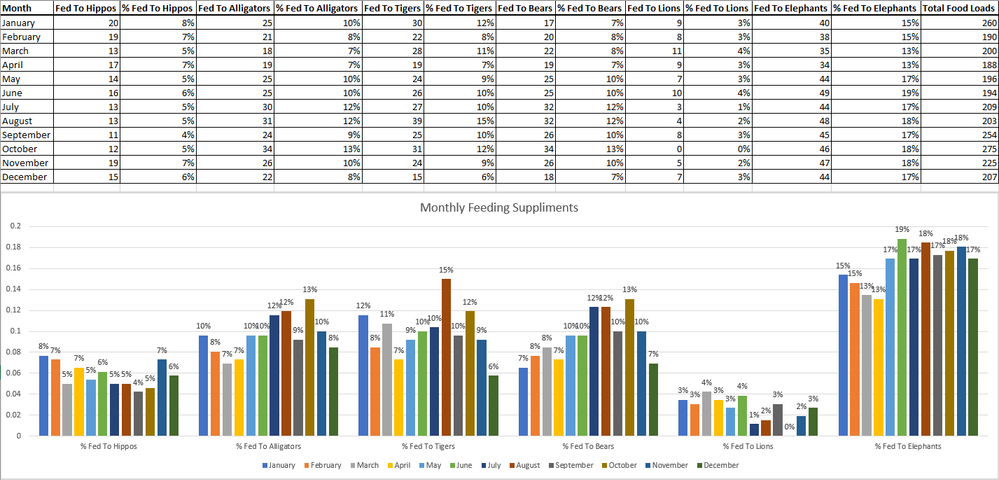
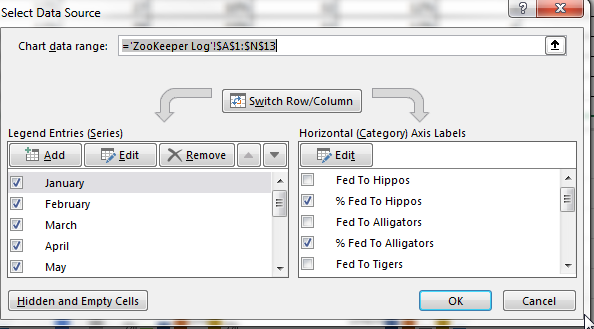
We will be moving some of our reports to PowerBi from Excel and I am having problems duplicating the report shown below. I provided what the data source looks likes, the expected result, as well as how it was built in excel. Any help would be appreciated.
Solved! Go to Solution.
Hi @PPalkowski ,
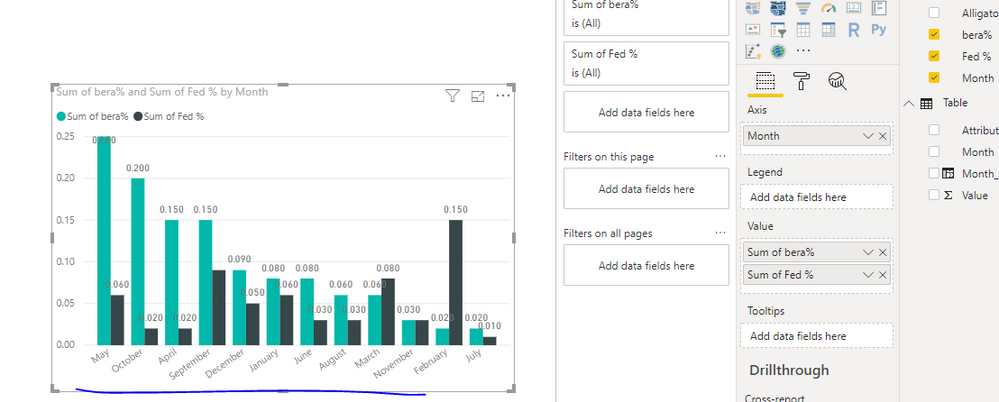
If you don't unpivot table, you couldn't get the result like you Excel. You might will get result like below
Best Regards,
Zoe Zhi
If this post helps, then please consider Accept it as the solution to help the other members find it more quickly.
Hi @PPalkowski ,
You could unpivot your dataset(choose column except Month column, then click unpivot column in powerbi-> Edit Queries), then use it in PowerBI like below, you could refer to my sample(click Edit Queries->Advanced Editor to see the M code). To sort legend, you could use Month number instead of month name.
Best Regards,
Zoe Zhi
If this post helps, then please consider Accept it as the solution to help the other members find it more quickly.
Would it make a difference that the data isn't pivoted, that is the actual table.
Hi @PPalkowski ,
If you don't unpivot table, you couldn't get the result like you Excel. You might will get result like below
Best Regards,
Zoe Zhi
If this post helps, then please consider Accept it as the solution to help the other members find it more quickly.
Vote for your favorite vizzies from the Power BI World Championship submissions!
If you love stickers, then you will definitely want to check out our Community Sticker Challenge!
Check out the January 2026 Power BI update to learn about new features.
| User | Count |
|---|---|
| 64 | |
| 56 | |
| 43 | |
| 20 | |
| 17 |
| User | Count |
|---|---|
| 123 | |
| 108 | |
| 44 | |
| 32 | |
| 24 |