Join us at FabCon Atlanta from March 16 - 20, 2026, for the ultimate Fabric, Power BI, AI and SQL community-led event. Save $200 with code FABCOMM.
Register now!View all the Fabric Data Days sessions on demand. View schedule
Happy new year guys. I have a bit of a sticker issue per below.
Really appreciate your help on this !
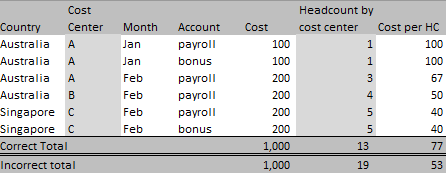
Source data
Source data (editable version)
| Country | Cost Center | Month | Account | Cost | Headcount by cost center | Cost per HC |
| Australia | A | Jan | payroll | 100 | 1 | 100 |
| Australia | A | Jan | bonus | 100 | 1 | 100 |
| Australia | A | Feb | payroll | 200 | 3 | 67 |
| Australia | B | Feb | payroll | 200 | 4 | 50 |
| Singapore | C | Feb | payroll | 200 | 5 | 40 |
| Singapore | C | Feb | bonus | 200 | 5 | 40 |
| Correct Total | 1,000 | 13 | 77 | |||
| Incorrect total | 1,000 | 19 | 53 |
Correct Desired view 1
Correct Desired view 2
Solved! Go to Solution.
Hi @Nethergate ,
Here are the steps you can follow:
Correct Desired view 1:
1. Use Enter data to create a table
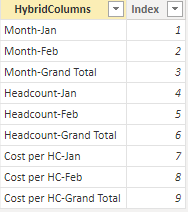
2. Create measure.
Sum_Month_Jan =
CALCULATE(SUM('Table'[Cost]),FILTER(ALL('Table'),'Table'[Cost Center]=MAX('Table'[Cost Center])&&'Table'[Month]="Jan"))Sum_Month_Feb =
CALCULATE(SUM('Table'[Cost]),FILTER(ALL('Table'),'Table'[Cost Center]=MAX('Table'[Cost Center])&&'Table'[Month]="Feb"))Sum_Month_group = CALCULATE(SUM('Table'[Cost]),FILTER(ALL('Table'),'Table'[Cost Center]=MAX('Table'[Cost Center])))Sum—Headcount-month_Jan =
CALCULATE(MAX('Table'[Headcount by cost center]),FILTER(ALL('Table'),'Table'[Cost Center]=MAX('Table'[Cost Center])&&'Table'[Month]="Jan"))Sum—Headcount-month_Feb =
CALCULATE(MAX('Table'[Headcount by cost center]),FILTER(ALL('Table'),'Table'[Cost Center]=MAX('Table'[Cost Center])&&'Table'[Month]="Feb"))Sum—Headcount-month-group =
[Sum—Headcount-month_Jan] + [Sum—Headcount-month_Feb]sum_costperHc_month_Jan =
CALCULATE(SUM('Table'[Cost per HC]),FILTER(ALL('Table'),'Table'[Cost Center]=MAX('Table'[Cost Center])&&'Table'[Month]="Jan"))sum_costperHc_month_Feb =
CALCULATE(SUM('Table'[Cost per HC]),FILTER(ALL('Table'),'Table'[Cost Center]=MAX('Table'[Cost Center])&&'Table'[Month]="Feb"))sum_costperHc_month_group =
CALCULATE(SUM('Table'[Cost per HC]),FILTER(ALL('Table'),'Table'[Cost Center]=MAX('Table'[Cost Center])))Flag =
VAR _1=
SWITCH(
TRUE(),
SELECTEDVALUE('Slice'[Index]) =1,[Sum_Month_Jan],
SELECTEDVALUE('Slice'[Index]) =2,[Sum_Month_Feb],
SELECTEDVALUE('Slice'[Index]) =3,[Sum_Month_group],
SELECTEDVALUE('Slice'[Index]) =4,[Sum—Headcount-month_Jan],
SELECTEDVALUE('Slice'[Index]) =5,[Sum—Headcount-month_Feb],
SELECTEDVALUE('Slice'[Index]) =6,[Sum—Headcount-month-group],
SELECTEDVALUE('Slice'[Index]) =7,[sum_costperHc_month_Jan],
SELECTEDVALUE('Slice'[Index]) =8,[sum_costperHc_month_Feb],
SELECTEDVALUE('Slice'[Index]) =9,[sum_costperHc_month_group])
RETURN
IF( ISBLANK([Sum_Month_Jan])&&ISBLANK([Sum_Month_group])&&ISBLANK([Sum—Headcount-month_Jan])&&ISBLANK([Sum—Headcount-month-group])&&ISBLANK([sum_costperHc_month_Jan]),BLANK(),_1)
3. Select [HybridColumns] column, click [Column tools] – Sort by column – [lndex]
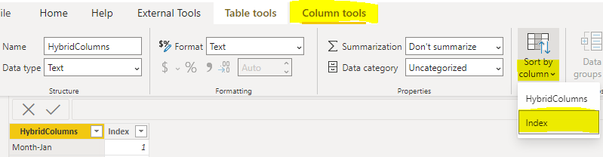
4. Result:
Correct Desired view 2:
1. Use Enter data to create a table
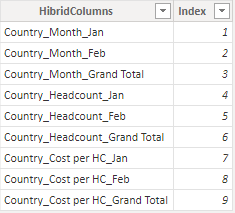
2. Create measure.
Country_Month_Jan =
CALCULATE(SUM('Table'[Cost]),FILTER(ALL('Table'),'Table'[Country]=MAX('Table'[Country])&&'Table'[Month]="Jan"))Country_Month_Feb =
CALCULATE(SUM('Table'[Cost]),FILTER(ALL('Table'),'Table'[Country]=MAX('Table'[Country])&&'Table'[Month]="Feb"))Country_Month_group = CALCULATE(SUM('Table'[Cost]),FILTER(ALL('Table'),'Table'[Country]=MAX('Table'[Country])))Country_Headcount-month_Jan =
CALCULATE(MAX('Table'[Headcount by cost center]),FILTER(ALL('Table'),'Table'[Country]=MAX('Table'[Country])&&'Table'[Month]="Jan"))Country_Headcount-month_Feb =
IF(
MAX('Table'[Country])="Australia",
CALCULATE(SUM('Table'[Headcount by cost center]),FILTER(ALL('Table'),'Table'[Country]=MAX('Table'[Country])&&'Table'[Month]="Feb")),
CALCULATE(MAX('Table'[Headcount by cost center]),FILTER(ALL('Table'),'Table'[Country]=MAX('Table'[Country])&&'Table'[Month]="Feb")))Country_Headcount-month-group =
[Country_Headcount-month_Jan]+[Country_Headcount-month_Feb]Country_costperHc_month_Jan =
IF(
MAX('Table'[Country])="Australia",BLANK(),"#DIV/0!")Country_costperHc_month_Feb =
CALCULATE(SUM('Table'[Cost per HC]),FILTER(ALL('Table'),'Table'[Country]=MAX('Table'[Country])&&'Table'[Month]="Feb"))Country_costperHc_month_group =
CALCULATE(SUM('Table'[Cost per HC]),FILTER(ALL('Table'),'Table'[Country]=MAX('Table'[Country])))Flag2 =
VAR _1=
SWITCH(
TRUE(),
SELECTEDVALUE('Desired view'[Index])=1,[Country_Month_Jan],
SELECTEDVALUE('Desired view'[Index]) =2,[Country_Month_Feb],
SELECTEDVALUE('Desired view'[Index]) =3,[Country_Month_group],
SELECTEDVALUE('Desired view'[Index]) =4,[Country_Headcount-month_Jan],
SELECTEDVALUE('Desired view'[Index])=5,[Country_Headcount-month_Feb],
SELECTEDVALUE('Desired view'[Index])=6,[Country_Headcount-month-group],
SELECTEDVALUE('Desired view'[Index])=7,[Country_costperHc_month_Jan],
SELECTEDVALUE('Desired view'[Index])=8,[Country_costperHc_month_Feb],
SELECTEDVALUE('Desired view'[Index])=9,[Country_costperHc_month_group])
RETURN
IF( ISBLANK([Country_costperHc_month_Jan])&&ISBLANK([Country_costperHc_month_group])&&ISBLANK([Country_Headcount-month_Jan])&&ISBLANK([Country_Headcount-month-group])&&ISBLANK([Country_costperHc_month_Jan]),BLANK(),_1)
3. Select [HybridColumns] column, click [Column tools] – Sort by column – [lndex]
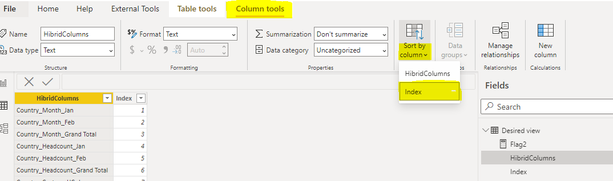
4. Result:

Best Regards,
Liu Yang
If this post helps, then please consider Accept it as the solution to help the other members find it more quickly
Hi @Nethergate ,
Here are the steps you can follow:
Correct Desired view 1:
1. Use Enter data to create a table
2. Create measure.
Sum_Month_Jan =
CALCULATE(SUM('Table'[Cost]),FILTER(ALL('Table'),'Table'[Cost Center]=MAX('Table'[Cost Center])&&'Table'[Month]="Jan"))Sum_Month_Feb =
CALCULATE(SUM('Table'[Cost]),FILTER(ALL('Table'),'Table'[Cost Center]=MAX('Table'[Cost Center])&&'Table'[Month]="Feb"))Sum_Month_group = CALCULATE(SUM('Table'[Cost]),FILTER(ALL('Table'),'Table'[Cost Center]=MAX('Table'[Cost Center])))Sum—Headcount-month_Jan =
CALCULATE(MAX('Table'[Headcount by cost center]),FILTER(ALL('Table'),'Table'[Cost Center]=MAX('Table'[Cost Center])&&'Table'[Month]="Jan"))Sum—Headcount-month_Feb =
CALCULATE(MAX('Table'[Headcount by cost center]),FILTER(ALL('Table'),'Table'[Cost Center]=MAX('Table'[Cost Center])&&'Table'[Month]="Feb"))Sum—Headcount-month-group =
[Sum—Headcount-month_Jan] + [Sum—Headcount-month_Feb]sum_costperHc_month_Jan =
CALCULATE(SUM('Table'[Cost per HC]),FILTER(ALL('Table'),'Table'[Cost Center]=MAX('Table'[Cost Center])&&'Table'[Month]="Jan"))sum_costperHc_month_Feb =
CALCULATE(SUM('Table'[Cost per HC]),FILTER(ALL('Table'),'Table'[Cost Center]=MAX('Table'[Cost Center])&&'Table'[Month]="Feb"))sum_costperHc_month_group =
CALCULATE(SUM('Table'[Cost per HC]),FILTER(ALL('Table'),'Table'[Cost Center]=MAX('Table'[Cost Center])))Flag =
VAR _1=
SWITCH(
TRUE(),
SELECTEDVALUE('Slice'[Index]) =1,[Sum_Month_Jan],
SELECTEDVALUE('Slice'[Index]) =2,[Sum_Month_Feb],
SELECTEDVALUE('Slice'[Index]) =3,[Sum_Month_group],
SELECTEDVALUE('Slice'[Index]) =4,[Sum—Headcount-month_Jan],
SELECTEDVALUE('Slice'[Index]) =5,[Sum—Headcount-month_Feb],
SELECTEDVALUE('Slice'[Index]) =6,[Sum—Headcount-month-group],
SELECTEDVALUE('Slice'[Index]) =7,[sum_costperHc_month_Jan],
SELECTEDVALUE('Slice'[Index]) =8,[sum_costperHc_month_Feb],
SELECTEDVALUE('Slice'[Index]) =9,[sum_costperHc_month_group])
RETURN
IF( ISBLANK([Sum_Month_Jan])&&ISBLANK([Sum_Month_group])&&ISBLANK([Sum—Headcount-month_Jan])&&ISBLANK([Sum—Headcount-month-group])&&ISBLANK([sum_costperHc_month_Jan]),BLANK(),_1)
3. Select [HybridColumns] column, click [Column tools] – Sort by column – [lndex]
4. Result:
Correct Desired view 2:
1. Use Enter data to create a table
2. Create measure.
Country_Month_Jan =
CALCULATE(SUM('Table'[Cost]),FILTER(ALL('Table'),'Table'[Country]=MAX('Table'[Country])&&'Table'[Month]="Jan"))Country_Month_Feb =
CALCULATE(SUM('Table'[Cost]),FILTER(ALL('Table'),'Table'[Country]=MAX('Table'[Country])&&'Table'[Month]="Feb"))Country_Month_group = CALCULATE(SUM('Table'[Cost]),FILTER(ALL('Table'),'Table'[Country]=MAX('Table'[Country])))Country_Headcount-month_Jan =
CALCULATE(MAX('Table'[Headcount by cost center]),FILTER(ALL('Table'),'Table'[Country]=MAX('Table'[Country])&&'Table'[Month]="Jan"))Country_Headcount-month_Feb =
IF(
MAX('Table'[Country])="Australia",
CALCULATE(SUM('Table'[Headcount by cost center]),FILTER(ALL('Table'),'Table'[Country]=MAX('Table'[Country])&&'Table'[Month]="Feb")),
CALCULATE(MAX('Table'[Headcount by cost center]),FILTER(ALL('Table'),'Table'[Country]=MAX('Table'[Country])&&'Table'[Month]="Feb")))Country_Headcount-month-group =
[Country_Headcount-month_Jan]+[Country_Headcount-month_Feb]Country_costperHc_month_Jan =
IF(
MAX('Table'[Country])="Australia",BLANK(),"#DIV/0!")Country_costperHc_month_Feb =
CALCULATE(SUM('Table'[Cost per HC]),FILTER(ALL('Table'),'Table'[Country]=MAX('Table'[Country])&&'Table'[Month]="Feb"))Country_costperHc_month_group =
CALCULATE(SUM('Table'[Cost per HC]),FILTER(ALL('Table'),'Table'[Country]=MAX('Table'[Country])))Flag2 =
VAR _1=
SWITCH(
TRUE(),
SELECTEDVALUE('Desired view'[Index])=1,[Country_Month_Jan],
SELECTEDVALUE('Desired view'[Index]) =2,[Country_Month_Feb],
SELECTEDVALUE('Desired view'[Index]) =3,[Country_Month_group],
SELECTEDVALUE('Desired view'[Index]) =4,[Country_Headcount-month_Jan],
SELECTEDVALUE('Desired view'[Index])=5,[Country_Headcount-month_Feb],
SELECTEDVALUE('Desired view'[Index])=6,[Country_Headcount-month-group],
SELECTEDVALUE('Desired view'[Index])=7,[Country_costperHc_month_Jan],
SELECTEDVALUE('Desired view'[Index])=8,[Country_costperHc_month_Feb],
SELECTEDVALUE('Desired view'[Index])=9,[Country_costperHc_month_group])
RETURN
IF( ISBLANK([Country_costperHc_month_Jan])&&ISBLANK([Country_costperHc_month_group])&&ISBLANK([Country_Headcount-month_Jan])&&ISBLANK([Country_Headcount-month-group])&&ISBLANK([Country_costperHc_month_Jan]),BLANK(),_1)
3. Select [HybridColumns] column, click [Column tools] – Sort by column – [lndex]
4. Result:
Best Regards,
Liu Yang
If this post helps, then please consider Accept it as the solution to help the other members find it more quickly
Check out the November 2025 Power BI update to learn about new features.
Advance your Data & AI career with 50 days of live learning, contests, hands-on challenges, study groups & certifications and more!
