
cancel
Showing results for 
Search instead for 
Did you mean: 

The Power BI Data Visualization World Championships is back! Get ahead of the game and start preparing now! Learn more

Reply
Chava1881
Helper II
Helper II

Duplicated Calculation / Leave only one row of data on measures

Hello,


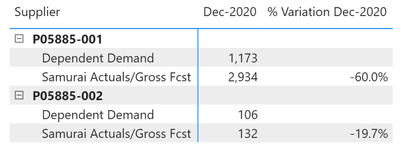
I am working on a dashboard that will serve to compare information for two different systems at work that should have the same information and need to measure the variation; however, as calculation is the same and I am using a matrix, the values for the measures are duplicated and I just one to leave one, the other portion could be blanked out.

 Code and screenshot below:

Any help on this? 

Chava1881_0-1601411859132.png


Measure code:

% Variation Dec-2020 = (DIVIDE(
CALCULATE(
SUM(Data[Dec-2020]),
Data[Key Figure] = "Dependent Demand"
),
CALCULATE(
SUM(Data[Dec-2020]),
Data[Key Figure] = "Samurai Actuals/Gross Fcst"
)
)) -1


1 ACCEPTED SOLUTION
DataInsights
Super User
Super User

@Chava1881,


Try this measure. I rewrote it with variables for readability.


% Variation Dec-2020 = 
VAR vKeyFigure =
    MAX ( Data[Key Figure] )
VAR vDepDemand =
    CALCULATE ( SUM ( Data[Dec-2020] ), Data[Key Figure] = "Dependent Demand" )
VAR vSamurai =
    CALCULATE (
        SUM ( Data[Dec-2020] ),
        Data[Key Figure] = "Samurai Actuals/Gross Fcst"
    )
VAR vResult =
    DIVIDE ( vDepDemand, vSamurai ) - 1
RETURN
IF ( vKeyFigure = "Dependent Demand", BLANK (), vResult )


DataInsights_0-1601505060226.png


Did I answer your question? Mark my post as a solution!

Proud to be a Super User!


View solution in original post

3 REPLIES 3
v-diye-msft
Community Support
Community Support

Hi @Chava1881 


If the above posts help, please kindly mark it as a answer to help others find it more quickly. thanks!

If not, please kindly elaborate more.


Community Support Team _ Dina Ye
If this post helps, then please consider Accept it as the solution to help the other members find it more
quickly.
DataInsights
Super User
Super User

@Chava1881,


Try this measure. I rewrote it with variables for readability.


% Variation Dec-2020 = 
VAR vKeyFigure =
    MAX ( Data[Key Figure] )
VAR vDepDemand =
    CALCULATE ( SUM ( Data[Dec-2020] ), Data[Key Figure] = "Dependent Demand" )
VAR vSamurai =
    CALCULATE (
        SUM ( Data[Dec-2020] ),
        Data[Key Figure] = "Samurai Actuals/Gross Fcst"
    )
VAR vResult =
    DIVIDE ( vDepDemand, vSamurai ) - 1
RETURN
IF ( vKeyFigure = "Dependent Demand", BLANK (), vResult )


DataInsights_0-1601505060226.png


Did I answer your question? Mark my post as a solution!

Proud to be a Super User!


This works perfectly, thank you!!

Helpful resources

Announcements
Power BI DataViz World Championships

Power BI Dataviz World Championships

The Power BI Data Visualization World Championships is back! Get ahead of the game and start preparing now!

December 2025 Power BI Update Carousel

Power BI Monthly Update - December 2025

Check out the December 2025 Power BI Holiday Recap!

FabCon Atlanta 2026 carousel

FabCon Atlanta 2026

Join us at FabCon Atlanta, March 16-20, for the ultimate Fabric, Power BI, AI and SQL community-led event. Save $200 with code FABCOMM.