Join us at FabCon Atlanta from March 16 - 20, 2026, for the ultimate Fabric, Power BI, AI and SQL community-led event. Save $200 with code FABCOMM.
Register now!Get Fabric certified for FREE! Don't miss your chance! Learn more
Hi,
I'm trying to create a column which will display an outcome depending on the results of the duplicate detection
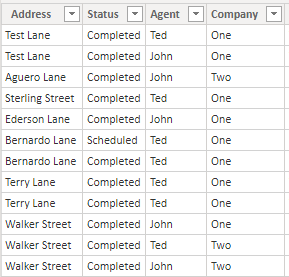
This is sample data that I'm working with
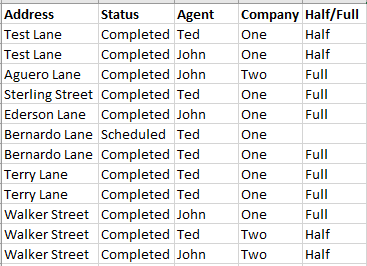
This is the outcome I want.
The first thing I look at is if Address, Status and Company are all the same. After looking at that we will then look at the Agent, if there is multiple Agents for the same Address then we will display "Half". If there is one or more Address that have the same Agent then we will display "Full"
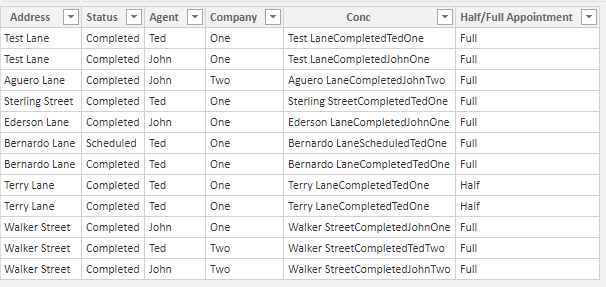
This is the outcome I got from Power BI. I did a simple Concatenate for the Conc column the merge the columns and then used this DAX formula to return the "Half" or "Full"
Half/Full Appointment =
Var Appoint = 'Table'[Conc]
var AppCount =
CALCULATE(
COUNTROWS('Table'),
all('Table'),
'Table'[Conc] = Appoint
)
return
IF(AppCount <= 1, "Full", "Half")
Does anyone know how to get the outcome that I'm looking for?
PBI File: https://www.dropbox.com/s/40kthwjmdwufm7l/Appoint.pbix?dl=0
Cheers,
Mike
Solved! Go to Solution.
Please try this column expression to get your result.
HalfFull =
VAR agentcount =
CALCULATE (
DISTINCTCOUNT ( 'Table'[Agent] ),
ALLEXCEPT ( 'Table', 'Table'[Address], 'Table'[Status], 'Table'[Company] )
)
RETURN
IF ( agentcount = 1, "Full", "Half" )
Pat
To learn more about Power BI, follow me on Twitter or subscribe on YouTube.
Please try this column expression to get your result.
HalfFull =
VAR agentcount =
CALCULATE (
DISTINCTCOUNT ( 'Table'[Agent] ),
ALLEXCEPT ( 'Table', 'Table'[Address], 'Table'[Status], 'Table'[Company] )
)
RETURN
IF ( agentcount = 1, "Full", "Half" )
Pat
To learn more about Power BI, follow me on Twitter or subscribe on YouTube.
Thank you, Pat!
Share feedback directly with Fabric product managers, participate in targeted research studies and influence the Fabric roadmap.
Check out the January 2026 Power BI update to learn about new features.
| User | Count |
|---|---|
| 68 | |
| 59 | |
| 48 | |
| 20 | |
| 16 |
| User | Count |
|---|---|
| 107 | |
| 104 | |
| 39 | |
| 27 | |
| 27 |