cancel
Showing results for 
Search instead for 
Did you mean: 

The Power BI Data Visualization World Championships is back! Get ahead of the game and start preparing now! Learn more

Reply
graham_ball
Frequent Visitor

Drillthrough using Summarized informatino and Keep All Filters Off

Hi there


I am working with a Data Model that has two tables that have a many to many relationship:

Data model.jpg


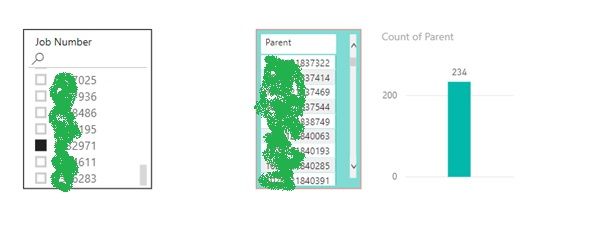
I have a visual that allows the user to select a particular Job Number via a slicer. This then shows the corresponding Parents of the Components made on that paricular Job Number (in this case, there are 234 Parents)
Select Job Number.jpg


Next, I want to set up a drillthrough from the above visual, that allows the user to select all 234 Parents (via the summarized count) and drillthrough to another visual that shows all the Jobs used for all Components of those Parents.


My problem:


  • I can set up the Parent drillthrough using 'Summarized', which allows me to drillthrough using the Count column. But this does not allow me to set the 'Keep All Filters' to Off - it fixes 'Keep All Filters' in the 'On' configuration. This has the undesirable consequence of filtering by the particular Job Number I chose, so I don't get to see all the Job numbers for all components. Not good  : (


  • I can set up the Parent drillthrough using 'Used as Category' and 'Keep All Filters Off'. This successfully gives the results that I want, but I can only drill using a single Parent from the table, not the Summarized Count. Not good either  : (


My Question:

  • Is there a way to set up a drillthrough using 'Summarized' information and 'Keep All Filters Off' ?


Thanks for your help in advance

1 ACCEPTED SOLUTION
v-chuncz-msft
Community Support
Community Support

@graham_ball 


As far as I know, this is not supported. You may give feedback via Ideas.


Community Support Team _ Sam Zha
If this post helps, then please consider Accept it as the solution to help the other members find it more quickly.

View solution in original post

1 REPLY 1
v-chuncz-msft
Community Support
Community Support

@graham_ball 


As far as I know, this is not supported. You may give feedback via Ideas.


Community Support Team _ Sam Zha
If this post helps, then please consider Accept it as the solution to help the other members find it more quickly.

Helpful resources

Announcements
Power BI DataViz World Championships

Power BI Dataviz World Championships

The Power BI Data Visualization World Championships is back! Get ahead of the game and start preparing now!

December 2025 Power BI Update Carousel

Power BI Monthly Update - December 2025

Check out the December 2025 Power BI Holiday Recap!

FabCon Atlanta 2026 carousel

FabCon Atlanta 2026

Join us at FabCon Atlanta, March 16-20, for the ultimate Fabric, Power BI, AI and SQL community-led event. Save $200 with code FABCOMM.