
cancel
Showing results for 
Search instead for 
Did you mean: 

The Power BI Data Visualization World Championships is back! It's time to submit your entry. Live now!

Reply
Anonymous
Not applicable

Drillthrough option is now showing in Azure Map visual

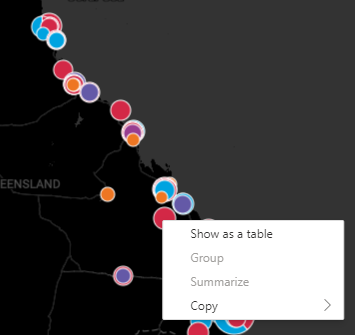
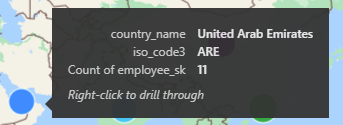
I setup a Azure Map visual with drill through ability. However, drill through option is not showing up when right click on the point. I can confirm the drill through is configured correctly as when turning on "drill through" option in "Data/Drill", I can see the option after clicking on the data point.


Right-click on the data point

linusyang_0-1688004279462.png


Left-click on the data point after turning on "Drill through" option in Desktop.

linusyang_1-1688004302071.png


3 REPLIES 3
Anonymous
Not applicable

Want to bump this post, has anyone found a solution to this? Not able to find a drill-through option in Azure Maps

lilyvg
New Member

I am having the same issue! Drill through shows up as an option on the tool tip, but right hand clicking doesn't show up a drillthrough option. 

phildo4
Regular Visitor

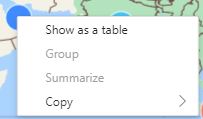
This is very mysterious to me why would the Drill Through option not be included in the new Azure Maps.  I duplicated a map from the regular map visual and changed it to an azure map and now the Drill Through option is gone.  Hover over does seem to suggest that the Drill Through is there but it is not.

phildo4_0-1710164554937.pngphildo4_1-1710164580047.png

Thanks


Helpful resources

Announcements
Power BI DataViz World Championships

Power BI Dataviz World Championships

The Power BI Data Visualization World Championships is back! It's time to submit your entry.

January Power BI Update Carousel

Power BI Monthly Update - January 2026

Check out the January 2026 Power BI update to learn about new features.

FabCon Atlanta 2026 carousel

FabCon Atlanta 2026

Join us at FabCon Atlanta, March 16-20, for the ultimate Fabric, Power BI, AI and SQL community-led event. Save $200 with code FABCOMM.