cancel
Showing results for 
Search instead for 
Did you mean: 

Get Fabric Certified for FREE during Fabric Data Days. Don't miss your chance! Request now

Reply
goflse
Helper I
Helper I

Drillthrough filters missing in Dec update of Power BI Desktop

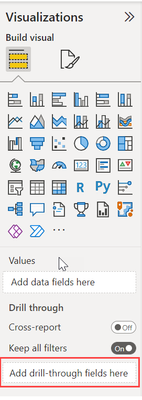
Hi forum. AFter applying the December version of Power BI Desktop a lot has changed in the UI.  And to the worse I personally think. Now it is much harder to add new visualistions which requires jumping between windows.  All of a sudden I also can't find where to edit my drillthrough filters. Where can I find it now?
I'm totally stuck. And frustrated.
Please help.

1 ACCEPTED SOLUTION
amitchandak
Super User
Super User

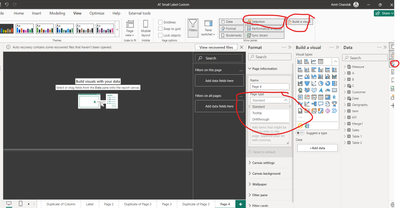
@goflse , Drill through is under the page information. Open format pane when nothing on the page is selected


amitchandak_0-1705570807961.png


Also opt for Clasic Pane UI option

https://powerbi.microsoft.com/en-us/blog/power-bi-december-2023-feature-summary/#post-25451-_Toc1526...

Share with Power BI Enthusiasts: Full Power BI Video (20 Hours) YouTube
Microsoft Fabric Series 60+ Videos YouTube
Microsoft Fabric Hindi End to End YouTube

View solution in original post

4 REPLIES 4
goflse
Helper I
Helper I

Thank you very much for a quick answer Much appreciated!

goflse
Helper I
Helper I

 To be more precise. These are the settings I'm looking for. In my report I don't want to keep all filters in my report.

goflse_0-1705570797595.png


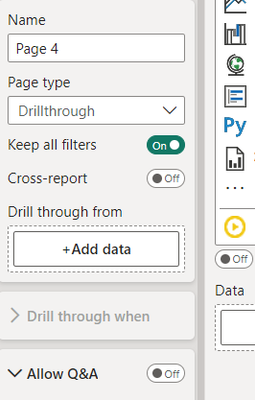
@goflse , Once you select page type as drill through, you will get those settings


amitchandak_0-1705571284779.png


Share with Power BI Enthusiasts: Full Power BI Video (20 Hours) YouTube
Microsoft Fabric Series 60+ Videos YouTube
Microsoft Fabric Hindi End to End YouTube
amitchandak
Super User
Super User

@goflse , Drill through is under the page information. Open format pane when nothing on the page is selected


amitchandak_0-1705570807961.png


Also opt for Clasic Pane UI option

https://powerbi.microsoft.com/en-us/blog/power-bi-december-2023-feature-summary/#post-25451-_Toc1526...

Share with Power BI Enthusiasts: Full Power BI Video (20 Hours) YouTube
Microsoft Fabric Series 60+ Videos YouTube
Microsoft Fabric Hindi End to End YouTube

Helpful resources

Announcements
November Power BI Update Carousel

Power BI Monthly Update - November 2025

Check out the November 2025 Power BI update to learn about new features.

Fabric Data Days Carousel

Fabric Data Days

Advance your Data & AI career with 50 days of live learning, contests, hands-on challenges, study groups & certifications and more!

FabCon Atlanta 2026 carousel

FabCon Atlanta 2026

Join us at FabCon Atlanta, March 16-20, for the ultimate Fabric, Power BI, AI and SQL community-led event. Save $200 with code FABCOMM.

Top Solution Authors
Top Kudoed Authors