Join us at FabCon Atlanta from March 16 - 20, 2026, for the ultimate Fabric, Power BI, AI and SQL community-led event. Save $200 with code FABCOMM.
Register now!Get Fabric Certified for FREE during Fabric Data Days. Don't miss your chance! Request now
Hi
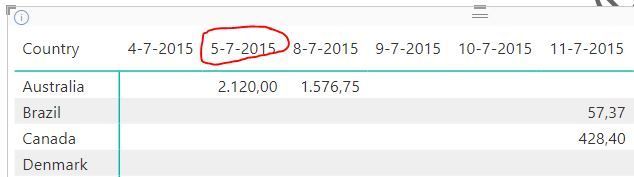
on my report I have a matrix.
In the rows a country name, in the columns dates. Max fifteen dates are shown.
Unfortunately I can't drill through to another page from a date from the matrix, like the one with the red circle
I also can't drill through from a slicer. Also not when I create a button with Action Drill through and link it to a page with Date as drill through field. I can only drill through from a table.
What is a nice way to select one of the fifteen dates and go to a page giving more detailed information about that date?
Thnx
Ron
Solved! Go to Solution.
Hey @PowerRon !
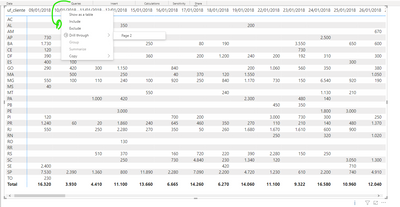
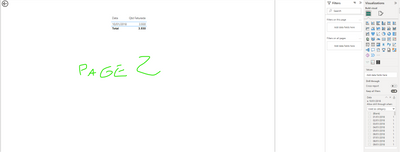
I tested the DrillTrough here and it works. In image 1 I have the principal Matrix. I chose the second date 10/01/2018 (image 2) and drill to Page 2 (image 3).
Take a look how to set the DrillTrough here: Set up drillthrough in Power BI reports - Power BI | Microsoft Learn
Best Regards,
Marcel
Image 1

Image 2
Image 3
Regards,
Marcel Magalhães
Microsoft Power BI Official Partner
MCT | Certified PL-300 Power BI
I started all over again and got it working. Probable I was misconfused somewhere.
Thnx a lot for helping me out. Enjoy the weekend!
Regards
Ron
Hey @PowerRon !
I tested the DrillTrough here and it works. In image 1 I have the principal Matrix. I chose the second date 10/01/2018 (image 2) and drill to Page 2 (image 3).
Take a look how to set the DrillTrough here: Set up drillthrough in Power BI reports - Power BI | Microsoft Learn
Best Regards,
Marcel
Image 1

Image 2
Image 3
Regards,
Marcel Magalhães
Microsoft Power BI Official Partner
MCT | Certified PL-300 Power BI
Check out the November 2025 Power BI update to learn about new features.
Advance your Data & AI career with 50 days of live learning, contests, hands-on challenges, study groups & certifications and more!