Join us at FabCon Atlanta from March 16 - 20, 2026, for the ultimate Fabric, Power BI, AI and SQL community-led event. Save $200 with code FABCOMM.
Register now!The Power BI Data Visualization World Championships is back! Get ahead of the game and start preparing now! Learn more
Hi,
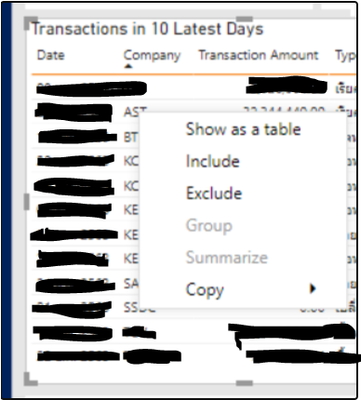
I cannot find the Drii-Through button when I right click on the table that I want to drill in.
Anyway, its working for other pages that I set it to drill to the same destintion.
I already set my destination page like this
it is working for this page
But it is not working here (Company column is = initial)
Any suggestion?
Thank you in advance.
Solved! Go to Solution.
I already put the [Initial] in my visual as "Company" . I just change it's name for this visual.
But after I try your suggest by removing that column and place with the sameone again. It is working now.
Thank you!
@Mice , You have only given [initial] in the drill through the page. So the option will only come if you have [Initial] in the visual
https://docs.microsoft.com/en-us/power-bi/create-reports/desktop-drillthrough
I already put the [Initial] in my visual as "Company" . I just change it's name for this visual.
But after I try your suggest by removing that column and place with the sameone again. It is working now.
Thank you!
The Power BI Data Visualization World Championships is back! Get ahead of the game and start preparing now!
| User | Count |
|---|---|
| 38 | |
| 38 | |
| 37 | |
| 28 | |
| 28 |
| User | Count |
|---|---|
| 124 | |
| 89 | |
| 73 | |
| 66 | |
| 65 |