- Power BI forums
- Get Help with Power BI
- Desktop
- Service
- Report Server
- Power Query
- Mobile Apps
- Developer
- DAX Commands and Tips
- Custom Visuals Development Discussion
- Health and Life Sciences
- Power BI Spanish forums
- Translated Spanish Desktop
- Training and Consulting
- Instructor Led Training
- Dashboard in a Day for Women, by Women
- Galleries
- Data Stories Gallery
- Themes Gallery
- Contests Gallery
- QuickViz Gallery
- Quick Measures Gallery
- Visual Calculations Gallery
- Notebook Gallery
- Translytical Task Flow Gallery
- TMDL Gallery
- R Script Showcase
- Webinars and Video Gallery
- Ideas
- Custom Visuals Ideas (read-only)
- Issues
- Issues
- Events
- Upcoming Events
Learn from the best! Meet the four finalists headed to the FINALS of the Power BI Dataviz World Championships! Register now
- Power BI forums
- Forums
- Get Help with Power BI
- Desktop
- Drill Level Matrix - Calculation Query
- Subscribe to RSS Feed
- Mark Topic as New
- Mark Topic as Read
- Float this Topic for Current User
- Bookmark
- Subscribe
- Printer Friendly Page


- Mark as New
- Bookmark
- Subscribe
- Mute
- Subscribe to RSS Feed
- Permalink
- Report Inappropriate Content
Drill Level Matrix - Calculation Query
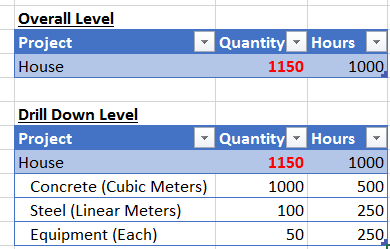
Is there a way to control the CALCULATION in Matrix based on Drill Level?
In my DATA table, i have column "Quantity". When using the MATRIX Visual, the Column "Quantity" & "Hours" is Summed up.
But in my case, i do not want the column QUANTITY summed up at "House" Level. This is because the data in the table is based of different Types / Unit of Measures [Cubic Meters, Linear Meters, Each], and hence summing up the quantity at "House" Level does not make sense. For example, we can say it took 500 hours to install 1000 cubic meters of Concrete and 1000 hours to build the house.
Hence at the "House" Level, "Quantity" should be BLANK. Is this possible?
Solved! Go to Solution.


- Mark as New
- Bookmark
- Subscribe
- Mute
- Subscribe to RSS Feed
- Permalink
- Report Inappropriate Content
Hi @hackfifi,
Here is the calculated field formula i wrote for Quantity
=if(HASONEVALUE(Table3[Type]),SUM([Quantity]),BLANK())
Hope this helps.
Regards,
Ashish Mathur
http://www.ashishmathur.com
https://www.linkedin.com/in/excelenthusiasts/
- Mark as New
- Bookmark
- Subscribe
- Mute
- Subscribe to RSS Feed
- Permalink
- Report Inappropriate Content
Hi,
This should be doable, Please share the link from where i can download your Excel/PowerBI desktop file.
Regards,
Ashish Mathur
http://www.ashishmathur.com
https://www.linkedin.com/in/excelenthusiasts/
- Mark as New
- Bookmark
- Subscribe
- Mute
- Subscribe to RSS Feed
- Permalink
- Report Inappropriate Content
Thanks @Ashish_Mathur
Hopefully the below link works
https://1drv.ms/x/s!Ahwb9FOvNbslhRbnLJ_0Zz8Gubxs


- Mark as New
- Bookmark
- Subscribe
- Mute
- Subscribe to RSS Feed
- Permalink
- Report Inappropriate Content
Hi @hackfifi,
Have you tried the solution provided by @Ashish_Mathur above? Does it work in your scenario? If it works, could you accept it as solution to close this thread?
If you still have any question on this issue, feel free to post here. 
Regards
- Mark as New
- Bookmark
- Subscribe
- Mute
- Subscribe to RSS Feed
- Permalink
- Report Inappropriate Content
Hi @hackfifi,
Here is the calculated field formula i wrote for Quantity
=if(HASONEVALUE(Table3[Type]),SUM([Quantity]),BLANK())
Hope this helps.
Regards,
Ashish Mathur
http://www.ashishmathur.com
https://www.linkedin.com/in/excelenthusiasts/


- Mark as New
- Bookmark
- Subscribe
- Mute
- Subscribe to RSS Feed
- Permalink
- Report Inappropriate Content
Hi,
you can switch off the sub total option under format tab, but unfortunately you can’t control it by column wise.
- Mark as New
- Bookmark
- Subscribe
- Mute
- Subscribe to RSS Feed
- Permalink
- Report Inappropriate Content
Thanks @dilumd -Maybe i need to think of another visual to represent the data. Cheers

Helpful resources

Join our Fabric User Panel
Share feedback directly with Fabric product managers, participate in targeted research studies and influence the Fabric roadmap.

Power BI Community Update - March 2026
Check out the March 2026 Power BI update to learn about new features.

| User | Count |
|---|---|
| 50 | |
| 35 | |
| 29 | |
| 17 | |
| 17 |


| User | Count |
|---|---|
| 66 | |
| 57 | |
| 39 | |
| 22 | |
| 21 |


