cancel
Showing results for 
Search instead for 
Did you mean: 

Data Days is here! Join us now for 60+ days of learning, challenges, and connection. Learn more

Reply
hackfifi
Helper V
Helper V

Drill Level Matrix - Calculation Query


Is there a way to control the CALCULATION in Matrix based on Drill Level?


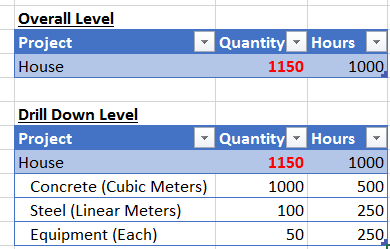
In my DATA table, i have column "Quantity".  When using the MATRIX Visual, the Column "Quantity" & "Hours" is Summed up.

But in my case, i do not want the column QUANTITY summed up at "House" Level. This is because the data in the table is based of different Types / Unit of Measures [Cubic Meters, Linear Meters, Each], and hence summing up the quantity at "House" Level does not make sense. For example, we can say it took 500 hours to install 1000 cubic meters of Concrete and 1000 hours to build the house.


Hence at the "House" Level, "Quantity" should be BLANK. Is this possible?


Calculate Function.PNG

1 ACCEPTED SOLUTION

Hi @hackfifi,


Here is the calculated field formula i wrote for Quantity


=if(HASONEVALUE(Table3[Type]),SUM([Quantity]),BLANK())

Hope this helps.


Regards,
Ashish Mathur
http://www.ashishmathur.com
https://www.linkedin.com/in/excelenthusiasts/

View solution in original post

6 REPLIES 6
Ashish_Mathur
Super User
Super User

Hi,


This should be doable,  Please share the link from where i can download your Excel/PowerBI desktop file.


Regards,
Ashish Mathur
http://www.ashishmathur.com
https://www.linkedin.com/in/excelenthusiasts/

Thanks @Ashish_Mathur


Hopefully the below link works


https://1drv.ms/x/s!Ahwb9FOvNbslhRbnLJ_0Zz8Gubxs


Hi @hackfifi,


Have you tried the solution provided by @Ashish_Mathur above? Does it work in your scenario? If it works, could you accept it as solution to close this thread?


If you still have any question on this issue, feel free to post here. Smiley Happy


Regards

Hi @hackfifi,


Here is the calculated field formula i wrote for Quantity


=if(HASONEVALUE(Table3[Type]),SUM([Quantity]),BLANK())

Hope this helps.


Regards,
Ashish Mathur
http://www.ashishmathur.com
https://www.linkedin.com/in/excelenthusiasts/
dilumd
Impactful Individual

Hi,


you can switch off the sub total option under format tab, but unfortunately you can’t control it by column wise.

Thanks @dilumd -Maybe i need to think of another visual to represent the data. Cheers

Helpful resources

Announcements
Fabric Data Days is here Carousel

Fabric Data Days 2026

Don't miss out on Data Days, June 15 through August 7. Learn Fabric, Power BI, SQL, AI and more.

May Power BI Update Carousel

Power BI Monthly Update - May 2026

Check out the May 2026 Power BI update to learn about new features.

Power BI DataViz World Championships carousel

Power BI DataViz World Championships - June 2026

A new Power BI DataViz World Championship is coming this June! Don't miss out on submitting your entry.