cancel
Showing results for 
Search instead for 
Did you mean: 

The Power BI Data Visualization World Championships is back! Get ahead of the game and start preparing now! Learn more

Reply
mhossain
Solution Sage
Solution Sage

Dragging or moving card/text box visuals are not aligning properly

After Sep/Oct Powerbi updates, I have been seeing this strange issue with my powerbi desktop files, 2 months ago all was OK. When I try to drag/move card/text box visuals using mouse or left/right keyboard key, visuals move extraordinary right/left, so unable to align the visuals properly.

Has anyone seeing these issues with powerbi files?

5 REPLIES 5
AllisonKennedy
Super User
Super User

@mhossain It will be something they developed recently? What computer are you using? I find some struggle more than others. Log a support ticket if it's a recent thing, and they can look at the problem for you, but otherwise I hope the workarounds help you in the meantime. https://powerbi.microsoft.com/en-us/support/free/ 


I really appreciate kudos if I helped a little. 🙂 


Please @mention me in your reply if you want a response.

Copying DAX from this post? Click here for a hack to quickly replace it with your own table names

Has this post solved your problem? Please Accept as Solution so that others can find it quickly and to let the community know your problem has been solved.
If you found this post helpful, please give Kudos C

I work as a Microsoft trainer and consultant, specialising in Power BI and Power Query.
www.excelwithallison.com

AllisonKennedy
Super User
Super User

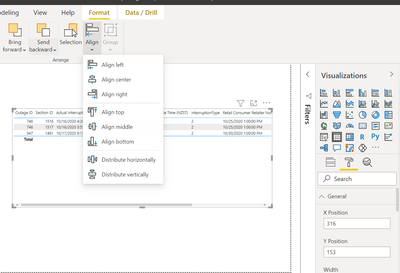
@mhossain I often struggle to align/move visuals using mouse or left/right arrows. Try using the visual format 'general' section to give it exact x and y coordinates, and use the 'align' button in the formatting tab in ribbon: 


AllisonKennedy_0-1608536788868.png


Please @mention me in your reply if you want a response.

Copying DAX from this post? Click here for a hack to quickly replace it with your own table names

Has this post solved your problem? Please Accept as Solution so that others can find it quickly and to let the community know your problem has been solved.
If you found this post helpful, please give Kudos C

I work as a Microsoft trainer and consultant, specialising in Power BI and Power Query.
www.excelwithallison.com

Thanks @AllisonKennedy  for the tips.

All of the points you have mentioned are helpful, but still not sure why moving the visuals with mouse or keyboard left/right key working little strange in my latest pbix files.

amitchandak
Super User
Super User

@mhossain , Not observed that. Clear the cache from Options, upgrade to latest version and try

Share with Power BI Enthusiasts: Full Power BI Video (20 Hours) YouTube
Microsoft Fabric Series 60+ Videos YouTube
Microsoft Fabric Hindi End to End YouTube

Thanks @amitchandak 

Actually already did this, but it is not solving the problem, wondering what is causing this.


Helpful resources

Announcements
Power BI DataViz World Championships

Power BI Dataviz World Championships

The Power BI Data Visualization World Championships is back! Get ahead of the game and start preparing now!

November Power BI Update Carousel

Power BI Monthly Update - November 2025

Check out the November 2025 Power BI update to learn about new features.

FabCon Atlanta 2026 carousel

FabCon Atlanta 2026

Join us at FabCon Atlanta, March 16-20, for the ultimate Fabric, Power BI, AI and SQL community-led event. Save $200 with code FABCOMM.