FabCon is coming to Atlanta
Join us at FabCon Atlanta from March 16 - 20, 2026, for the ultimate Fabric, Power BI, AI and SQL community-led event. Save $200 with code FABCOMM.
Register now!- Power BI forums
- Get Help with Power BI
- Desktop
- Service
- Report Server
- Power Query
- Mobile Apps
- Developer
- DAX Commands and Tips
- Custom Visuals Development Discussion
- Health and Life Sciences
- Power BI Spanish forums
- Translated Spanish Desktop
- Training and Consulting
- Instructor Led Training
- Dashboard in a Day for Women, by Women
- Galleries
- Data Stories Gallery
- Themes Gallery
- Contests Gallery
- QuickViz Gallery
- Quick Measures Gallery
- Visual Calculations Gallery
- Notebook Gallery
- Translytical Task Flow Gallery
- TMDL Gallery
- R Script Showcase
- Webinars and Video Gallery
- Ideas
- Custom Visuals Ideas (read-only)
- Issues
- Issues
- Events
- Upcoming Events
The Power BI Data Visualization World Championships is back! Get ahead of the game and start preparing now! Learn more
- Power BI forums
- Forums
- Get Help with Power BI
- Desktop
- Double TopN Measure Returning Text
- Subscribe to RSS Feed
- Mark Topic as New
- Mark Topic as Read
- Float this Topic for Current User
- Bookmark
- Subscribe
- Printer Friendly Page


- Mark as New
- Bookmark
- Subscribe
- Mute
- Subscribe to RSS Feed
- Permalink
- Report Inappropriate Content
Double TopN Measure Returning Text
Good morning,
I'm creating a report that would focus on the top 10 Accounts in the selected period, based on the quantity sold of a specifc product.
In the Sales table there are 5 different Product Types, and each one of these types has several ProductName.
Example:
| ProductType | ProductName |
GPU | RTX 3080 |
| GPU | RTX 3070 |
| GPU | RTX 3060 |
| CPU | Ryzen 7 3700x |
| CPU | Ryzen 9 3900x |
| CPU | Ryzen 5 2600x |
In the report I'm creating I want to show the top 10 Accounts per GPU sold.The measure looks like:
m_GPU_Qty = Calculate(SUM('Sales(Product Level)'[Quantity]), 'Sales(Product Level)'[ProductType]="GPU").
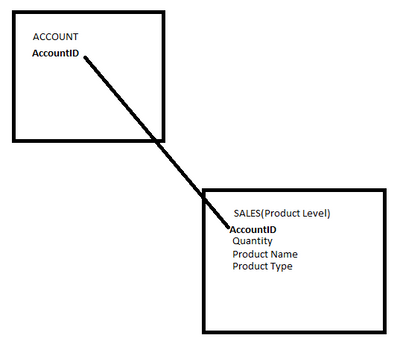
I want to create a card box that would show the top 1 ProductName, among the top 10 Accounts filtered by quantity of GPU sold.
Unfortunately I found out that it is not possible to include two Top(N) filters in the view.
Thanks for your attention,
Alessio B.
Solved! Go to Solution.

- Mark as New
- Bookmark
- Subscribe
- Mute
- Subscribe to RSS Feed
- Permalink
- Report Inappropriate Content
Hi @Alex-PBIComm ,
So far, I have completed your first request, and I have encountered some difficulties with your second request. Please wait patiently until I come back next week during work hours. I will continue to study.
The measure is
top 5 Accounts per GPU sold =
VAR _RANK =
    RANKX (
        ALL ( 'Sales(Product Level)' ),
        CALCULATE (
            SUM ( 'Sales(Product Level)'[Quantity] ),
            FILTER (
                ALLEXCEPT ( 'Sales(Product Level)', 'Sales(Product Level)'[AccountID] ),
                [ProductType] = "GPU"
            )
        ),
        ,
        DESC,
        DENSE
    )
RETURN
    IF ( _RANK <= 5, _RANK )
Because there are only 7 account IDs in my sample data, I returned the top five account IDs.
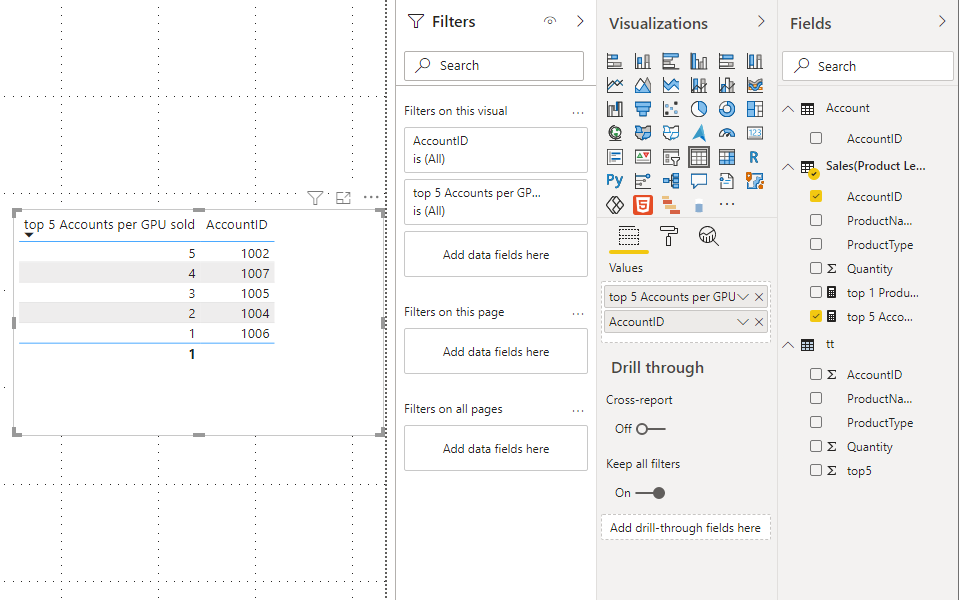
I apologize again for not solving your problem in time.
Best Regards,
Stephen Tao
If this post helps, then please consider Accept it as the solution to help the other members find it more quickly.
- Mark as New
- Bookmark
- Subscribe
- Mute
- Subscribe to RSS Feed
- Permalink
- Report Inappropriate Content
Hi @Alex-PBIComm ,
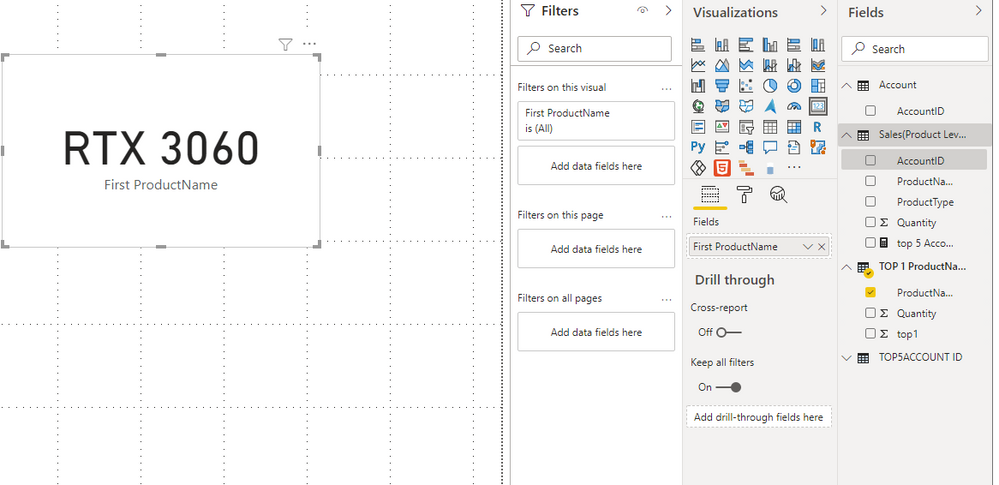
After my test, creating a measure to get the top 1 product name does not work.
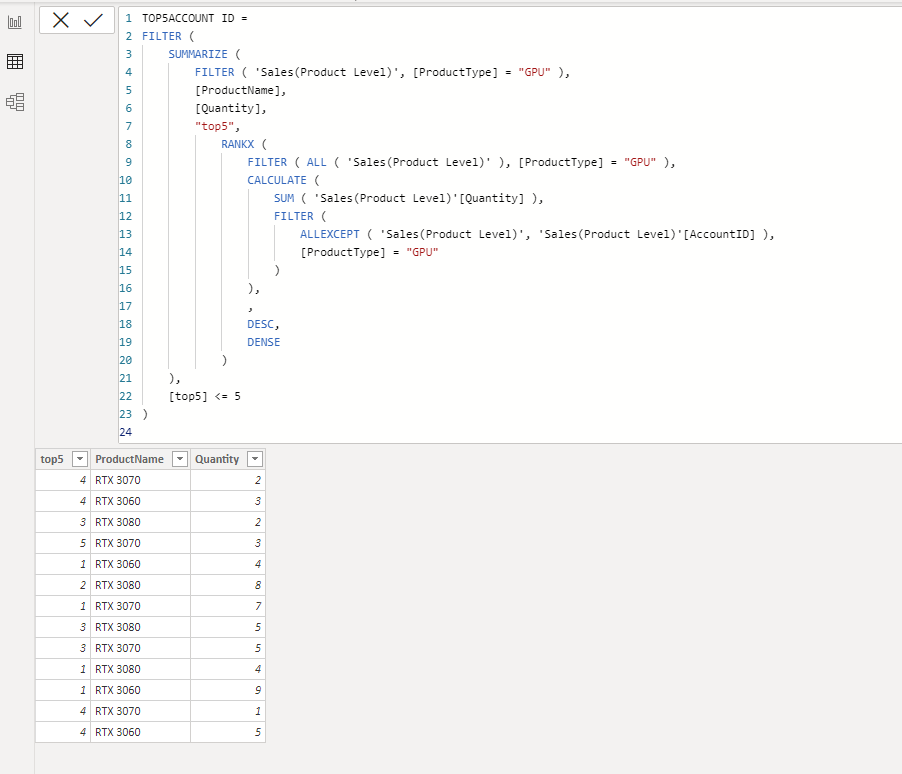
I finally achieved it by creating two tables. Because it is written in dax, if your data is updated, the result will also be updated.
TOP5ACCOUNT ID =
FILTER (
    SUMMARIZE (
        FILTER ( 'Sales(Product Level)', [ProductType] = "GPU" ),
        [ProductName],
        [Quantity],
        "top5",
            RANKX (
                FILTER ( ALL ( 'Sales(Product Level)' ), [ProductType] = "GPU" ),
                CALCULATE (
                    SUM ( 'Sales(Product Level)'[Quantity] ),
                    FILTER (
                        ALLEXCEPT ( 'Sales(Product Level)', 'Sales(Product Level)'[AccountID] ),
                        [ProductType] = "GPU"
                    )
                ),
                ,
                DESC,
                DENSE
            )
    ),
    [top5] <= 5
)
TOP 1 ProductName =
FILTER (
    SUMMARIZE (
        'TOP5ACCOUNT ID',
        [ProductName],
        [Quantity],
        "top1",
            RANKX (
                ALL ( 'TOP5ACCOUNT ID' ),
                CALCULATE (
                    SUM ( 'TOP5ACCOUNT ID'[Quantity] ),
                    ALLEXCEPT ( 'TOP5ACCOUNT ID', 'TOP5ACCOUNT ID'[ProductName] )
                ),
                ,
                DESC,
                DENSE
            )
    ),
    [top1] = 1
)

Best Regards,
Stephen Tao
If this post helps, then please consider Accept it as the solution to help the other members find it more quickly.
- Mark as New
- Bookmark
- Subscribe
- Mute
- Subscribe to RSS Feed
- Permalink
- Report Inappropriate Content
Hi @Alex-PBIComm ,
After my test, creating a measure to get the top 1 product name does not work.
I finally achieved it by creating two tables. Because it is written in dax, if your data is updated, the result will also be updated.
TOP5ACCOUNT ID =
FILTER (
    SUMMARIZE (
        FILTER ( 'Sales(Product Level)', [ProductType] = "GPU" ),
        [ProductName],
        [Quantity],
        "top5",
            RANKX (
                FILTER ( ALL ( 'Sales(Product Level)' ), [ProductType] = "GPU" ),
                CALCULATE (
                    SUM ( 'Sales(Product Level)'[Quantity] ),
                    FILTER (
                        ALLEXCEPT ( 'Sales(Product Level)', 'Sales(Product Level)'[AccountID] ),
                        [ProductType] = "GPU"
                    )
                ),
                ,
                DESC,
                DENSE
            )
    ),
    [top5] <= 5
)
TOP 1 ProductName =
FILTER (
    SUMMARIZE (
        'TOP5ACCOUNT ID',
        [ProductName],
        [Quantity],
        "top1",
            RANKX (
                ALL ( 'TOP5ACCOUNT ID' ),
                CALCULATE (
                    SUM ( 'TOP5ACCOUNT ID'[Quantity] ),
                    ALLEXCEPT ( 'TOP5ACCOUNT ID', 'TOP5ACCOUNT ID'[ProductName] )
                ),
                ,
                DESC,
                DENSE
            )
    ),
    [top1] = 1
)
Best Regards,
Stephen Tao
If this post helps, then please consider Accept it as the solution to help the other members find it more quickly.
- Mark as New
- Bookmark
- Subscribe
- Mute
- Subscribe to RSS Feed
- Permalink
- Report Inappropriate Content
Hi @Alex-PBIComm ,
So far, I have completed your first request, and I have encountered some difficulties with your second request. Please wait patiently until I come back next week during work hours. I will continue to study.
The measure is
top 5 Accounts per GPU sold =
VAR _RANK =
    RANKX (
        ALL ( 'Sales(Product Level)' ),
        CALCULATE (
            SUM ( 'Sales(Product Level)'[Quantity] ),
            FILTER (
                ALLEXCEPT ( 'Sales(Product Level)', 'Sales(Product Level)'[AccountID] ),
                [ProductType] = "GPU"
            )
        ),
        ,
        DESC,
        DENSE
    )
RETURN
    IF ( _RANK <= 5, _RANK )
Because there are only 7 account IDs in my sample data, I returned the top five account IDs.
I apologize again for not solving your problem in time.
Best Regards,
Stephen Tao
If this post helps, then please consider Accept it as the solution to help the other members find it more quickly.


- Mark as New
- Bookmark
- Subscribe
- Mute
- Subscribe to RSS Feed
- Permalink
- Report Inappropriate Content
Hi,
Please share a dataset and also show the expected result.
Regards,
Ashish Mathur
http://www.ashishmathur.com
https://www.linkedin.com/in/excelenthusiasts/

- Mark as New
- Bookmark
- Subscribe
- Mute
- Subscribe to RSS Feed
- Permalink
- Report Inappropriate Content
Hi, @Alex-PBIComm
Please try the below measure or similar to the below measure.
Top 1 Product Name on card visual =
MAXX (
TOPN (
1,
'Sales(Product Level)',
CALCULATE (
SUM ( 'Sales(Product Level)'[Quantity] ),
'Sales(Product Level)'[ProductType] = "GPU"
), DESC
),
'Sales(Product Level)'[ProductName]
)
Hi, My name is Jihwan Kim.
If this post helps, then please consider accept it as the solution to help other members find it faster.
If this post helps, then please consider accepting it as the solution to help other members find it faster, and give a big thumbs up.
Click here to visit my LinkedIn page
Click here to schedule a short Teams meeting to discuss your question.
- Mark as New
- Bookmark
- Subscribe
- Mute
- Subscribe to RSS Feed
- Permalink
- Report Inappropriate Content
Hello Jihwan,
thanks for your reply! This looks good, but is not considering that I need it only among the top 10 Accounts.
Edit: I've tried it and actually it returns something unexpected, and can't really figure out the reason of the outcome.
- Mark as New
- Bookmark
- Subscribe
- Mute
- Subscribe to RSS Feed
- Permalink
- Report Inappropriate Content
Hi, @Alex-PBIComm
Thank you for your feedback.
Please share a dataset and also show the expected result.
If this post helps, then please consider accepting it as the solution to help other members find it faster, and give a big thumbs up.
Click here to visit my LinkedIn page
Click here to schedule a short Teams meeting to discuss your question.
Helpful resources

Power BI Dataviz World Championships
The Power BI Data Visualization World Championships is back! Get ahead of the game and start preparing now!

Power BI Monthly Update - December 2025
Check out the December 2025 Power BI Holiday Recap!

FabCon Atlanta 2026
Join us at FabCon Atlanta, March 16-20, for the ultimate Fabric, Power BI, AI and SQL community-led event. Save $200 with code FABCOMM.

| User | Count |
|---|---|
| 41 | |
| 38 | |
| 36 | |
| 30 | |
| 28 |


| User | Count |
|---|---|
| 129 | |
| 88 | |
| 79 | |
| 68 | |
| 63 |


