Join us at FabCon Atlanta from March 16 - 20, 2026, for the ultimate Fabric, Power BI, AI and SQL community-led event. Save $200 with code FABCOMM.
Register now!The Power BI Data Visualization World Championships is back! Get ahead of the game and start preparing now! Learn more
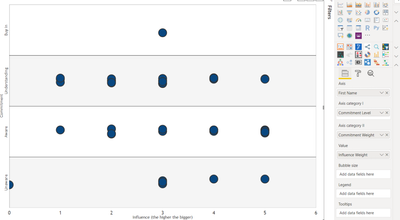
I am trying to create a Dot Plot that has a fixed Y-Axis that will allow me show the full range of possible Y-Values even if there isn't a data point that is plotted against that Y-value.
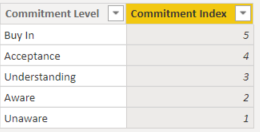
I would like to show all of the categories along the Y-Axis (fromm Unaware to Buy In) even if the category is empty and there isn't a data point that falls into that category. For example, if there wasn't a data point plotted at (3, Acceptance) I would still want the Acceptance category to be shown in order on the Y-Axis. How can I do this?
Solved! Go to Solution.
Hi @Anonymous ,
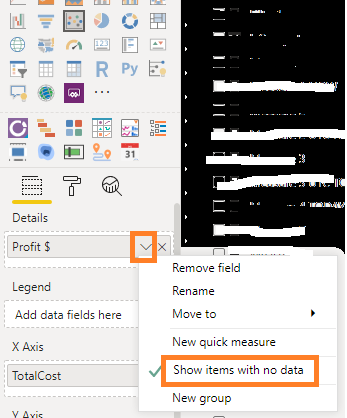
You may tick the option "Show items with no data" .
Best Regards,
Amy
Community Support Team _ Amy
If this post helps, then please consider Accept it as the solution to help the other members find it more quickly.
Hi @Anonymous ,
You may tick the option "Show items with no data" .
Best Regards,
Amy
Community Support Team _ Amy
If this post helps, then please consider Accept it as the solution to help the other members find it more quickly.
Hi @Anonymous
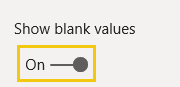
Select to include null values. And/or set the min and max values for that axis manually.
HTH
Michele
Hi @Anonymous
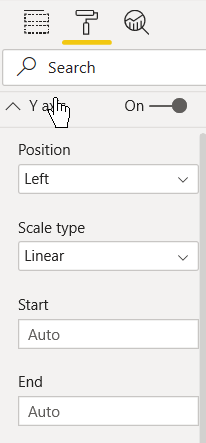
Few more details. In the Formatting pane, play around with these settings. Also try switching between Linear and Log.
HTH
Michele
Thanks for your response. I have looked into the Axis settings but haven't been able to find anything...
The "Commitment Level" field in Category I is populating my Y-Axis but is only showing the categories that contain data (Unaware-1, Aware-2, Understanding-3, Buy In-5) and not showing Acceptance-4 because there are no data entries in the category. How do I solve for this?
The Power BI Data Visualization World Championships is back! Get ahead of the game and start preparing now!
| User | Count |
|---|---|
| 41 | |
| 38 | |
| 36 | |
| 30 | |
| 28 |
| User | Count |
|---|---|
| 129 | |
| 88 | |
| 79 | |
| 68 | |
| 63 |