cancel
Showing results for 
Search instead for 
Did you mean: 

We've captured the moments from FabCon & SQLCon that everyone is talking about, and we are bringing them to the community, live and on-demand. Starts on April 14th. Register now

Reply
Anonymous
Not applicable

Donut Chart Using Multiple Columns

Hi,


I am trying to create a Donut Chart. My Requirement are as below.


I have one table. Where we have stored.

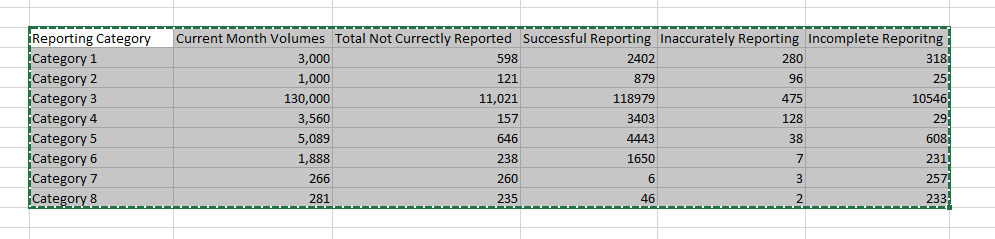
1. Monthly Volumes, Based on Some Category as each row.


Table to be usedTable to be used

Now I want create two charts. 

1. Table Chart - For Category,Monthly Volume, Percent Impact -> It is done and working fine.

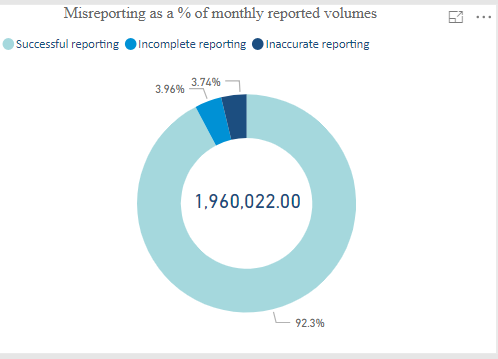
2. Second is donut chart. - as below. with mentioned requirement

  • When I have not clicked any this. It should show sum of every thing with three categories(Successful, incomple, inaccurate). with percentang of each category.
    • Total Percent should be 100%
  • When I select one category ( from the table chart) then donut should be updated to show  for specific category and numbers and percent should be updated.  Here interesting point is.
    • Total Percent should be 100% and now it should show how much percent inaccurate, incomplete, successful. [Not working]
    •  
  • Reverse from this chart should also be possible. like if I select "inaccurate " donut chart it should update "Table chart" to show numbers and percent impact based on inaccurate. [Not working]


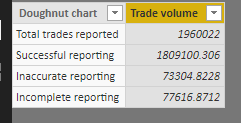
Donut to be createdDonut to be created


The above donut chart I have creating. using table in different format. 

total trades reported is skipped from the chart intentionallytotal trades reported is skipped from the chart intentionally

This is urgent requirement. 


Thanks in advance.

2 REPLIES 2
v-diye-msft
Community Support
Community Support

Hi @Anonymous 


Please use the M code to transform your table as below:

let

    Source = Table.FromRows(Json.Document(Binary.Decompress(Binary.FromText("XZA7DgIxDESvskq9hR1/4tQcA21BgSiREA23Z2doUJo4cd5Mxrle2+X2vj+er8+2adubichZYta5dpeOUmiZVjv2fx53+uO1Q1xjnutMaGKBDRTciatQoFqTGh9Bs/BcdI6nI6mKgYMLvToTzgWHTUjBMx1B3B24gU5ZRwChVbQiohl4arChC81ucjwGws447FhIGpbSBZEYhX9p1o7jCw==", BinaryEncoding.Base64), Compression.Deflate)), let _t = ((type text) meta [Serialized.Text = true]) in type table [#"Reporting category" = _t, #"Current month volumes" = _t, #"Total not currently reported" = _t, #"Successful reporting" = _t, #"Inaccurately reporting" = _t, #"Incomplete reporting" = _t]),

    #"Changed Type" = Table.TransformColumnTypes(Source,{{"Reporting category", type text}, {"Current month volumes", Int64.Type}, {"Total not currently reported", Int64.Type}, {"Successful reporting", Int64.Type}, {"Inaccurately reporting", Int64.Type}, {"Incomplete reporting", Int64.Type}}),

    #"Unpivoted Other Columns" = Table.UnpivotOtherColumns(#"Changed Type", {"Reporting category", "Total not currently reported", "Current month volumes"}, "Attribute", "Value")

in

#"Unpivoted Other
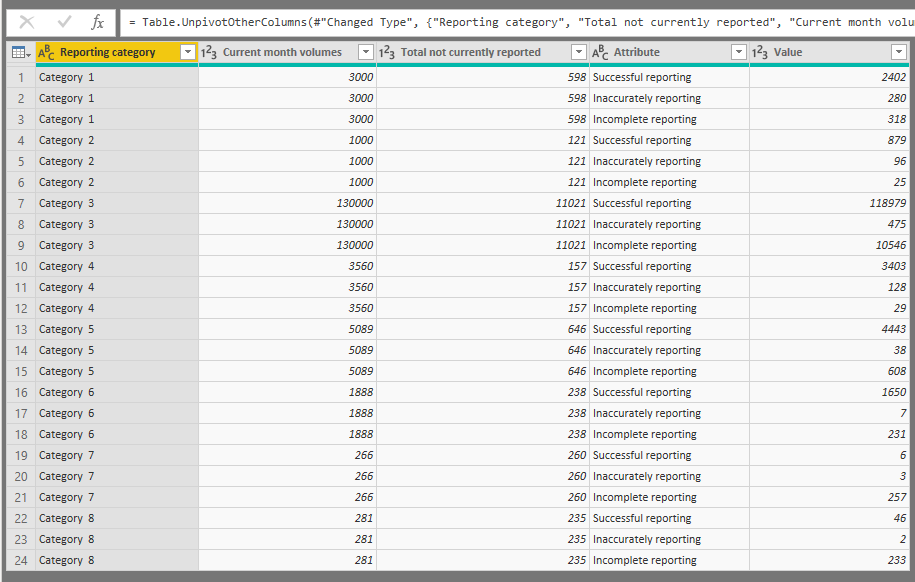
4.png

And then create the donut chart: (keep the drill mode on)

5.png

When you click category 3 in the first donut chart, or select inaccurate in the second chart:
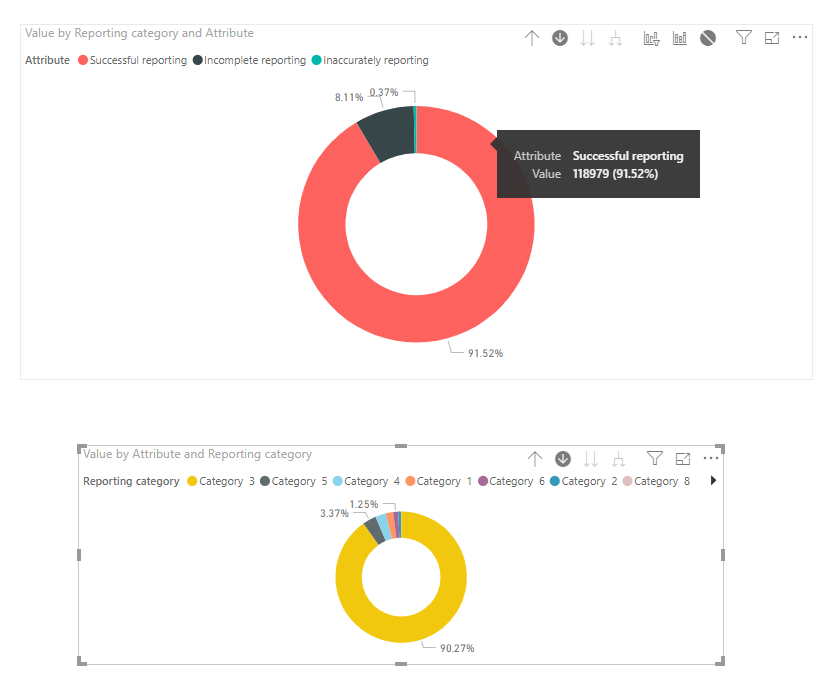
6.png

Attached pbix here for your reference: https://wicren-my.sharepoint.com/:u:/g/personal/dinaye_wicren_onmicrosoft_com/EcQHotD-Gd9BhpW4-PuXU-0B2WcTmCkUg-qa6WGavaJ-Ag?e=dD8Dva


Best regards,

Dina Ye

Community Support Team _ Dina Ye
If this post helps, then please consider Accept it as the solution to help the other members find it more
quickly.

Hi @Anonymous 

If my above post helps, could you please consider Accept it as the solution to help the other members find it more quickly. thanks!

Best regards,
Dina Ye

Community Support Team _ Dina Ye
If this post helps, then please consider Accept it as the solution to help the other members find it more
quickly.
Helpful resources

Announcements
New to Fabric survey Carousel

New to Fabric Survey

If you have recently started exploring Fabric, we'd love to hear how it's going. Your feedback can help with product improvements.

Power BI DataViz World Championships carousel

Power BI DataViz World Championships - June 2026

A new Power BI DataViz World Championship is coming this June! Don't miss out on submitting your entry.

Join our Fabric User Panel

Join our Fabric User Panel

Share feedback directly with Fabric product managers, participate in targeted research studies and influence the Fabric roadmap.

March Power BI Update Carousel

Power BI Community Update - March 2026

Check out the March 2026 Power BI update to learn about new features.