cancel
Showing results for 
Search instead for 
Did you mean: 

The Power BI Data Visualization World Championships is back! Get ahead of the game and start preparing now! Learn more

Reply
jsteffe
Helper III
Helper III

Don't have The "Publish to web" Menu

Hello,


I want to publish a dashboard on a website and I'm using a free version of Power BI desktop.


Inside power BI, I don't get any menu "Publish on website". I can only publish it in my workspace.


And in my workspace, in the menu "Other options" I don't get "Embed --> Publish on website".


How can I solve this problem ?


Thanks,

Jérôme

1 ACCEPTED SOLUTION
Anonymous
Not applicable

Hi @jsteffe ,

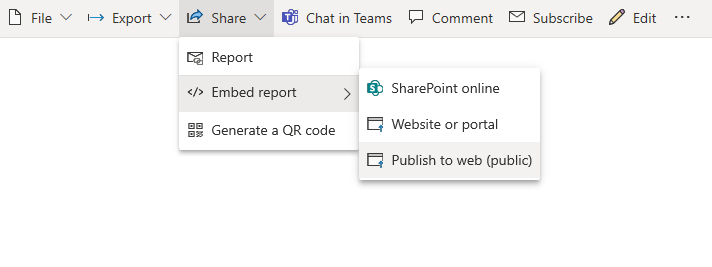
If you could not find the Publish to Web options shown below, please check the report  for the following limitiations.

Or you need to find one of these people in your organization and ask them to update the Publish to web tenant settings in the admin portal.

11.5.3.1.png

Did I answer your question ? Please mark my reply as solution. Thank you very much.
If not, please upload some insensitive data samples and expected output.


Best Regards,
Eyelyn Qin

View solution in original post

5 REPLIES 5
Anonymous
Not applicable

Hi @jsteffe ,


Sorry to disturb you...

But did I answer your question ? Please mark my reply as solution. Thank you very much.
If not, please upload some insensitive data samples and expected output.


Best Regards,
Eyelyn Qin

Anonymous
Not applicable

Hi @jsteffe ,

If you could not find the Publish to Web options shown below, please check the report  for the following limitiations.

Or you need to find one of these people in your organization and ask them to update the Publish to web tenant settings in the admin portal.

11.5.3.1.png

Did I answer your question ? Please mark my reply as solution. Thank you very much.
If not, please upload some insensitive data samples and expected output.


Best Regards,
Eyelyn Qin

Thanks for your answer.


I will contact my administrator because it seems I get some limitations to manage ...

amitchandak
Super User
Super User

@jsteffe , There were few changes done in july, that you need to admin of the organzation account to publish or need permission to publish

https://www.youtube.com/watch?v=KpZPUdzNXeE

Share with Power BI Enthusiasts: Full Power BI Video (20 Hours) YouTube
Microsoft Fabric Series 60+ Videos YouTube
Microsoft Fabric Hindi End to End YouTube

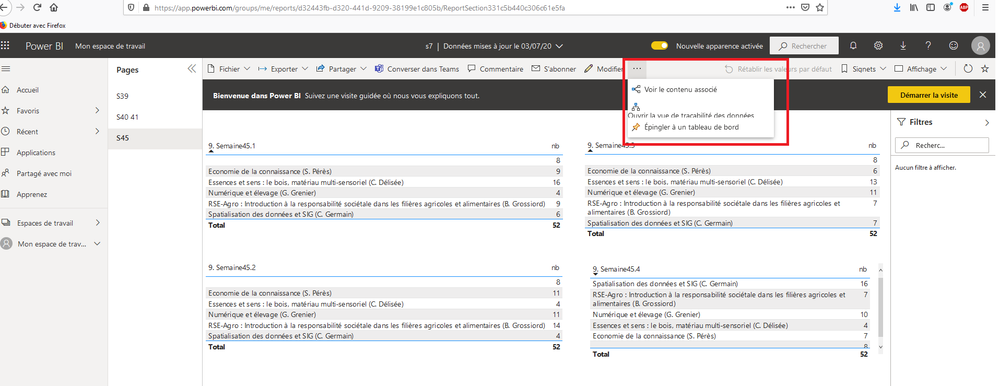
Thanks for your answer but unfortunately, in my Power BI workspace, I don't get any menu either in "Other options", either in "settings".

See screenshtots ...

other_options.png


Settings --> admin portal

admin_portal.png

Helpful resources

Announcements
Power BI DataViz World Championships

Power BI Dataviz World Championships

The Power BI Data Visualization World Championships is back! Get ahead of the game and start preparing now!

December 2025 Power BI Update Carousel

Power BI Monthly Update - December 2025

Check out the December 2025 Power BI Holiday Recap!

FabCon Atlanta 2026 carousel

FabCon Atlanta 2026

Join us at FabCon Atlanta, March 16-20, for the ultimate Fabric, Power BI, AI and SQL community-led event. Save $200 with code FABCOMM.