FabCon is coming to Atlanta
Join us at FabCon Atlanta from March 16 - 20, 2026, for the ultimate Fabric, Power BI, AI and SQL community-led event. Save $200 with code FABCOMM.
Register now!- Power BI forums
- Get Help with Power BI
- Desktop
- Service
- Report Server
- Power Query
- Mobile Apps
- Developer
- DAX Commands and Tips
- Custom Visuals Development Discussion
- Health and Life Sciences
- Power BI Spanish forums
- Translated Spanish Desktop
- Training and Consulting
- Instructor Led Training
- Dashboard in a Day for Women, by Women
- Galleries
- Data Stories Gallery
- Themes Gallery
- Contests Gallery
- QuickViz Gallery
- Quick Measures Gallery
- Visual Calculations Gallery
- Notebook Gallery
- Translytical Task Flow Gallery
- TMDL Gallery
- R Script Showcase
- Webinars and Video Gallery
- Ideas
- Custom Visuals Ideas (read-only)
- Issues
- Issues
- Events
- Upcoming Events
The Power BI Data Visualization World Championships is back! Get ahead of the game and start preparing now! Learn more
- Power BI forums
- Forums
- Get Help with Power BI
- Desktop
- Do not count duplicates DAX Formula
- Subscribe to RSS Feed
- Mark Topic as New
- Mark Topic as Read
- Float this Topic for Current User
- Bookmark
- Subscribe
- Printer Friendly Page

- Mark as New
- Bookmark
- Subscribe
- Mute
- Subscribe to RSS Feed
- Permalink
- Report Inappropriate Content
Do not count duplicates DAX Formula
Hi Everyone,
I am having trouble getting a calculation that works like a COUNTIF in PowerBI.
If this is my database

and I am looking for and end result like this
| In Process | 1 |
| Rejected | 1 |
| Carrier Invoice Posted in SAP ERP | 1 |
Since Carrier Reference "ALBEMA2-2040596" has duplicates with Life Cycle Status = "Rejected" that i do not need them to be counted.
I currenlty have this DAX formula which is not helping much


- Mark as New
- Bookmark
- Subscribe
- Mute
- Subscribe to RSS Feed
- Permalink
- Report Inappropriate Content
Hi @Anonymous ,
Due to ALBEMA2-2040596 has Life Cycle Status:Carrier Invoice Posted in SAP ERP,and you just want to know the count for the times it was payed,so ignore ALBEMA2-2040596 forother Life Cycle Status ,right? If so ,try the following Steps:
Step1,use the following measure:
test =
VAR Life =
MAX ( 'RawData'[Life Cycle Status] )
VAR new1 =
CALCULATE (
COUNT ( RawData[Carrier Reference] ),
FILTER (
ALL ( RawData ),
RawData[Carrier Reference] = MAX ( RawData[Carrier Reference] )
&& RawData[Life Cycle Status] = "Carrier Invoice Posted in SAP ERP"
)
)
VAR NEW2 =
IF ( NEW1 = 1, "Carrier Invoice Posted in SAP ERP", Life )
RETURN
NEW2
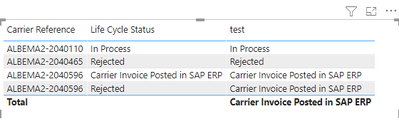
Step 2,create new column based on test:
TESTCOLUMN =
RawData[test]
Step3, create new measure :
your_measurefinal =
CALCULATE (
DISTINCTCOUNT ( RawData[Carrier Reference] ),
FILTER ( ALL ( RawData ), RawData[TESTCOLUMN] = MAX ( RawData[TESTCOLUMN] ) )
final you will see :
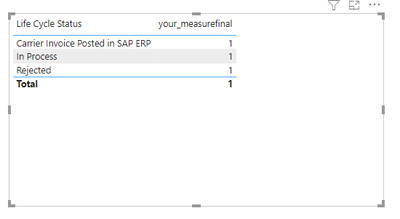
Click here to download pbix if you need.
Best Regard
Lucien Wang


- Mark as New
- Bookmark
- Subscribe
- Mute
- Subscribe to RSS Feed
- Permalink
- Report Inappropriate Content
Hi @Anonymous ,
I may be oversimplifying your scenario, but I believe a simplification of your measure should work fine:
_yourMeasure = DISTINCTCOUNT(RawData[Carrier Reference])
When you apply this using [Life Cycle Status] as a dimension it should give you what you want.
Pete
Now accepting Kudos! If my post helped you, why not give it a thumbs-up?
Proud to be a Datanaut!
- Mark as New
- Bookmark
- Subscribe
- Mute
- Subscribe to RSS Feed
- Permalink
- Report Inappropriate Content
wow....I am not sure why was i overcomplicating things, i feel dumb!!
- Mark as New
- Bookmark
- Subscribe
- Mute
- Subscribe to RSS Feed
- Permalink
- Report Inappropriate Content
Not dumb - I do it ALLLL the time!
Glad it's working for you 🙂
Pete
Now accepting Kudos! If my post helped you, why not give it a thumbs-up?
Proud to be a Datanaut!
- Mark as New
- Bookmark
- Subscribe
- Mute
- Subscribe to RSS Feed
- Permalink
- Report Inappropriate Content
I know why was not working in the beginning. while testing data for example
ALBEMA2-2040596 Rejected status is getting counted and that is exactly what I DO NOT need. Does this make sense?
- Mark as New
- Bookmark
- Subscribe
- Mute
- Subscribe to RSS Feed
- Permalink
- Report Inappropriate Content
Not sure.
Do you mean that as soon as ANY [Carrier Reference] is rejected, you don't want any more to be counted?
...or do you mean that you want all others to be counted but not ALBEMA2-2040596 specifically?
...or do you mean it works just fine now, but you found why is wasn't working for you originally?
Pete
Now accepting Kudos! If my post helped you, why not give it a thumbs-up?
Proud to be a Datanaut!
- Mark as New
- Bookmark
- Subscribe
- Mute
- Subscribe to RSS Feed
- Permalink
- Report Inappropriate Content
I found why the simple DISTINCTCOUNT is not working for what I want to achieve.
The problem is that the invoice perhaps was sent twice, it was once rejected and once payed. for this particular analysis i just want to know the count for the times it was payed
Helpful resources

Power BI Dataviz World Championships
The Power BI Data Visualization World Championships is back! Get ahead of the game and start preparing now!

Power BI Monthly Update - December 2025
Check out the December 2025 Power BI Holiday Recap!

FabCon Atlanta 2026
Join us at FabCon Atlanta, March 16-20, for the ultimate Fabric, Power BI, AI and SQL community-led event. Save $200 with code FABCOMM.

| User | Count |
|---|---|
| 38 | |
| 37 | |
| 33 | |
| 32 | |
| 29 |


| User | Count |
|---|---|
| 132 | |
| 88 | |
| 82 | |
| 68 | |
| 64 |


