Join us at FabCon Atlanta from March 16 - 20, 2026, for the ultimate Fabric, Power BI, AI and SQL community-led event. Save $200 with code FABCOMM.
Register now!The Power BI Data Visualization World Championships is back! Get ahead of the game and start preparing now! Learn more
Guys,
I need to get a value from a previous row, but I'm having troubles in order to do so. An example, This is the table that I'm looking for:
Date Fruit Buy Sold Stock Buy - Sold = Stock
1/8/2021 Lime 90 70 20 90 - 70 = 20
5/8/2021 Orange 60 50 10 60 - 50 = 10
7/8/2021 Lime 70 80 10 90 (70 + 20) - 80 = 10
At the end of August 7th, there are 10 limes and 10 oranges in stock. I tried with LOOKUPVALUE and some others, but with no success so far.
Any idea how to solve this? Thanks!
Solved! Go to Solution.
Hi @Abevann ,
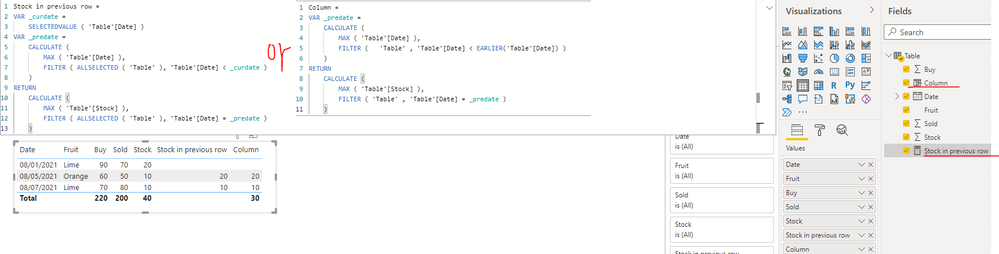
You can create a measure or calculated column as below to achieve it, please find the details in the attachment.
1. Create a measure
Stock in previous row =
VAR _curdate =
SELECTEDVALUE ( 'Table'[Date] )
VAR _predate =
CALCULATE (
MAX ( 'Table'[Date] ),
FILTER ( ALLSELECTED ( 'Table' ), 'Table'[Date] < _curdate )
)
RETURN
CALCULATE (
MAX ( 'Table'[Stock] ),
FILTER ( ALLSELECTED ( 'Table' ), 'Table'[Date] = _predate )
)
2. Create a calculatd column
Column =
VAR _predate =
CALCULATE (
MAX ( 'Table'[Date] ),
FILTER ( 'Table' , 'Table'[Date] < EARLIER('Table'[Date]) )
)
RETURN
CALCULATE (
MAX ( 'Table'[Stock] ),
FILTER ( 'Table' , 'Table'[Date] = _predate )
)
In addtion, you can also refer the method in the following links to achieve it.
Get previous row in Power Query - EXPLAINED
Calculate previous row using DAX
Best Regards
Hi @Abevann ,
You can create a measure or calculated column as below to achieve it, please find the details in the attachment.
1. Create a measure
Stock in previous row =
VAR _curdate =
SELECTEDVALUE ( 'Table'[Date] )
VAR _predate =
CALCULATE (
MAX ( 'Table'[Date] ),
FILTER ( ALLSELECTED ( 'Table' ), 'Table'[Date] < _curdate )
)
RETURN
CALCULATE (
MAX ( 'Table'[Stock] ),
FILTER ( ALLSELECTED ( 'Table' ), 'Table'[Date] = _predate )
)
2. Create a calculatd column
Column =
VAR _predate =
CALCULATE (
MAX ( 'Table'[Date] ),
FILTER ( 'Table' , 'Table'[Date] < EARLIER('Table'[Date]) )
)
RETURN
CALCULATE (
MAX ( 'Table'[Stock] ),
FILTER ( 'Table' , 'Table'[Date] = _predate )
)
In addtion, you can also refer the method in the following links to achieve it.
Get previous row in Power Query - EXPLAINED
Calculate previous row using DAX
Best Regards
Thanks @Anonymous !
@Abevann Looks like a variation on MTBF: See my article on Mean Time Between Failure (MTBF) which uses EARLIER: http://community.powerbi.com/t5/Community-Blog/Mean-Time-Between-Failure-MTBF-and-Power-BI/ba-p/3395....
The basic pattern is:
Column =
VAR __Current = [Value]
VAR __PreviousDate = MAXX(FILTER('Table','Table'[Date] < EARLIER('Table'[Date])),[Date])
VAR __Previous = MAXX(FILTER('Table',[Date]=__PreviousDate),[Value])
RETURN
__Current - __Previous
Thanks @Greg_Deckler ,
Tha solution works, but I had the problem that the information if from different tables. I'm struggling with this, but it does what I was looking for.
Thanks, regards,
The Power BI Data Visualization World Championships is back! Get ahead of the game and start preparing now!
Check out the November 2025 Power BI update to learn about new features.
| User | Count |
|---|---|
| 65 | |
| 46 | |
| 44 | |
| 28 | |
| 19 |
| User | Count |
|---|---|
| 199 | |
| 125 | |
| 102 | |
| 69 | |
| 53 |