cancel
Showing results for 
Search instead for 
Did you mean: 

A new Data Days event is coming soon! This time we’re going bigger than ever. Fabric, Power BI, SQL, AI and more. Don't miss out.

Reply
Justair07
Resolver I
Resolver I

Do Not Aggregate Column Chart

Hello everyone,


I'm brand new to Power BI and I'm attempting my first report/dashboard.


My column chart defaults to aggregate (summerize?) my data. I don't want it to do this. I want my value field (ScrapV) to show all individual records for my axis (Scrap Reason). I'm also applying a filter to show only valuse >= 100.


When I go to table view, and select "Don't Summerize" on my ScrapV value field, it shows exactly as I would expect in the table.

How can I do this same exact thing in a colmun chart?


Thank you,


- Justin

1 ACCEPTED SOLUTION

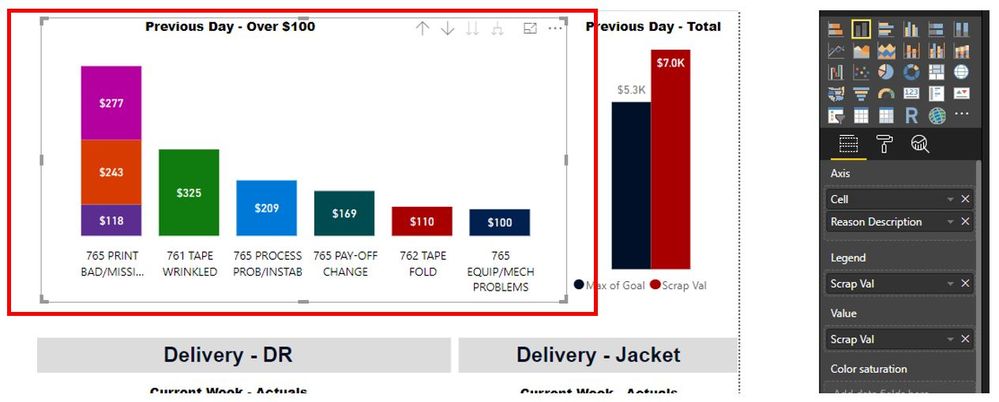
@v-piga-msft thank you for explaining. I was able to accomplish something close enough (maybe even better). I just had to stack the data to get individual records not summerized. I also had to add the applicable field to the Value and Legend. Very cool!Capture.JPG

View solution in original post

2 REPLIES 2
v-piga-msft
Resident Rockstar
Resident Rockstar

Hi @Justair07,


Normally, the value in chart will be the aggregate value. 


You could go to modeling tab and set the default summarization to be Don't summarize. 


If you still have the aggregate value in chart, I'm afraid that there is no ways for us to show the individual records in chart.


In addition, you could share some data sample and your desired output, may be we could have another way to solve it.


Best  Regards,

Cherry

Community Support Team _ Cherry Gao
If this post helps, then please consider Accept it as the solution to help the other members find it more quickly.

@v-piga-msft thank you for explaining. I was able to accomplish something close enough (maybe even better). I just had to stack the data to get individual records not summerized. I also had to add the applicable field to the Value and Legend. Very cool!Capture.JPG

Helpful resources

Announcements
May Power BI Update Carousel

Power BI Monthly Update - May 2026

Check out the May 2026 Power BI update to learn about new features.

Fabric SQL PBI Data Days

Data Days 2026 coming soon!

Sign up to receive a private message when registration opens and key events begin.

New to Fabric survey Carousel

New to Fabric Survey

If you have recently started exploring Fabric, we'd love to hear how it's going. Your feedback can help with product improvements.

Power BI DataViz World Championships carousel

Power BI DataViz World Championships - June 2026

A new Power BI DataViz World Championship is coming this June! Don't miss out on submitting your entry.