Join us at FabCon Atlanta from March 16 - 20, 2026, for the ultimate Fabric, Power BI, AI and SQL community-led event. Save $200 with code FABCOMM.
Register now!Learn from the best! Meet the four finalists headed to the FINALS of the Power BI Dataviz World Championships! Register now
Hi,
Im new to power BI and am facing some problems here.
I have a table like this:
| CAMP | TYPE | ITEM | UNITS |
| 201701 | A | Apple | 100 |
| 201702 | B | Lemon | 50 |
| 201702 | A | Apple | 1000 |
I'd like to proportion breakdown the units to previous month, current month and next month, so that I have a dynamic table that looks like this:
| CAMP | ITEM | UNITS | REMARK |
| 201612 | Apple | 30 | M1 |
| 201701 | Apple | 50 | M2 |
| 201702 | Apple | 20 | N2 |
| 201702 | Lemon | 45 | N1 |
| 201703 | Lemon | 5 | N2 |
| 201701 | Apple | 300 | M1 |
| 201702 | Apple | 500 | M2 |
| 201703 | Apple | 200 | N2 |
So, the each CAMP column is breakdown into previous month, current month and next month and the units are breakdown as below table. If the TYPE column is A, then breakdown the units with matrix [0.3,0.5,0.2], and remark M1, M2, N1 or N2 corresponding to the the table. The breakdown index is as below table:
| A | B | ||
| 30% | M1 | 90% | N1 |
| 50% | M2 | 10% | N2 |
| 20% | N2 |
I've been trying to write a DAX formula to convert this, but it doesnt work, and I've been stuck on this for days. Can anyone point me in the right direction as to DAX to split out units into the second table?
Thanks in advance.
Solved! Go to Solution.
Hi @will1296,
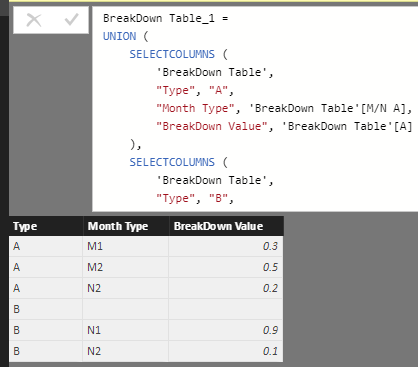
For BreakDown table, I changed its structure to make it more usable.
In CAMP table, I added some auxilliary columns as highlighted in below image.
Then, I make PreviousMonth, CurrentMonth and NextMonth records to be listed in a single column via UNION. And use LOOKUPVALUE function to refer to BreakDown value in BreakDown table.
For more detailed steps, please see the attached .pbix file. CAMP Table_2 is the result table.
Best regards,
Yuliana Gu
Hi,
Im new to power BI and am facing some problems here.
I have a table like this:
| CAMP | TYPE | ITEM | UNITS |
| 201701 | A | Apple | 100 |
| 201702 | B | Lemon | 50 |
| 201702 | A | Apple | 1000 |
I'd like to proportion breakdown the units to previous month, current month and next month, so that I have a dynamic table that looks like this:
| CAMP | ITEM | UNITS | REMARK |
| 201612 | Apple | 30 | M1 |
| 201701 | Apple | 50 | M2 |
| 201702 | Apple | 20 | N2 |
| 201702 | Lemon | 45 | N1 |
| 201703 | Lemon | 5 | N2 |
| 201701 | Apple | 300 | M1 |
| 201702 | Apple | 500 | M2 |
| 201703 | Apple | 200 | N2 |
So, the each CAMP column is breakdown into previous month, current month and next month and the units are breakdown as below table. If the TYPE column is A, then breakdown the units with matrix [0.3,0.5,0.2], and remark M1, M2, N1 or N2 corresponding to the the table. The breakdown index is as below table:
| A | B | ||
| 30% | M1 | 90% | N1 |
| 50% | M2 | 10% | N2 |
| 20% | N2 |
I've been trying to write a DAX formula to convert this, but it doesnt work, and I've been stuck on this for days. Can anyone point me in the right direction as to DAX to split out units into the second table?
Thanks in advance.
Hi @will1296,
For BreakDown table, I changed its structure to make it more usable.
In CAMP table, I added some auxilliary columns as highlighted in below image.
Then, I make PreviousMonth, CurrentMonth and NextMonth records to be listed in a single column via UNION. And use LOOKUPVALUE function to refer to BreakDown value in BreakDown table.
For more detailed steps, please see the attached .pbix file. CAMP Table_2 is the result table.
Best regards,
Yuliana Gu
Hi @will1296,
A B 30% M1 90% N1 50% M2 10% N2 20% N2
Please post the correct table structure of the breakdown index table. Show us column headers and detailed records.
Regards,
Yuliana Gu
Share feedback directly with Fabric product managers, participate in targeted research studies and influence the Fabric roadmap.
Check out the February 2026 Power BI update to learn about new features.
| User | Count |
|---|---|
| 53 | |
| 51 | |
| 39 | |
| 15 | |
| 14 |
| User | Count |
|---|---|
| 95 | |
| 78 | |
| 34 | |
| 28 | |
| 25 |