cancel
Showing results for 
Search instead for 
Did you mean: 

Get Fabric certified for FREE! Don't miss your chance! Learn more

Reply
Anonymous
Not applicable

Divide values from a column by specifc values of same column and display in matrix

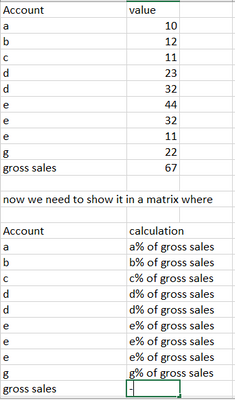
I have a data looks like below111.PNG

Its a matrix where calculation is like
(sum of all values of column1 /sum of E)*100

so it has be for each row of account column.

5 REPLIES 5
Anonymous
Not applicable

.11.PNG

i refraim my query
top most view is data and then matrix view.
To conclude.

all sum of rows must be divide by same value gross sales *100


Show your underlaying data structure or table please. Is gross sales a column in your table?


Did I answer your question? Mark my post as a solution!

Proud to be a Super User!


Anonymous
Not applicable

gross sales is same as other values as account in that column

andhiii079845
Solution Sage
Solution Sage

Measure =
Var _sumall = CALCULATE(sum('Table'[Value]),ALLSELECTED('Table'))
Var _currentvalue = sumx('Table','Table'[Value])
RETURN _currentvalue/_sumall


Did I answer your question? Mark my post as a solution!

Proud to be a Super User!


Ahmedx
Super User
Super User

 = DIVIDE(
           CALCULATE(sum('table'[column1], REMOVEFILTERS(),
            sum('table'[column1])

Helpful resources

Announcements
Sticker Challenge 2026 Carousel

Join our Community Sticker Challenge 2026

If you love stickers, then you will definitely want to check out our Community Sticker Challenge!

January Power BI Update Carousel

Power BI Monthly Update - January 2026

Check out the January 2026 Power BI update to learn about new features.

FabCon Atlanta 2026 carousel

FabCon Atlanta 2026

Join us at FabCon Atlanta, March 16-20, for the ultimate Fabric, Power BI, AI and SQL community-led event. Save $200 with code FABCOMM.